SQLiteUI: Drop a SQLite File, Get an ERD, a Data Browser, and a Whole App
How I built sqliteui.netlify.app — a browser-only SQLite viewer with a hand-rolled Sugiyama ERD layout engine, Peter Coad domain color classification, relationship inference for Core Data stores, and a UI view that turns foreign keys into a navigable application. No backend, no upload; the file never leaves your machine.
Earlier this year I built SQLite ERD Viewer — a native macOS app that turns a SQLite file into an interactive, color-coded entity-relationship diagram. I use it constantly. And every time someone asked "can I try it?", the answer was the same wall I hit with Capvera on iPad: it's a Mac app. You can't send someone a URL.
So — you know where this is going — I ported it to the web. And then kept going, because the web version grew two things the Mac app never had: a real data browser and a UI view that turns your foreign keys into a navigable application.
It's called SQLiteUI, it lives at sqliteui.netlify.app, and it has no backend at all. Drop a .sqlite file; everything — parsing, layout, queries — runs in your browser via WebAssembly. The file never leaves your machine.
Quick Links
- Live site: sqliteui.netlify.app (click "Try the demo" — it loads the Chinook sample database)
- Source: github.com/danielwanja/sqliteui — open source, MIT licensed
- Original macOS write-up: SQLite ERD Viewer
- Stack: React 19 + Vite + sql.js (SQLite compiled to WASM) + Tailwind CSS 4 + hand-rolled SVG. ~2,300 lines of TypeScript, zero server.
- Built with: Claude Fable 5 in Claude Code
No Backend, On Purpose
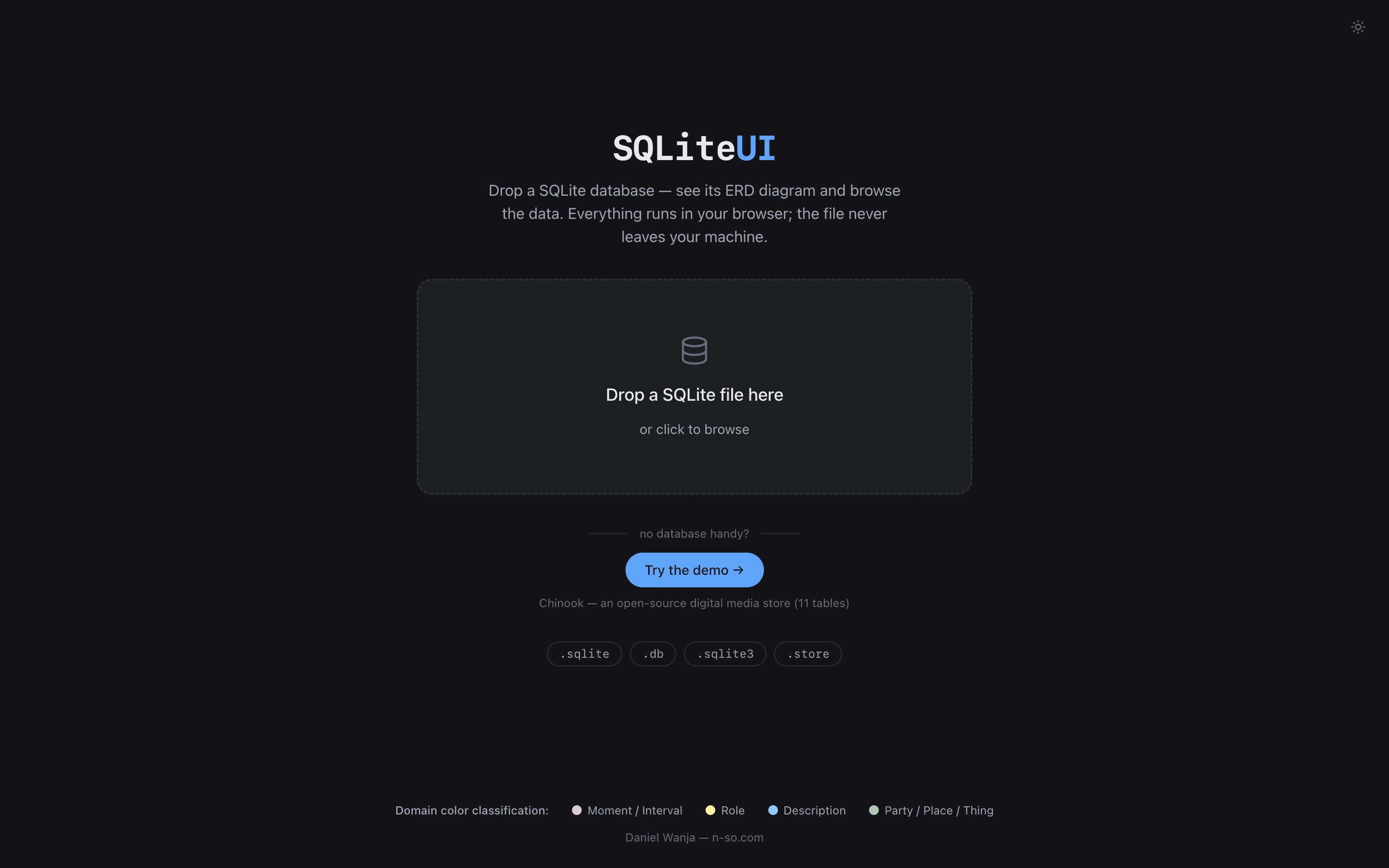
A database file is about the most sensitive thing you can ask someone to upload, so the design constraint was absolute: nothing leaves the browser. sql.js — SQLite compiled to WebAssembly — parses the dropped file entirely in-memory, and it's dynamically imported so the WASM binary never touches the initial page load:
// src/lib/db.ts
export async function openDatabase(buffer: ArrayBuffer): Promise<Database> {
  const [{ default: initSqlJs }, { default: wasmUrl }] = await Promise.all([
    import("sql.js"),
    import("sql.js/dist/sql-wasm.wasm?url"),
  ]);
  const SQL = await initSqlJs({ locateFile: () => wasmUrl });
  return new SQL.Database(new Uint8Array(buffer));
}
File validation is the 16 magic bytes every SQLite file starts with (SQLite format 3\0), so the extension barely matters — .sqlite, .db, .sqlite3, or .store all work. The app even reads header bytes 18–19 to detect WAL mode and warn you that a .db-wal sidecar might hold un-checkpointed changes the browser can't see. (Readers of the haveiread post will recognize this exact sql.js trick — it's how that app reads a Kobo's database too. I'm getting mileage out of this hammer.)
Schema introspection is pure PRAGMA: table_info for columns, foreign_key_list for FKs (grouped by id, so composite keys survive), index_list + index_info for indexes. The whole schema loader is ~250 lines.
Inferring Relationships When There Are None
Here's the thing about real-world SQLite files: half of them declare zero foreign keys. Core Data and SwiftData stores in particular — the schema is all ZAUTHOR and Z_PK and not a single FK constraint in sight. An ERD tool that only draws declared relationships draws nothing.
So when a database has no declared FKs, SQLiteUI infers them from naming conventions:
// src/lib/inferRelationships.ts — the three patterns, in order
// 1. "user_id" / "userId" / "userID" → a "user" or "users" table
if (columnName.endsWith("_id")) {
  base = columnName.slice(0, -3);
} else if (columnName.endsWith("id") && columnName.length > 2) {
  const withoutId = columnName.slice(0, -2);
  if (/[a-z]$/.test(withoutId)) base = withoutId; // "userid", not "grid"
}

// 2. Core Data style: a column literally named after the entity
//    ("author" → table "Author" or "ZAUTHOR")
const direct = variants.get(columnName) ??
  (columnName.startsWith("z") ? variants.get(columnName.slice(1)) : undefined);

// 3. And the target's PK: Core Data tables use Z_PK instead of "id"
return tableName.toUpperCase().startsWith("Z") ? "Z_PK" : "id";
The table-name matching handles plurals both ways (user_id finds users; categories matches category_id) and strips Core Data's Z prefix. Inferred edges are flagged inferred: true so the UI can be honest about which relationships are declared facts and which are educated guesses. It's a heuristic, it will occasionally be wrong, and it turns a blank canvas into a readable diagram for an entire class of databases that would otherwise show disconnected boxes.
The Layout Engine: Hand-Rolled Sugiyama
The heart of the app is ~620 lines of layout code with no dependencies — no Graphviz, no dagre, no Cytoscape. It's a classic Sugiyama layered layout, ported from the Mac app and structured as a pipeline:
// src/lib/layout/index.ts
const layers = assignLayers(tables.length, edges);        // 1. Kahn longest-path layering
const ordered = minimizeCrossings(layers, count, edges);  // 2. barycenter/median + sifting
let positions = assignCoordinates(ordered, sizes, config); // 3. center within layers
positions = resolveOverlaps(sizes, positions, config);     // 4. push-apart, 30 iterations
positions = normalizePositions(positions);                 // 5. shift to origin
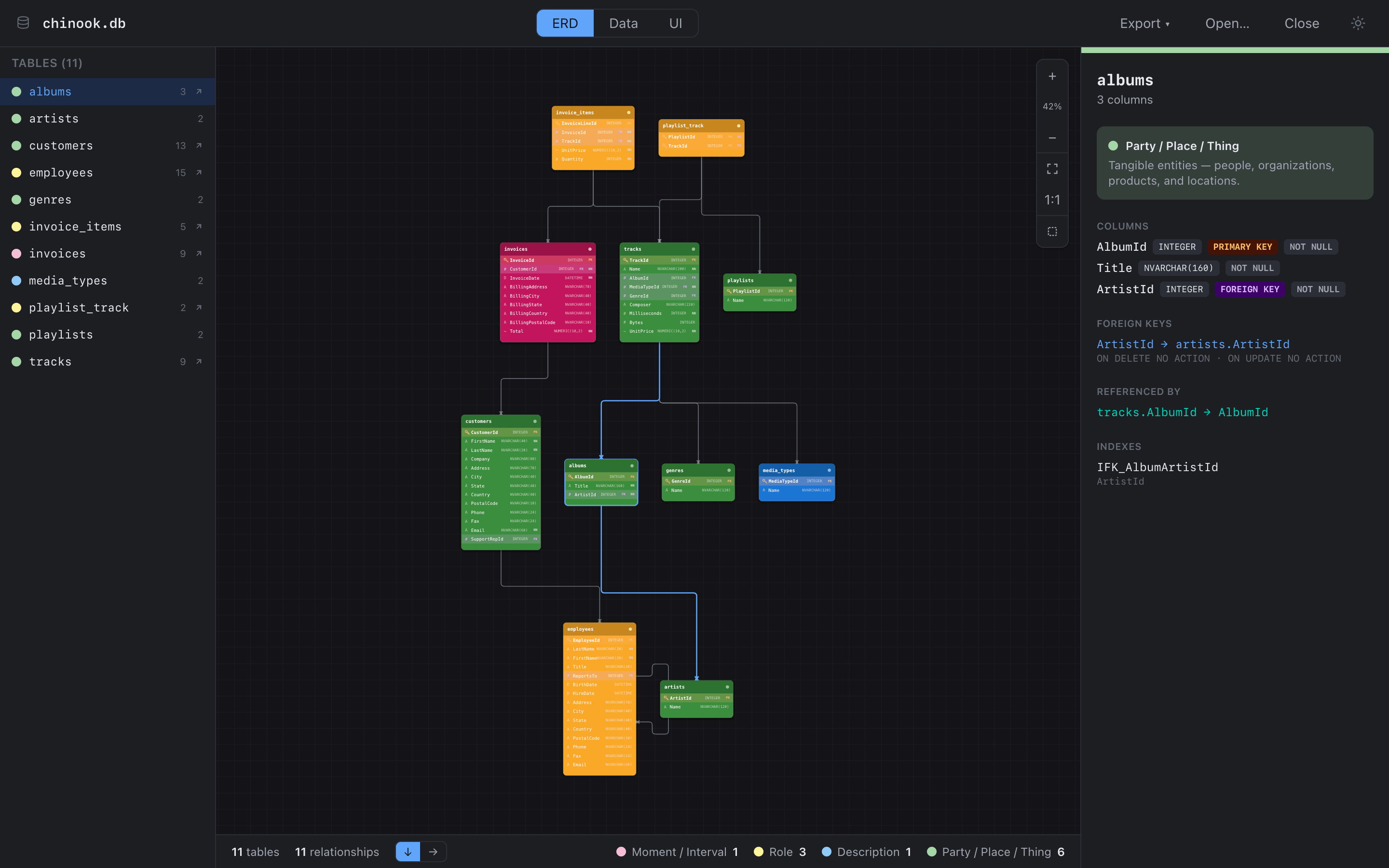
Layer assignment is a topological sort where referenced tables sink downward — so artists ends up below albums, which sits below tracks, and the diagram reads like a dependency graph. Cycles (they happen — employees.ReportsTo points at employees) get pushed below the deepest layer instead of crashing the sort.
Crossing minimization is where the compute goes: 24 alternating barycenter/median sweeps, then greedy sifting, restarted 3 times from shuffled orders — with a seeded PRNG, so the same database always produces the same diagram:
// src/lib/layout/ordering.ts
const random = mulberry32(0x5eed); // deterministic layouts, reproducible bugs
Edges are routed as orthogonal L/Z polylines with rounded corners; self-referential FKs draw a neat rectangular loop off the side of their table. Everything renders as plain SVG — table nodes are <g> groups with type glyphs (# int, A text, ~ real, B blob) and PK/FK/NN badges, and pan/zoom is a transform on the root group.
One performance lesson carried over from the Mac app, where dragging a table re-laid-out the world and beachballed: on the web, full edge routing only recomputes when a drag commits. While you're dragging, only the edges touching the dragged table re-route:
// src/components/erd/ErdCanvas.tsx
const displayEdges = useMemo(() => {
  if (!dragging) return routed;
  return routed.map((edge) =>
    edge.fk.fromTable.toLowerCase() === draggedName ||
    edge.fk.toTable.toLowerCase() === draggedName
      ? (routeEdge(edge.fk, byName, config) ?? edge)
      : edge,
  );
}, [routed, dragging, effectiveNodes, config]);
And because a layout engine is exactly the kind of code that regresses silently, there's a headless check — npx tsx scripts/layout-check.mts runs the engine against fixture databases and asserts the invariants: every position finite, deterministic output, no overlapping boxes, and zero diagonal segments in the routed edges.
Tables Have Colors, and the Colors Mean Something
Carried straight over from the Mac app: tables are classified using Peter Coad's domain color modeling from Java Modeling in Color with UML. Four archetypes:
- 🩷 Moment / Interval — things that happen:
invoices,orders,sessions,logs - 💛 Role — ways parties participate:
employees,memberships,permissions, and join tables - 💙 Description — catalog entries:
media_types,statuses,categories,settings - 💚 Party / Place / Thing — the tangible stuff:
customers,artists,tracks,albums
Classification is keyword lists plus two structural patterns — a join-table detector (2+ FKs, ≤3 non-FK columns) and an "event" detector (timestamp column + an FK + few columns → pink). On the Chinook demo it gets all eleven tables right, and on my own schemas the color read is instant: pink tables are your business activity, green tables are your nouns, blue tables you can mostly ignore.
One implementation footnote I enjoy: the colors are literal hex values in the code rather than CSS variables — because the same React components render the exported SVG, and a serialized SVG can't resolve var(--color-pink). Export (vector SVG or 2× PNG) reuses the live layout including your manual drag adjustments, via renderToStaticMarkup.
The Data View
The second tab is a proper data browser: 500-row pages, real ORDER BY sorting on header click, search over loaded rows, and a record form in the sidebar.
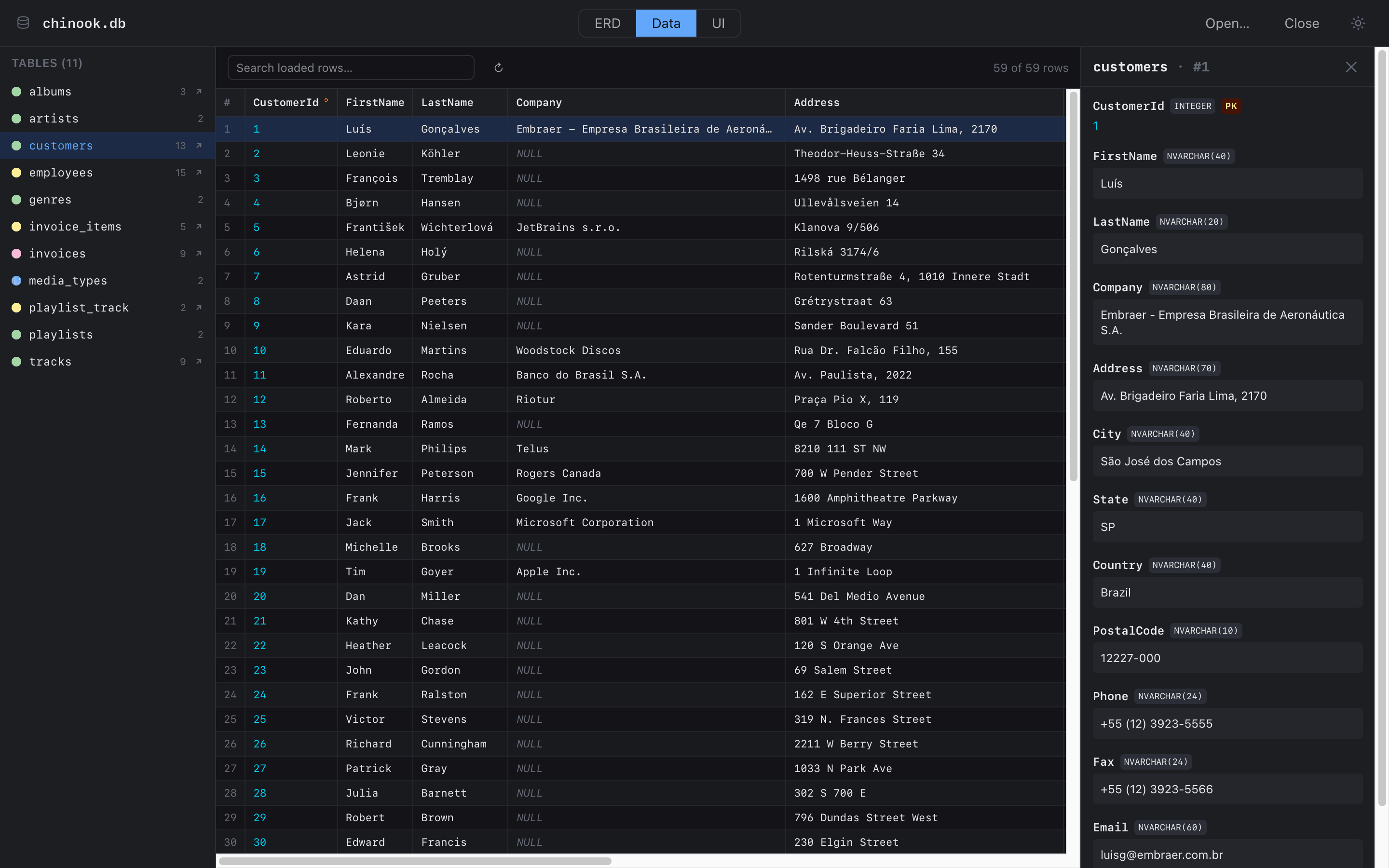
All queries are read-only with quoted identifiers and bound parameters, and there's a small trick to keep huge databases snappy — blobs are truncated in SQL, not after the fact:
// src/lib/dataQueries.ts — never drag a 40MB blob across the WASM boundary
function columnSelect(name: string): string {
  const q = quoteIdent(name);
  return `CASE WHEN typeof(${q})='blob' THEN substr(${q},1,64) ELSE ${q} END AS ${q}`;
}
Double-click any cell and the inspector shows the declared type vs. actual storage class, constraints, a hex dump for blobs, and the little interpretations that make browsing unfamiliar data pleasant: integers that look like Unix timestamps get a secondary "as timestamp" line, BOOL-declared integers render as ✓/○, text that parses as a date shows the parsed form. Foreign-key cells get a jump button to the referenced record.
The UI View: Your Schema Is Already an App
This is the feature that doesn't exist in the Mac app, and it's become the reason I open SQLiteUI at all. The observation: a schema with foreign keys already describes an application — every FK is a "belongs to" link, every reverse FK is a has-many tab. So the third tab just builds that app:
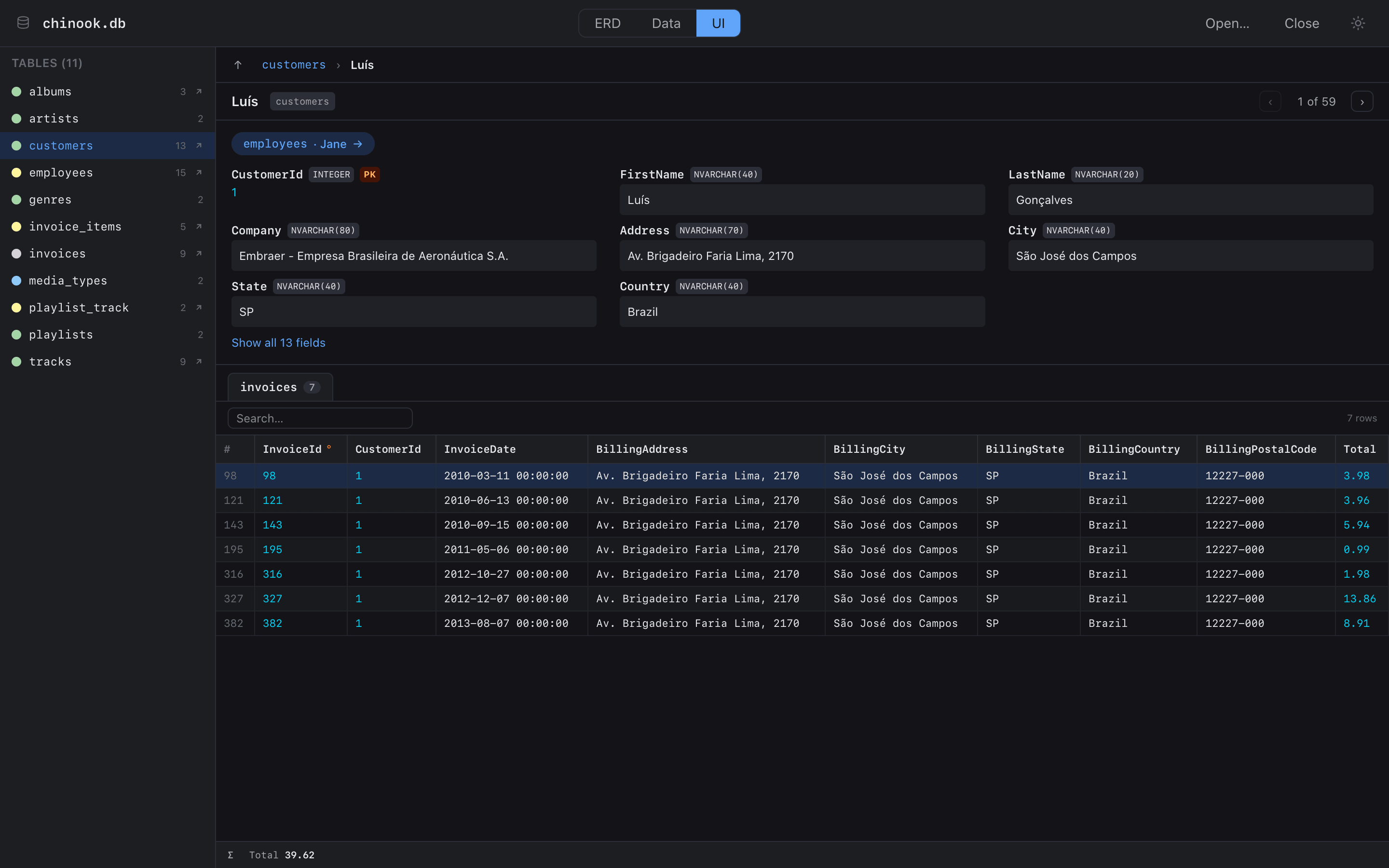
Click into a customer and you get their fields, a chip linking to their support rep (employees · Jane →), and one tab per referencing table — their 7 invoices, with a Σ footer summing the numeric columns (Luís has spent $39.62). A pager flips through the customer list you drilled in from; breadcrumbs and Esc walk back up; ↑↓ and Enter drive the whole thing from the keyboard.
The clever bit is join-table traversal. When a has-many tab would land on a join table, the view looks through it to the far side:
// src/components/ui/UiView.tsx — a playlist shows its tracks,
// not its playlist_track rows
if (isJoinTable(child)) {
  const others = child.foreignKeys.filter((f) => f.id !== fk.id);
  if (others.length === 1) {
    const farFk = others[0];
    const far = findTable(schema, farFk.toTable);
    specs.push({
      label: `${far.name} via ${child.name}`,
      listTable: far,
      fetchRows: (offset, sort) =>
        fetchThroughPage(session.db, far, child, farFk, fk, values, offset, sort),
    });
  }
}
Breadcrumbs need human labels, not #4021, so rowLabel picks the best column by convention — name, then title, then email, then the first non-PK text column with a value, then finally the rowid. Dumb heuristic, right label ~95% of the time.
What Surprised Me
- The UI view fell out of the schema for free. I planned it as "maybe someday" and it took one evening, because the ERD work had already built the relationship graph. Every feature after
foreign_key_listwas compounding interest. - Determinism is a feature users feel. Seeding the layout PRNG means the same file always renders the same diagram. People re-open a database and their mental map still works. The Mac app shuffled on every open and I never noticed how much that cost until it stopped.
- Relationship inference carries the long tail. Declared-FK databases are the minority in my own
~/Library. TheZ_PK/plural-stripping heuristics are inelegant and they're also why the tool works on Core Data stores at all. - sql.js keeps earning its place. Same library, third app now (Kobo parsing in haveiread, fixtures in the layout checker, and this). "A full SQL engine, client-side, no server" is a genuinely underused building block.
- Porting from Swift to TypeScript found bugs in the original. Composite foreign keys losing columns, hardcoded ON DELETE actions — rewriting code in a second language is a surprisingly effective code review.
Try It
sqliteui.netlify.app — no signup, no upload. Click Try the demo for the Chinook sample database, or drop any .sqlite / .db / .store file you have lying around (your browser's own profile folders are full of them). Export the diagram as SVG or PNG when it looks right. And if you want to read the layout engine or borrow the color classifier, the code is MIT licensed at github.com/danielwanja/sqliteui.
Reflections
This is the third "port it to the web" post in a row, and the pattern is now unmistakable. A native app is a great place to figure out what a tool should be — and a URL is where the tool gets used. Like haveiread, SQLiteUI was built with Claude Fable 5 in Claude Code: the Swift codebase went in as reference material, and the layout engine, the inference heuristics, and the color classifier came out the other side as TypeScript — behavior preserved, two latent bugs fixed, and a whole new UI view added where SwiftUI screens used to be.
The part I keep thinking about: the entire app is ~2,300 lines. No backend, no state library, no diagram dependency, one WASM binary. Small tools that do one thing well — apparently that's just what I build now.
Daniel Wanja is a developer and founder of Nouvelles Solutions, Inc. His databases are now self-documenting; his desk, less so.