HaveIRead: A Calm Little App That Answers One Question About Your Books
How I built haveiread.app on Convex — a minimalist reading tracker for people with libraries scattered across Kindle, Kobo, Libby, and paper. Bookmarklets that read your Kindle library in place, parsing the Kobo's SQLite database directly in the browser, and a dedupe key that unifies it all.
I have a problem that sounds fake until it happens to you: I keep starting books I've already read. Thirty pages into a space opera, a scene feels familiar, then a character's death doesn't land the way it should — because I watched them die two years ago, on a different device.
The books are the problem. Or rather, where they live. My library is scattered across Kindle, Kobo, Libby, BookFunnel, and a shelf of paper books, and none of those services talk to each other. Amazon knows what I own but not what I finished. Libby forgets loans after they're returned. The Kobo knows exactly what I finished — and keeps that knowledge locked in a SQLite file on the device. There is no single place to ask the only question I actually have: have I read it?
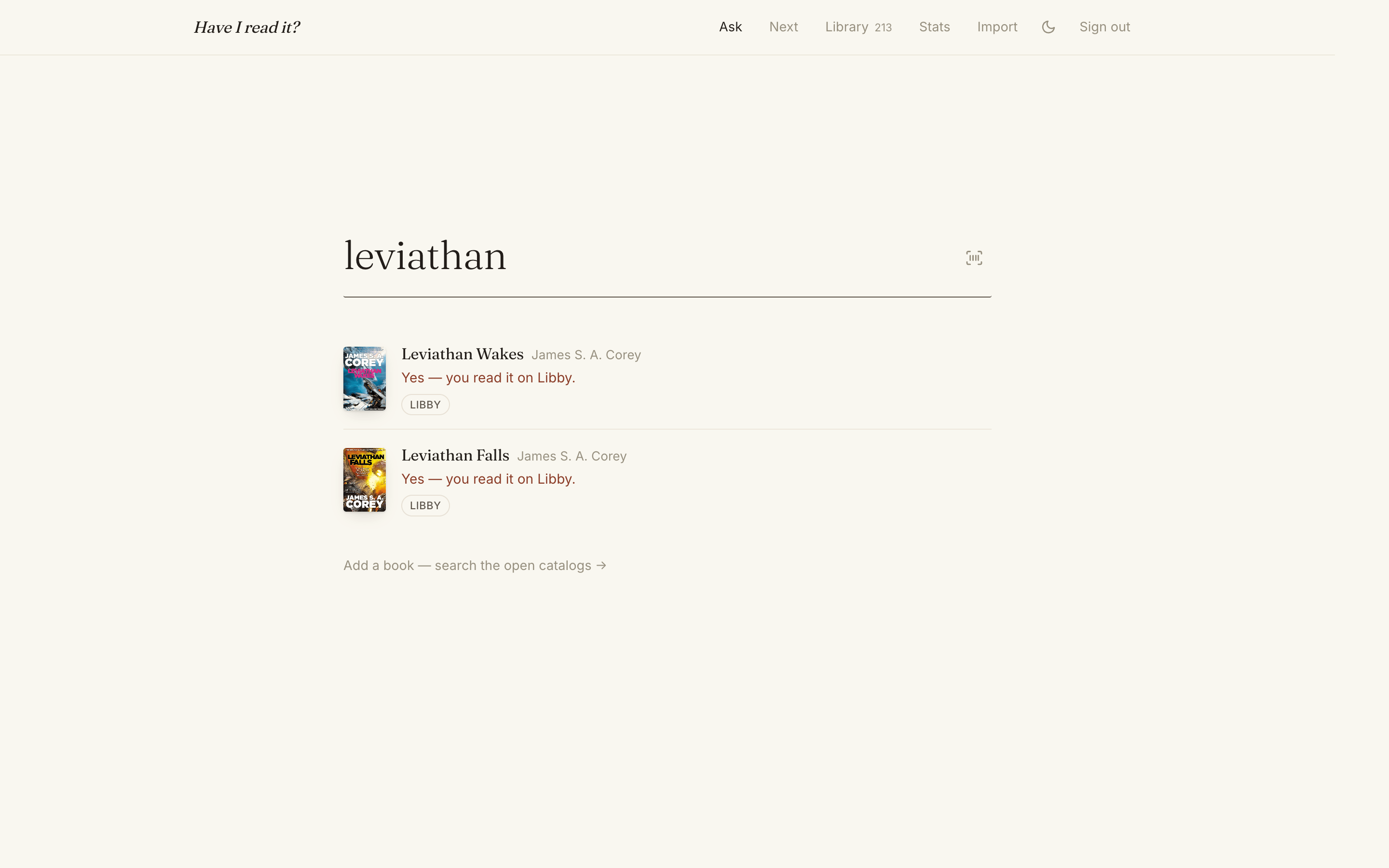
So I built the single place. It's called haveiread.app, it runs entirely on Convex, and the home page is just the question.
Quick Links
- Live site: haveiread.app
- Stack: React 19 + Vite + Convex + Tailwind CSS 4 + sql.js (SQLite in WASM)
- Built with: Claude Fable 5 in Claude Code
Why Convex (Again)
I made the case for Convex in the Capvera port write-up: a typed serverless DB, queries + mutations + actions, a scheduler, file storage, and live subscriptions — one account, one deployment, one auth model. Everything I said there held up here, and this project went one step further: the frontend ships on Convex too. The @convex-dev/static-hosting component serves the built Vite app through HTTP actions, so npm run deploy builds the SPA, deploys the backend, uploads the static files, and the whole thing — www.haveiread.app included — is live in seconds. There is no Vercel, no Netlify, no S3 bucket. One command, one platform.
Auth is @convex-dev/auth with the Password provider, Resend for password-reset codes, and @convex-dev/rate-limiter wrapped around the auth flows — per-email and global token buckets, so neither a targeted attacker nor a distributed one can burn through Resend's email quota or enumerate accounts. Six named buckets, one file, done.
The Data Model: Books, Sources, and an Honest "Unknown"
The schema is ten tables and the two that matter are books and sources:
// convex/schema.ts
books: defineTable({
  userId: v.id("users"),
  title: v.string(),
  authors: v.array(v.string()),
  isbn13: v.optional(v.string()),
  dedupeKey: v.string(),   // normalized title + first author's last name
  searchText: v.string(),  // what the search index actually sees
  enrichedAt: v.optional(v.number()),
  series: v.optional(v.string()),
  seriesIndex: v.optional(v.number()),
  // ...
})
  .index("by_user_dedupeKey", ["userId", "dedupeKey"])
  .index("by_user_isbn13", ["userId", "isbn13"])
  .searchIndex("search", { searchField: "searchText", filterFields: ["userId"] }),

sources: defineTable({
  userId: v.id("users"),
  bookId: v.id("books"),
  service: serviceValidator, // kindle | kobo | libby | bookfunnel | paper | other
  status: statusValidator,   // read | reading | unfinished | unread | unknown
  readAt: v.optional(v.string()),
  externalKey: v.optional(v.string()), // ASIN, ContentID… for idempotent re-imports
})
  .index("by_user_service_externalKey", ["userId", "service", "externalKey"]),
A book is one row; each place it lives is a source. The Expanse book four exists once in my library even though I own it on Kindle and read it on Libby — two sources, one book, one answer.
The status enum has a fifth value most trackers don't have: unknown. This is the honest one. Kindle, Libby, and BookFunnel exports tell you what you own, not what you finished — pretending otherwise is how most reading trackers lie to you. HaveIRead imports those books as unknown and gives you a flashcard-style confirmation queue instead: cover, title, "did you read it?", press y or n, next card. Clearing 116 unknowns takes about four minutes and is weirdly satisfying.
The Dedupe Key
The real work of unifying four services happens in one small file, shared/normalize.ts, shared verbatim between the browser and the Convex functions:
/** Title without a trailing subtitle or series marker, for fuzzier matching. */
export function normalizeTitle(title: string): string {
  const base = title
    .replace(/[:(].*$/, "") // drop subtitle after ":" or series "(...)"
    .replace(/\b(a novel|unabridged)\b/gi, "");
  const normalized = normalizeText(base);
  return normalized || normalizeText(title);
}

/** Last name of the first author, the most stable author token across services. */
export function authorKey(authors: string[]): string {
  const first = authors[0] ?? "";
  // Handle "Last, First" (Goodreads/Kindle) and "First Last" forms.
  const last = first.includes(",")
    ? first.split(",")[0]
    : (first.trim().split(/\s+/).pop() ?? "");
  return normalizeText(last);
}

/** Stable key for deduping the same book across services. */
export function dedupeKey(title: string, authors: string[]): string {
  return `${normalizeTitle(title)}|${authorKey(authors)}`;
}
Normalized title plus the first author's last name. That's it. Every fancier scheme I tried broke on real data — Goodreads writes "Corey, James S. A.", Kindle writes "James S. A. Corey:" (with a trailing colon, because Amazon), Kobo writes whatever the publisher felt like. Subtitles differ per edition. ISBNs are missing from half the Kindle catalog. But "leviathan wakes|corey" is the same string everywhere.
Imports dedupe in three passes: exact externalKey match (same ASIN — also repairs bad author data from older imports), then ISBN-13 (with ISBN-10 conversion, since Kindle loves ISBN-10), then the dedupe key. Re-importing the same file is always a no-op, which means "just re-run the import" is the answer to almost every support question I could have.
Bookmarklets: Import Without an Export
Kindle has no "export my library" button. What it does have is read.amazon.com — a logged-in web app with a same-origin JSON API behind it. So the Kindle import is a bookmarklet: drag a button to your bookmarks bar, open your Kindle library, click it.
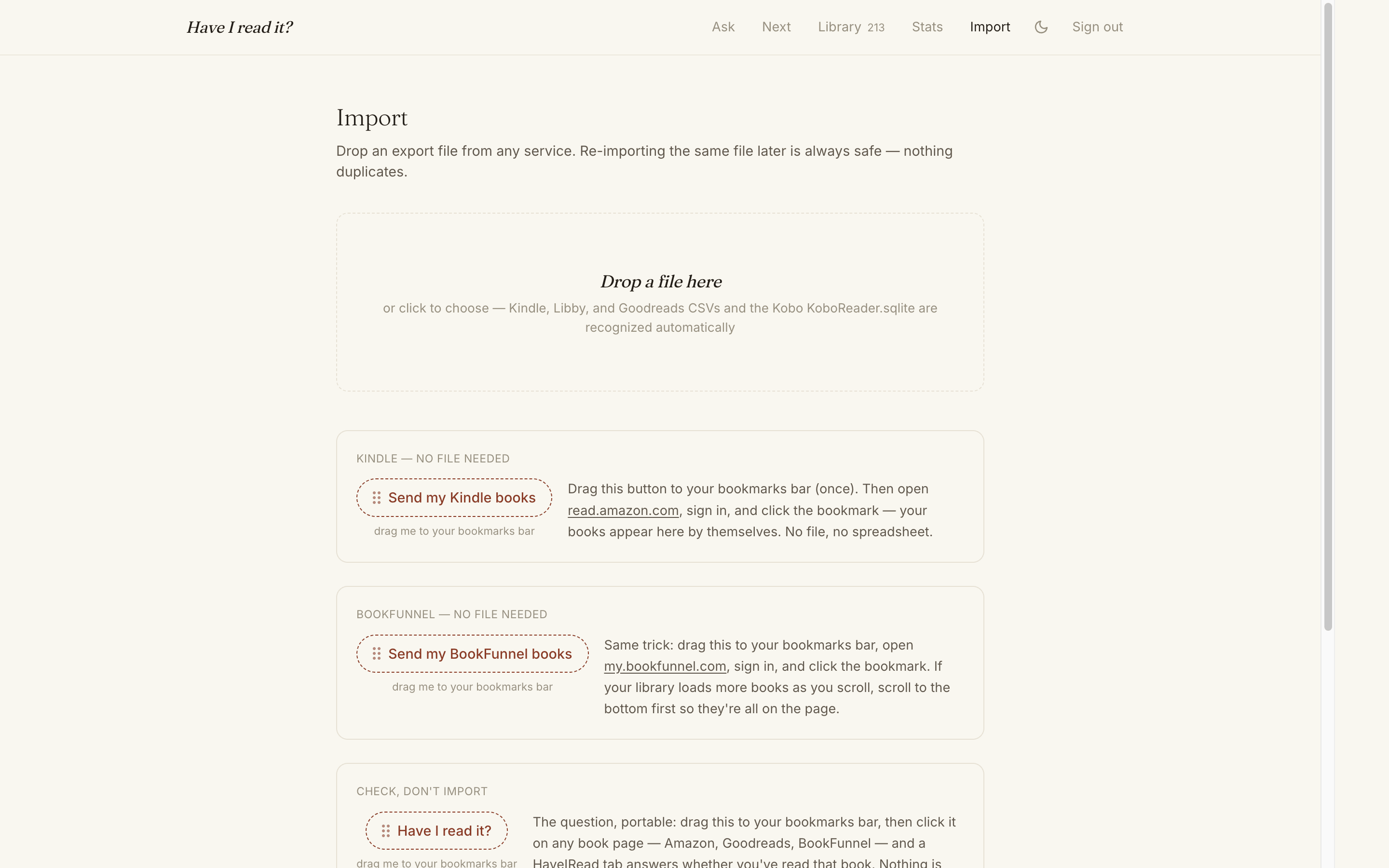
The bookmarklet pages through Amazon's own library API from inside the page, where the session cookies and CSP already permit it:
// src/lib/bookmarklet.ts — the Kindle collector (runs on read.amazon.com)
"do{" +
  "var u=new URL('https://read.amazon.com/kindle-library/search');" +
  "u.searchParams.set('libraryType','BOOKS');" +
  "u.searchParams.set('sortType','acquisition_desc');" +
  "u.searchParams.set('querySize','50');" +
  "if(token)u.searchParams.set('paginationToken',token);" +
  "var r=await fetch(u,{headers:{Accept:'application/json'},credentials:'include'});" +
  "var d=await r.json();" +
  "(d.itemsList||[]).forEach(function(b){" +
  "rows.push({asin:b.asin,title:b.title," +
  "authors:(b.authors||[]).map(function(a){return String(a).replace(/:+$/,'')})})});" +
  "o.textContent='Reading your Kindle library\\u2026 '+rows.length+' books';" +
  "token=d.paginationToken||null" +
"}while(token);"
(Note the .replace(/:+$/,'') — Amazon terminates author names with colons. Every parser in this codebase knows that now.)
Getting the rows out is the interesting part. The bookmarklet opens a HaveIRead tab and hands the data over via postMessage — no server-side scraping, no OAuth, no credentials leaving the user's browser. Two timing details cost me real debugging:
window.openmust happen inside the click gesture, before anyawait, or popup blockers eat it silently.- The receiving tab might not be ready (or logged in) when collection finishes, so there's a handshake — the receive page posts
hir-ready, the bookmarklet waits for it before posting the rows, and both sides checke.originagainst an exact allowlist.
BookFunnel gets the same shell with a different collector (their library page has no API, so it reads .library-slot elements off the DOM). Goodreads goes the boring route — their CSV export is good and it's the only source besides Kobo that reliably knows read vs. unread. And there's a third, tiny bookmarklet I use more than either: the checker. Click it on any Amazon or Goodreads book page and it grabs the ASIN/ISBN/title and opens HaveIRead's Ask page with the answer. The question, portable.
Reading the Kobo's SQLite — In the Browser
This is my favorite part of the app. Kobo devices keep everything in .kobo/KoboReader.sqlite on the device's USB volume, and that database contains the one thing no cloud service will give you: the truth about what you finished. ReadStatus is 0 unread, 1 reading, 2 finished. Kindle doesn't know this. Libby forgets it. The Kobo has it in a table.
HaveIRead parses that database entirely client-side with sql.js — SQLite compiled to WebAssembly. The file never leaves the machine unparsed:
// src/lib/koboSqlite.ts
const result = db.exec(`
  SELECT Title, Attribution, ISBN, Series, SeriesNumber, ReadStatus,
         DateLastRead, ___SyncTime, ContentID
  FROM content
  WHERE ContentType = 6 AND BookTitle IS NULL AND Title IS NOT NULL AND Title != ''
  ORDER BY Title
`);
// ContentType=6 = books; BookTitle IS NULL = top-level rows, not chapters.
// ReadStatus: 0=unread, 1=reading, 2=finished — the only truthful
// read/unread signal any service provides.
On Safari or Firefox you drag KoboReader.sqlite onto the import page and it's parsed on the spot. But on Chrome and Edge it gets better: the File System Access API lets the app hold a persistent handle to the KOBOeReader volume itself. Pick the drive once; the handle goes into IndexedDB; from then on "Sync from Kobo" reads the database directly off the plugged-in e-reader — no file dialog, no digging into hidden folders:
// src/lib/koboSync.ts
/** Silent status check — never prompts; safe to run on page load. */
export async function checkKobo(): Promise<KoboConnection> {
  if (!koboSyncSupported()) return { state: "unsupported" };
  const handle = await idbGet(); // the KOBOeReader handle, from IndexedDB
  if (!handle) return { state: "none" };
  const perm = await handle.queryPermission({ mode: "read" });
  if (perm !== "granted") return { state: "needs-permission", handle };
  return (await probeDb(handle))
    ? { state: "ready", handle }
    : { state: "unplugged", handle };
}
When the Kobo isn't plugged in, the read fails — which conveniently is the "is it connected?" check. I looked at WebUSB first, but the OS owns the mass-storage interface and Chrome blocklists USB class 08 anyway. The filesystem, not the USB bus, is the right API, and it's a genuinely great one: plug in the Kobo, click sync, and every book you finished on the device shows up marked read with the date.
Filling In the Covers
Imported rows are titles and authors — no covers, no blurbs. A background enrichment pipeline fixes that: each new book gets a scheduled Convex action (staggered one per second, out of respect for free APIs) that queries Google Books first and falls back to Open Library, matching candidates by ISBN before anything fuzzier.
The rule I eventually landed on: enrichedAt means "the catalogs answered definitively," not "we tried." If Open Library affirmatively says the book doesn't exist, that's a settled verdict and the book is never re-fetched. A 429 or a network failure leaves it retryable. Before I made that distinction, the pipeline happily re-asked the same unanswerable questions forever — and worse, early versions matched on author alone, which is how a children's book briefly wore the cover of the Bible. ISBN first. Always ISBN first.
There's also a shameless trick for Kindle-only indie books that no catalog knows: Amazon's cover CDN is addressable by ISBN-10, so a little checksum arithmetic converts the ISBN-13 and pulls the cover straight from the source.
A UI for People Who Like Books
The design bar was: it should feel like a well-set page, not a dashboard.
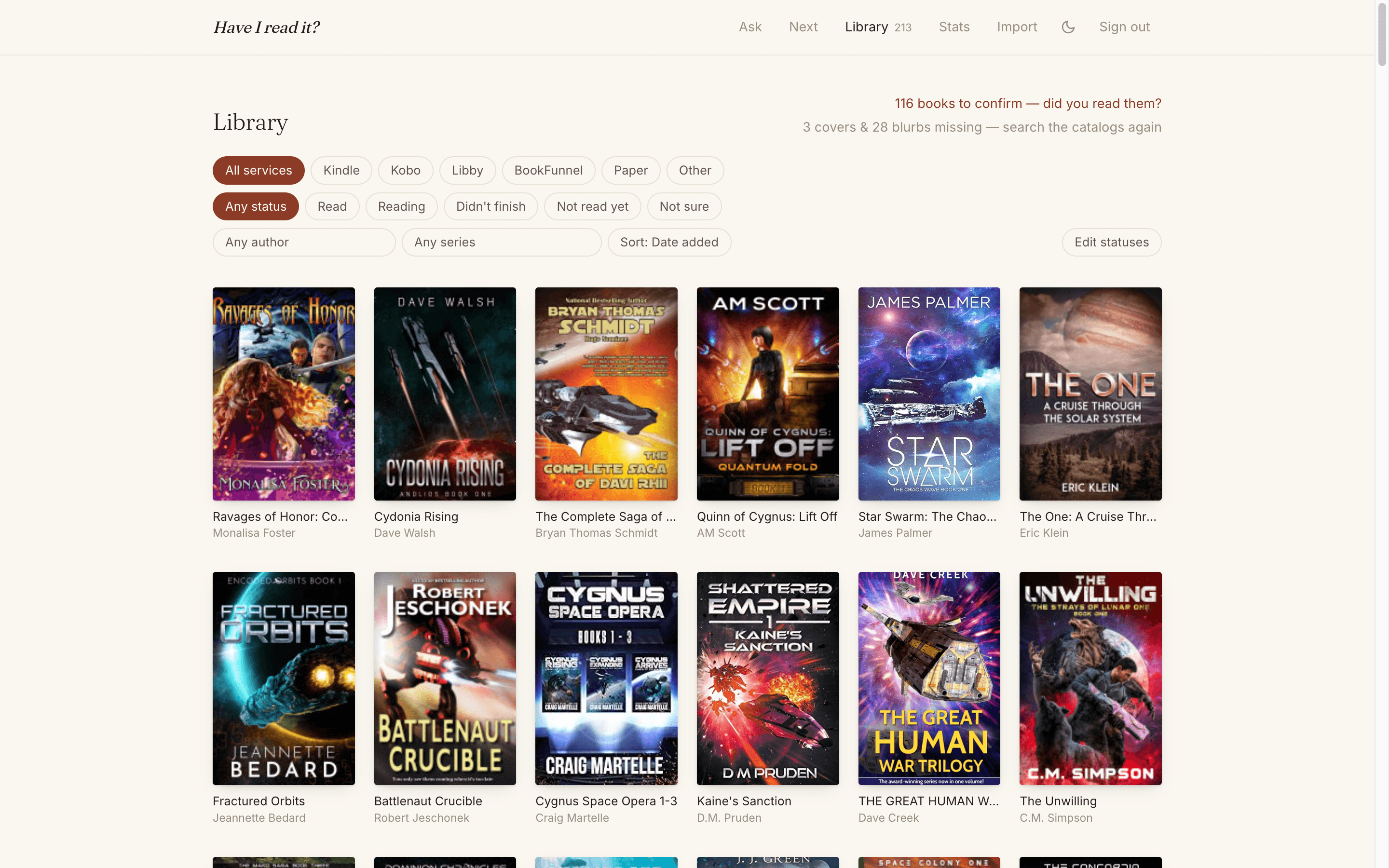
The whole design system is a Tailwind CSS 4 @theme block — warm paper, soft ink, a terracotta accent the color of old leather, Fraunces for display type:
@theme {
  --font-display: "Fraunces Variable", Georgia, serif;
  --color-paper: #faf7f0;
  --color-ink: #211d18;
  --color-ink-soft: #5f574c;
  --color-accent: #8a3b26; /* terracotta — old leather */
}
No gamification, no streaks, no social feed, no numbers demanding to go up. The home page is a single search box that answers in a sentence: "Yes — you read it on Libby." / "It's in your Kindle library — did you read it?" / "Not in your library." Press / anywhere to ask. Covers carry all the color; everything else stays out of the way.
The one rule I kept enforcing in review: honest UI. Buttons only exist when they can succeed. There's no "sync Kobo" button on Safari — there's the drop zone. There's no "fetch metadata again" link on a book the catalogs have definitively answered. Every affordance that could dead-end got deleted instead of disabled.
And because every import row carries series and seriesIndex (parsed from Kobo's columns, or extracted from title patterns like "(Culture Book 3)" and "Marvin Redpost #6" by an embarrassingly load-bearing regex), the app can answer the second question too — what should I read next:
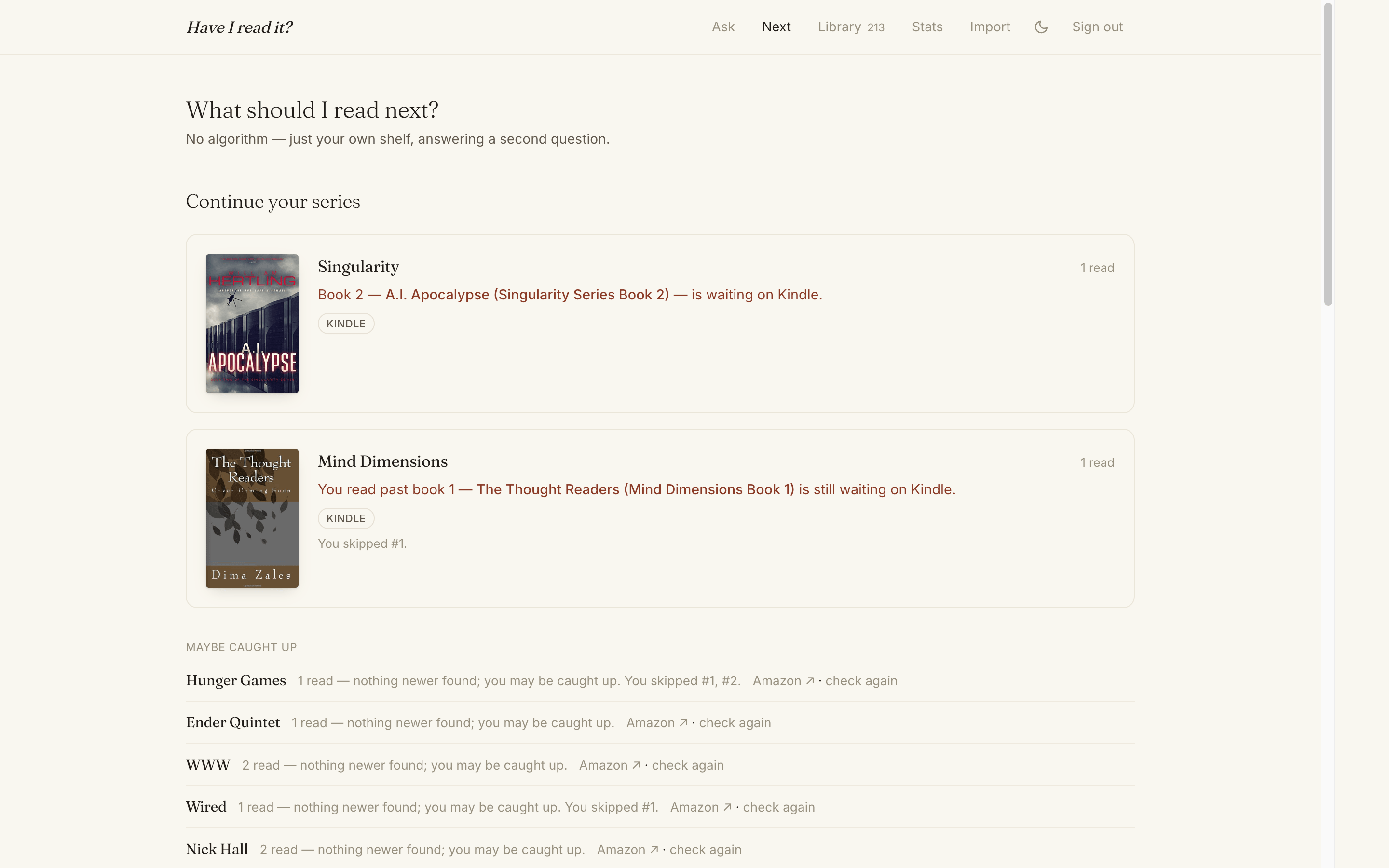
"Book 2 is waiting on Kindle." "You read past book 1 — you skipped #1." "Nothing newer found; you may be caught up." No algorithm, no recommendations — just your own shelf, sorted by what you're in the middle of. The "is there a next book?" lookups hit the same catalog APIs and get cached per series in a seriesLookups table, because Convex makes adding a cache table a two-minute job.
What Surprised Me
- The Kobo is the only honest device. Every cloud reading service knows what you acquired. Only the $150 e-reader with a SQLite file knows what you finished. The entire app is, in some sense, a delivery mechanism for that one table.
- Bookmarklets beat OAuth. No API keys, no scraping infrastructure, no terms-of-service anxiety about server-side automation. The user's own browser, their own session, their own data, handed to their own tab via
postMessage. It's a 2009 technology and it's perfect for this. - Dedup was harder than anything else. No AI in this app, and it didn't need any — but
dedupeKeywent through more revisions than every other function combined. Real-world book metadata is hostile. unknownas a first-class status changed the product. The moment the app stopped pretending imports knew everything, the confirm flashcards became the most-used feature after search.- Convex static hosting removed the last other thing. Capvera still had DNS pointed at separate concerns. This app is one deploy, one platform, top to bottom. It's the closest I've come to "the app is just the code."
Try It
haveiread.app is live. Create a library, drag the Kindle button to your bookmarks bar, plug in your Kobo if you have one, and find out how many books you own twice. My personal record so far: three copies of a book I'd read once and started twice more.
Reflections
The pattern from the Capvera port held: I wrote none of this by hand. The entire app — schema, bookmarklet string-assembly, the sql.js Kobo parser, the File System Access API handle dance, the rate-limiter buckets, the flashcard deck — was built with Claude Fable 5 in Claude Code, with a set of Convex skills loaded so the agent already knew the platform's idioms before the first prompt. I described behavior, reviewed diffs, and reported what felt wrong. The most valuable thing I contributed was taste: no, that button shouldn't exist when it can't work; yes, the answer should be a sentence, not a status chip.
Small apps that answer one question well are a genuinely great shape for this way of working. The question was "have I read it?" The answer, finally, is one search box away.
Daniel Wanja is a developer and founder of Nouvelles Solutions, Inc. When not asking whether he's read a book, he's usually thirty pages into finding out the hard way.