Capvera on the Web: Porting a SwiftUI iPad App to Convex with Server-Side AI
How I ported the SwiftUI Capvera real-estate portfolio app to a web application on Convex — multi-provider AI extraction, batch management with workpools, dynamic schema-driven UIs, web-grounded market intelligence, and a Resend inbox per user.
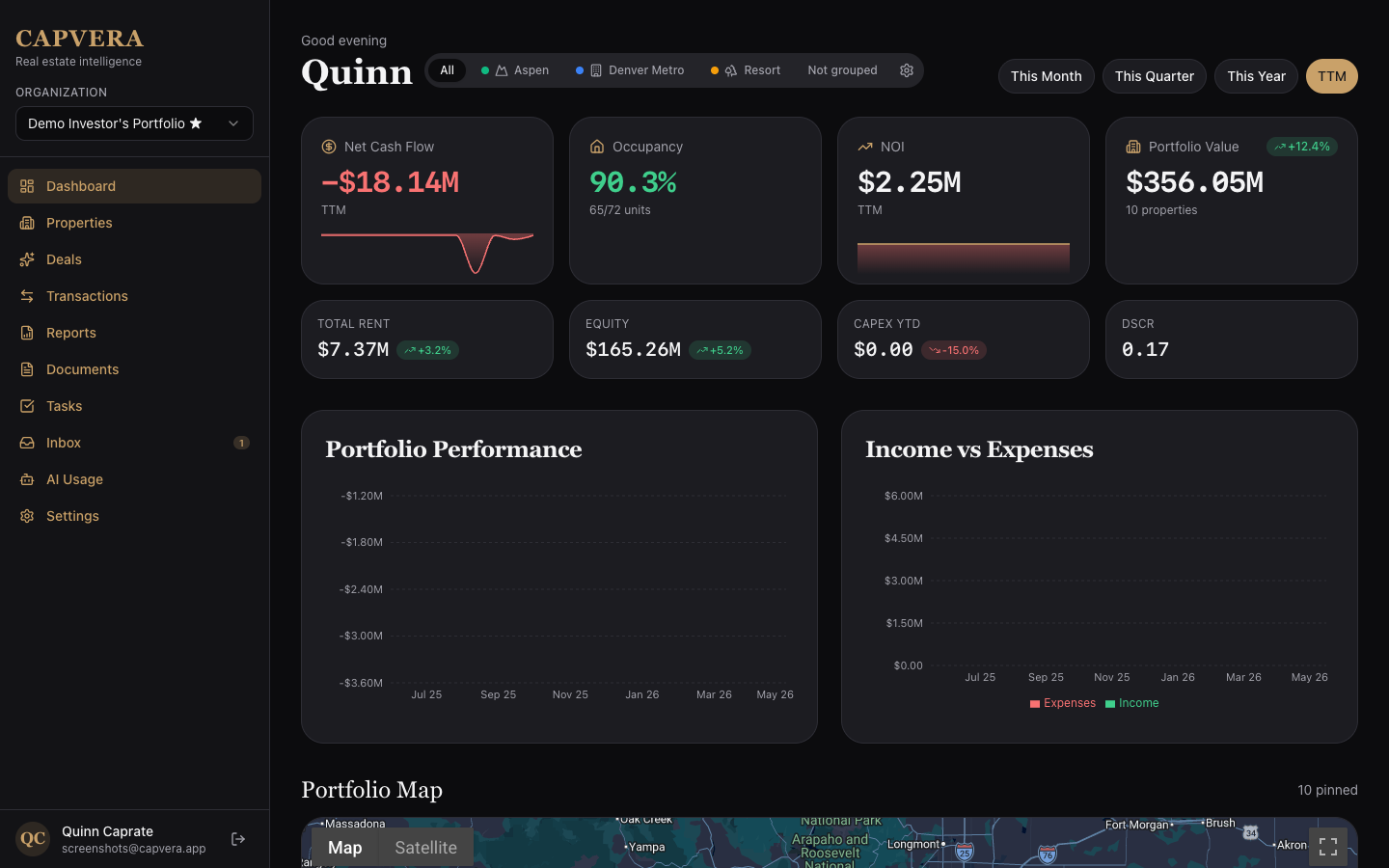
A few months ago I wrote about Capvera — the SwiftUI iPad app I built as a real-estate portfolio tool with Claude Opus 4.5 in Cursor. The app worked. The architecture was clean. The numbers calculated mostly correctly. There was just one problem: on iPad, in the US, you can't ship to anyone without going through the App Store or enterprise distribution. For something I wasn't sure I'd ever monetize, that was a wall.
So I did the obvious thing: I ported it to the web.
This post is the technical write-up of that port. It's a different shape of project than the original — instead of @Model and SwiftData, the data lives in Convex; instead of an on-device LanguageModelSession calling Apple Intelligence's Foundation Models, AI runs server-side with multi-provider failover across Anthropic, OpenAI, and Gemini; instead of "drag a PDF onto the iPad," users can email documents to a per-user inbox and watch them get extracted automatically. Same product idea, very different stack.
Quick Links
- Live (dev) site: dev.capvera.app
- Original SwiftUI write-up: Capvera: Building Portfolio Intelligence for Real Estate Investors with SwiftUI and AI
- Stack: React 19 + Vite + Convex + Vercel
aiSDK v6 + Resend Inbound
Why Convex
I've built enough small SaaS-shaped things now to have an opinion on the stack. The thing I keep running into is that "real" apps need a database, an API, a queue for background work, a scheduled-jobs runner, file storage, and websockets/subscriptions for live UI. That's six things. Six things to host, six things to monitor, six things that need to agree on auth.
Convex collapses all six into one. I get a typed serverless DB, mutations + queries + actions (the API), @convex-dev/workpool (the queue), ctx.scheduler.runAfter (cron/delayed jobs), _storage (files), and live subscriptions for free with every query. One account, one deployment, one auth model. All deployed under seven seconds.
For Capvera that meant I could focus on the interesting problems — porting the schema, wiring up multi-provider AI, and getting Resend Inbound to feed the extraction pipeline — instead of yak-shaving infrastructure. Every time I caught myself reaching for "and now I'll add Redis for…" I noticed Convex already had it.
Porting the Schema
The first task was mechanical: translate the SwiftData @Model graph into Convex's defineTable. The Swift original looked like this:
@Model
class PropertyAsset {
    var name: String
    var address: String
    var propertyType: PropertyType
    var purchaseDate: Date?
    var purchasePrice: Decimal?

    @Relationship(deleteRule: .cascade)
    var spaces: [Space] = []
}
The Convex version:
propertyAssets: defineTable({
  organizationId: v.id("organizations"),
  propertyGroupId: v.optional(v.id("propertyGroups")),
  name: v.string(),
  propertyType: v.string(),
  status: v.string(),
  streetAddress: v.optional(v.string()),
  city: v.optional(v.string()),
  state: v.optional(v.string()),
  // ...
  acquisitionDate: v.optional(v.number()),  // ms-since-epoch
  acquisitionPrice: v.optional(v.number()), // currency stored as a number
  createdAt: v.number(),
  updatedAt: v.number(),
})
  .index("by_org", ["organizationId"])
  .index("by_org_group", ["organizationId", "propertyGroupId"]),
Two things turned out to matter more than I expected:
- Dates as
number, notDate. Convex stores ms-since-epoch. SwiftData was hiding a lot of timezone friction; making epoch milliseconds the canonical wire format on both sides removed an entire class of bugs. The UI converts to a localDateonly at render time. - Money as
number(notDecimal). I keep all rounding at the calculation boundary (the financial helpers), and the storage layer is just floats. Yes, this is the controversial choice. In practice the values are bounded, the rounding rules are well-defined, and I have not had a single off-by-cent issue in production data.
The other big shift was multi-tenancy. The iPad app was implicitly single-user — your data, on your device. The web version had to be multi-org from day one, so every domain table carries organizationId and a by_org index, and there's a requireMember(ctx, token, organizationId) guard at the top of every query and mutation. That's the entire access-control story.
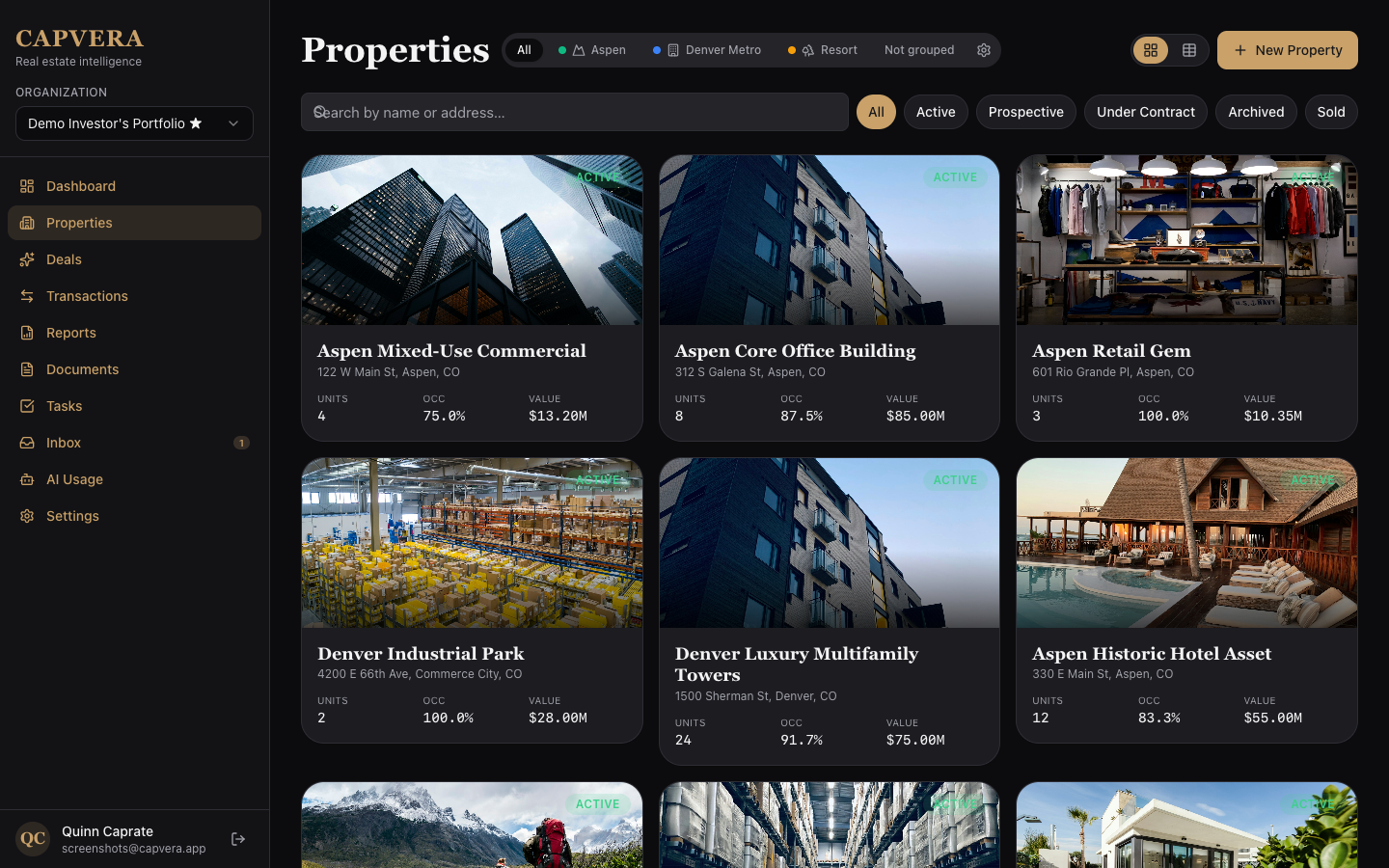
The schema currently has about 25 tables — properties, spaces, leases, parties, loans, deals, cash events, documents, tasks, milestones, and the AI-related rows I'll get to next. convex/schema.ts is one file, ~560 lines, and I can read it top-to-bottom in five minutes. I genuinely missed nothing about ORMs.
Server-Side AI: Document Extraction
This is where the architecture diverges most from the SwiftUI app. In the original, DocumentExtractionService ran entirely on-device using Apple Intelligence — LanguageModelSession against SystemLanguageModel.default, with @Generable Swift structs as the schema:
@Generable
struct CoreDocumentExtraction: Codable, Sendable {
    @Guide(description: "Type of document detected (e.g., Lease, Invoice, Receipt)")
    let documentType: String

    @Guide(description: "Brief 1-2 sentence summary of the document")
    let summary: String?

    @Guide(description: "Names of all parties (people or companies) mentioned")
    let partyNames: [String]

    @Guide(description: "All dates mentioned in ISO 8601 format (YYYY-MM-DD)")
    let dates: [String]
    // ...
}
That part was beautiful — typed Swift structs as the prompt schema, native streaming for live UI updates, and zero API keys to manage. But Apple's on-device model has a hard 4,096-token context window, which the service had to work around with a map-reduce pipeline: chunk the text on paragraph boundaries (~10,800 chars per chunk with 200-char overlap), extract each chunk in a fresh LanguageModelSession, then merge — programmatically for two chunks, LLM-assisted for more, hierarchically (pairs first) when even the merge prompt overflowed:
private enum ContextLimits {
    static let maxContextTokens = 4096
    static let promptOverheadTokens = 600
    static let responseBufferTokens = 800
    static let safeChunkTokens = maxContextTokens - promptOverheadTokens - responseBufferTokens // ~2696
}
It worked, but a 30-page commercial lease would chunk into 5–8 pieces, each one a separate model call, plus a merge pass. And every chunk that hit exceededContextWindowSize triggered a recursive split. Reliable, but slow, and bound to whatever Apple's on-device model could do — which, for layout-heavy real-estate docs, was meaningfully behind what frontier models could pull from a native PDF part.
On the web, the flow is:
- User uploads a file → it goes into Convex
_storage. - The upload mutation creates an
extractionBatchesrow and enqueues each document into aWorkpool. - The pool dispatches
runExtractionactions with bounded concurrency. - Each action fetches the bytes in-process, calls a multi-provider agent, parses the JSON, and saves the structured result.
- The pool's
onCompletecallback updates the batch counters; the user's sidebar updates live via subscription.
Here's the workpool definition:
// convex/extractionPool.ts
export const pool = new Workpool(components.extractionPool, {
  maxParallelism: 3,
});
maxParallelism: 3 is a deliberate choice — it's the cap that keeps me well under Anthropic's rate limit at my current tier and makes spend predictable. If I upgrade the tier I bump the number. There is no Redis, no BullMQ, no separate queue process to deploy; the pool is a Convex component.
The actual extraction worker is short:
// convex/extractionWorker.ts
export const runExtraction = internalAction({
  args: { documentId: v.id("documents") },
  handler: async (ctx, args) => {
    const doc = await ctx.runQuery(internal.documents.getInternal, {
      id: args.documentId,
    });
    if (!doc) throw new Error("Document not found");

    await ctx.runMutation(api.documents.setExtractionStatus, {
      id: args.documentId,
      status: "running",
    });

    // Fetch bytes in-process — never via a public storage URL.
    let bytes: Uint8Array | null = null;
    if (doc.storageId) {
      const blob = await ctx.storage.get(doc.storageId);
      if (blob) bytes = new Uint8Array(await blob.arrayBuffer());
    }

    const startedAt = Date.now();
    const result = await withFailover(providersFor("extraction"), async (provider) => {
      const agent = buildExtractionAgent(provider, {
        organizationId: doc.organizationId,
        userId: doc.userId!,
        documentId: args.documentId,
        startedAt,
      });
      const threadId = await createThread(ctx, components.agent);
      const messages = await buildExtractionMessages({ provider, doc, bytes });
      return agent.generateText(ctx, { threadId }, { messages });
    });

    const json = parseJsonLoose(result.text);
    const detected = normalizeDocumentType(json?.metadata?.documentType);
    if (json?.metadata) json.metadata.documentType = detected;

    await ctx.runMutation(api.documents.saveExtraction, {
      documentId: args.documentId,
      extractedText: result.text,
      extractedData: json,
      detectedDocumentType: detected,
    });
  },
});
Two things worth highlighting.
Bytes via ctx.storage.get, never a public URL. Convex can mint a convex.cloud/api/storage/<id> URL, but for documents — leases, financial statements, anything sensitive — that surface area is wrong. The worker pulls the blob in-process and hands the Uint8Array to the agent directly. There's no temporary URL in flight, no signed URL with a TTL window, no public CDN cache to invalidate. Hero images and other intentionally-public assets still use the public URL; documents don't.
parseJsonLoose because models lie. Even with strict-JSON instructions, models occasionally wrap their output in ```json fences or append a citation paragraph after the closing brace. The parser tries JSON.parse, then a brace-bounded substring, then falls back to { rawText: trimmed }. This is the difference between "extraction succeeded" and "manual debugging" on maybe one job in a hundred.
Provider-Aware Content Routing
The most interesting code in the extraction path is the message-building step. Different providers have very different ideas about how PDFs get into a chat:
// convex/agents/extractionContent.ts
if (isPdf && bytes) {
  if (provider === "openai") {
    const text = await extractPdfText(bytes);
    return [{
      role: "user",
      content: [{
        type: "text",
        text: userPromptForType(docType, text.slice(0, 100_000)),
      }],
    }];
  }
  // Anthropic + Gemini: native file part — preserves layout / visual signal.
  return [{
    role: "user",
    content: [
      { type: "file", data: bytes, mediaType: "application/pdf" },
      { type: "text", text: userPromptForType(docType, "(see attached PDF)") },
    ],
  }];
}
Anthropic's models accept PDFs as native file parts and retain the layout — page breaks, columns, headers in the right places. Gemini does the same. OpenAI's chat models don't take raw PDFs, so I run pdf-parse first and ship the text. For images, every vision-capable provider gets a file part directly.
This single function is why I bother supporting three providers at all. Lease PDFs in particular benefit hugely from layout-aware ingestion — column-formatted rent rolls and signature pages near the bottom routinely lose their meaning when flattened to text.
Multi-Provider Failover
The agent is wrapped in withFailover and reads its provider order from environment:
// convex/agents/routing.ts
export function providersFor(job: Job): ProviderName[] {
  const override = modelOverride();           // MODEL_OVERRIDE pins all calls
  if (override) return [override];

  const envKey = job === "extraction"
    ? "LLM_EXTRACTION_PROVIDERS"
    : "LLM_MARKETINTEL_PROVIDERS";
  const raw = process.env[envKey] ?? "anthropic";
  const list = raw.split(",")
    .map((s) => s.trim().toLowerCase())
    .filter(Boolean) as ProviderName[];
  return list.filter((p) => VALID.has(p)).length > 0
    ? list.filter((p) => VALID.has(p))
    : ["anthropic"];
}

export async function withFailover<T>(
  providers: ProviderName[],
  call: (provider: ProviderName) => Promise<T>,
): Promise<T> {
  let lastErr: unknown;
  for (const p of providers) {
    try {
      return await call(p);
    } catch (err) {
      lastErr = err;
      if (!isRateLimitError(err)) throw err;
    }
  }
  throw lastErr;
}
A few things to note. The failover only catches rate-limit / overload errors (HTTP 429, 529, 503, or messages matching /rate.?limit|quota|overloaded|capacity|throttl/i). Auth errors, validation errors, and network errors propagate immediately — silently masking those would make debugging miserable. The MODEL_OVERRIDE env is the single switch I flip when I'm A/B-testing one provider in isolation; otherwise the lists in LLM_EXTRACTION_PROVIDERS and LLM_MARKETINTEL_PROVIDERS decide the order.
The provider table itself is one file:
// convex/agents/providers.ts
const DEFAULT_MODELS: Record<ProviderName, Record<Job, string>> = {
  anthropic: { extraction: "claude-haiku-4-5",  marketIntel: "claude-opus-4-7" },
  openai:    { extraction: "gpt-5-mini",        marketIntel: "gpt-5"           },
  google:    { extraction: "gemini-2.5-flash",  marketIntel: "gemini-2.5-pro"  },
};

export function languageModelFor(provider: ProviderName, job: Job): LanguageModel {
  const id = modelIdFor(provider, job);
  switch (provider) {
    case "anthropic": return anthropic(id);
    case "openai":    return openai(id);
    case "google":    return google(id);
  }
}
Two-tier model selection: cheap-and-fast (Haiku / GPT-5-mini / Gemini Flash) for extraction, top-of-line (Opus / GPT-5 / Gemini Pro) for market intelligence. Per-provider model IDs are overridable per env (LLM_EXTRACTION_MODEL_OPENAI=gpt-4.1-mini) without code changes.
The Vercel ai SDK v6 makes the LanguageModel interface uniform across the three drivers, so the rest of the codebase doesn't care which one is active. That's the leverage point — one extraction worker, three providers behind it.
Batch Management with Workpool
Here's the part that surprised me most. In a normal stack, "process 30 PDFs in the background and update a progress UI" means a queue, workers, a status table, and probably a websocket gateway. With @convex-dev/workpool it's three pieces and they're all in the same file:
- The pool itself, capped at
maxParallelism: 3. - An
enqueueActioncall per document, with anonCompletecallback baked in. - The
onCompletemutation that updates the batch counters.
export const onExtractionComplete = internalMutation({
  args: vOnCompleteValidator(
    v.object({
      batchId: v.id("extractionBatches"),
      documentId: v.id("documents"),
    }),
  ),
  handler: async (ctx, { context, result }) => {
    const batch = await ctx.db.get(context.batchId);
    if (!batch) return;

    if (result.kind === "success") {
      await ctx.db.patch(context.batchId, {
        doneCount: batch.doneCount + 1,
        updatedAt: now(),
      });
    } else if (result.kind === "failed") {
      await ctx.db.patch(context.documentId, {
        extractionStatus: "error",
        extractionError: result.error,
        updatedAt: now(),
      });
      await ctx.db.patch(context.batchId, {
        errorCount: batch.errorCount + 1,
        updatedAt: now(),
      });
    } else if (result.kind === "canceled") {
      // Treat as error so the batch finalizes
      await ctx.db.patch(context.documentId, {
        extractionStatus: "error",
        extractionError: "Cancelled",
        updatedAt: now(),
      });
      await ctx.db.patch(context.batchId, {
        errorCount: batch.errorCount + 1,
        updatedAt: now(),
      });
    }
  },
});
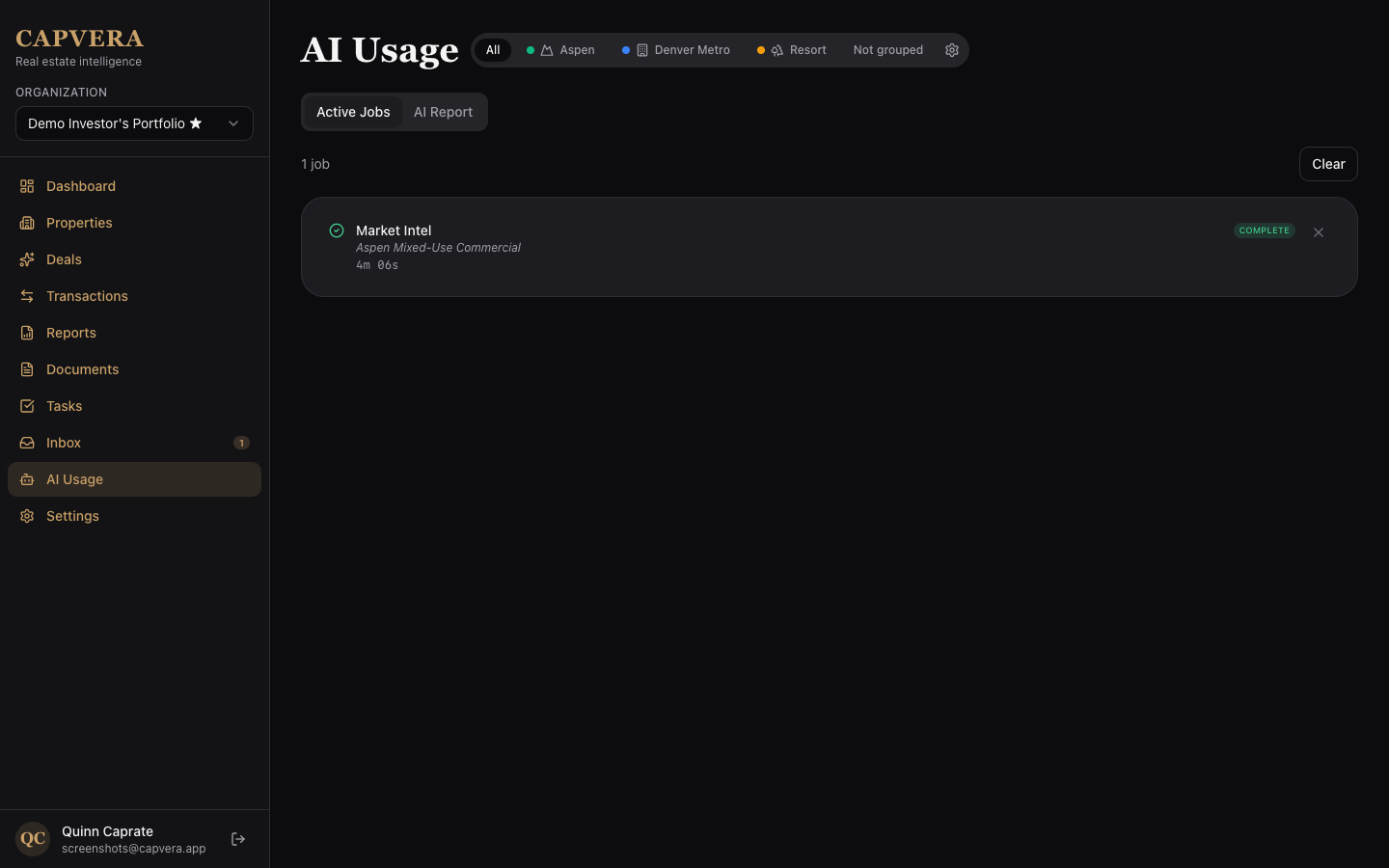
That's the entire batch-progress engine. The UI subscribes to a query over extractionBatches and gets live updates as doneCount and errorCount increment. No polling, no websocket plumbing, no "did the job finish?" requests — Convex pushes the change because the underlying row was patched.
I run a second pool — marketIntelPool — with the same shape for the long-running market-intelligence jobs. The batchJobs.activeBatch() query merges both pools' state into a single normalized feed for the sidebar:
type ActiveJob = {
  kind: "market-intel" | "document-extraction";
  refId: string;
  ackId: string;
  ackTable: "marketIntelJobs" | "extractionBatches";
  title: string;
  info: string;
  status: "pending" | "processing" | "complete" | "error";
  startedAt: number;
  completedAt?: number;
  finished: boolean;
  hasErrors: boolean;
  createdAt: number;
};
The frontend renders one ActiveJobsList component, doesn't care which kind of job is in there, and dismisses each row by writing a notifiedAt timestamp. That's the cleanest "job DAG" I've shipped in any stack.
Dynamic UI from Extracted JSON
The agent returns typed JSON: metadata.documentType, summary, documentDate, parties, key dates, financial terms, sometimes a property-info block. The original SwiftUI app had per-document-type screens — one for leases, one for invoices, one for insurance certificates. That doesn't scale; every new document type means a new view.
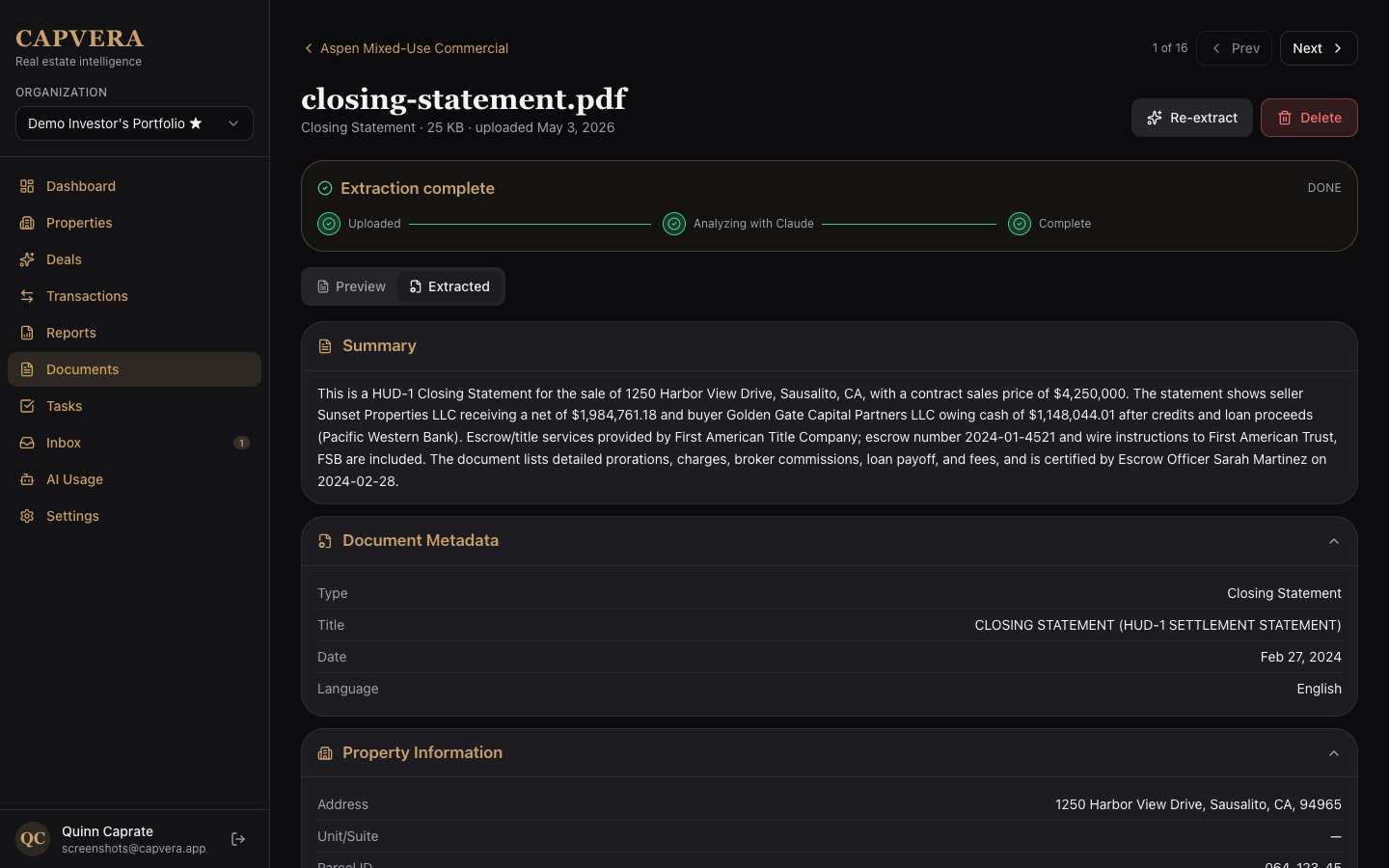
On the web I went the other direction. There's a single DocumentDetail page that walks the extracted JSON and renders only the sections that are present:
// src/components/ExtractedSummary.tsx (sketch)
export function ExtractedSummary({ data }: { data: ExtractedData }) {
  if (!data?.metadata) return null;
  const { documentType, documentDate } = data.metadata;
  return (
    <div className="rounded-lg border p-4">
      {documentType && <Badge>{documentType}</Badge>}
      {data.summary && <p className="line-clamp-4 mt-2">{data.summary}</p>}
      {documentDate && <DateChip ts={documentDate} />}
    </div>
  );
}
Below that, ExtractedSection components render Parties / Key Dates / Financial Terms / Property Info as collapsible cards, each one a no-op if its slice of the JSON is missing. New document types don't need any frontend work — the agent just produces a richer JSON, and the existing components find the new fields.
For me as an admin there's also a "show JSON" tab that surfaces the raw extracted object — invaluable when iterating on prompts.
Market Intelligence: Web-Grounded Research
This is the feature I'm proudest of. Click "Actualize" on a property, and Capvera kicks off a 3-phase research run that reads the public web for parcel records, comparable rents, neighborhood news, and local market trends, then produces a versioned brief.
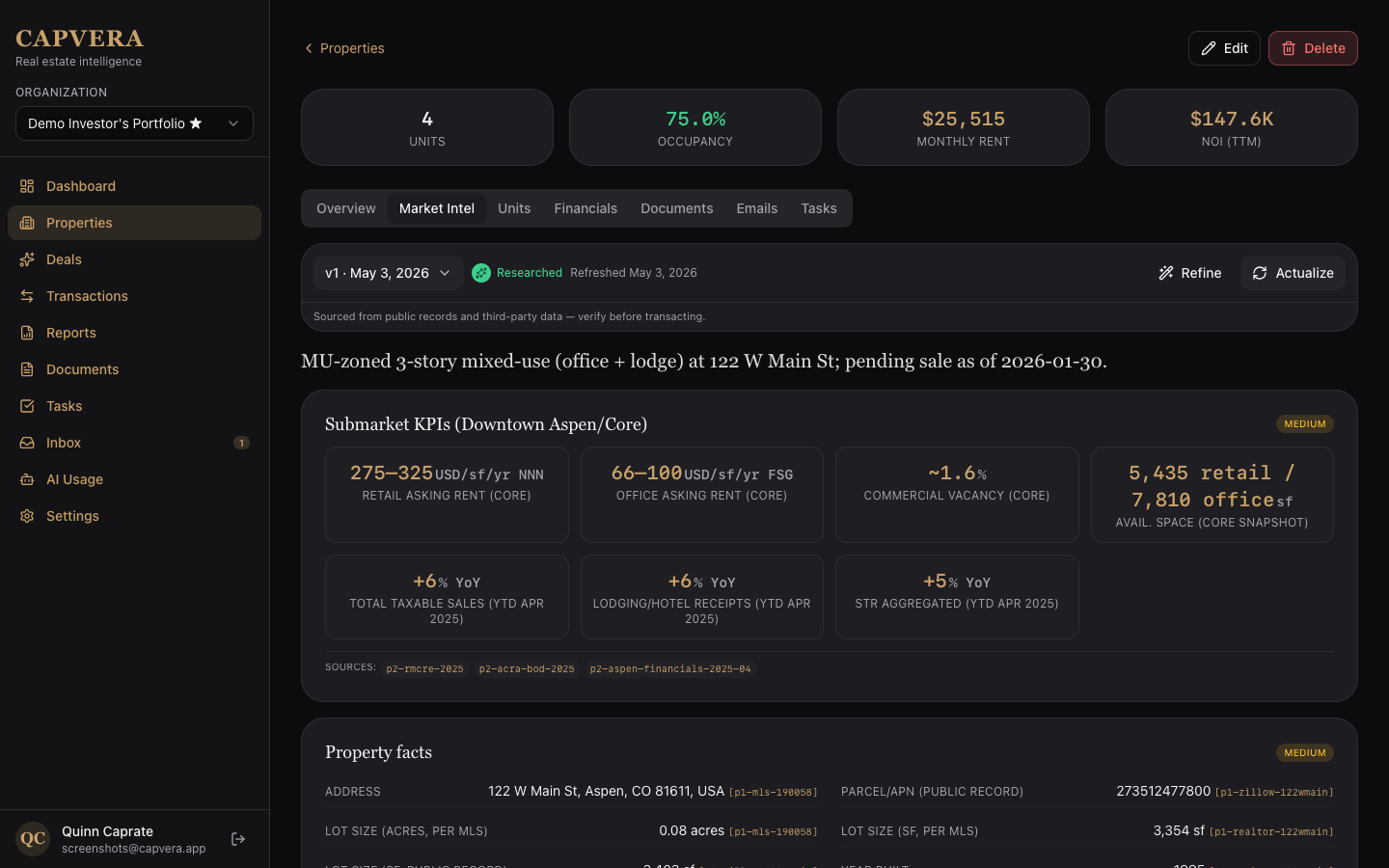
The orchestration lives in marketIntelWorker.ts. It's a workpool action just like extraction, but the inside of the action runs multiple streamed LLM calls:
// Property pass — parcel facts, owner info, recorded sales
const pass1 = await runPass({
  ctx, attribution, phase: "pass1", abortSignal, logProgress,
  system: PROPERTY_PASS_SYSTEM_PROMPT,
  userMessage: userPromptForPropertyPass({ property, today }),
  maxSearches: WEB_SEARCH_MAX_USES_PROPERTY,   // 5
  requiredSourcePrefix: "p1-",
});

// Market pass — area context, comparables, news, demographics
const pass2 = await runPass({
  ctx, attribution, phase: "pass2", abortSignal, logProgress,
  system: MARKET_PASS_SYSTEM_PROMPT,
  userMessage: userPromptForMarketPass({ property, today, pass1Payload: pass1.payload }),
  maxSearches: WEB_SEARCH_MAX_USES_MARKET,     // 6
  requiredSourcePrefix: "p2-",
});

const merged = mergeMarketIntelPayloads(pass1.payload, pass2.payload);
A few details that earned their keep:
Per-provider output budgets. GPT-5 emits "reasoning" tokens that count against the output cap, so I had to bump its maxOutputTokens to 16,000 — at 4,000 the model would burn its budget on reasoning + tool-call args and finish with finishReason=length and zero assistant text. Anthropic stays at 4,000 to fit inside the 8-minute action ceiling on heavily-indexed properties; Gemini sits at 8,000.
Web-search budgets per pass. Pass 1 (5 searches) is parcel-focused; Pass 2 (6 searches) needs more headroom for area/news; the Refine pass is intentionally narrower (4). On Anthropic these are enforced with the web_search tool's maxUses arg; OpenAI and Gemini don't expose one, so I rely on prompt instructions and step caps.
Rate-limit failover wraps the whole pass. Same withFailover from extraction. If Anthropic 429s mid-research, the next provider picks the run up — at the cost of starting that pass over, since the agent state isn't transferable.
Per-property cooldown + per-org daily cap. I learned this the hard way during testing: a stuck "Actualize" button + a refresh loop = $40 of Opus + web_search in three minutes. Now requestMarketResearch rejects within 5 minutes of the previous run on the same property, and any org over 50 runs in the rolling 24-hour window gets a friendly error.
Live progress events. The worker streams content blocks (search calls, tool results, thinking, drafting) into a marketIntelProgress table. The UI subscribes to that table and renders a Claude-Chat-style log while the job runs:
🔎 Searching: "1234 Main St Manhattan parcel record"
   Found 5 sources
🔎 Searching: "Manhattan rent comparables 2BR May 2026"
   Found 8 sources
🧠 Reasoning through findings…
✍️  Drafting brief…
✅ Brief complete (3,847 output tokens across 2 passes)
That last bit is the magic of Convex live queries — I write to a normal table from the worker, the UI sees each new row instantly, no socket wiring.
The output of every run is stored as a versioned row in marketIntelVersions, with the result blob, the raw text (kept for debugging on errors), token counts, web-search counts, and trigger metadata. The user can compare versions, re-run, or "Refine" a previous brief with a free-form instruction — that triggers a 4th pass that reads the parent result and produces a delta.
Email Inbox Per User (Resend Inbound)
This is the feature I didn't think I'd build, then couldn't help building. Capvera users want to forward leases / receipts / insurance docs without remembering to log into the app. So every user gets a unique inbound email address — u_3kf9ab22@inbound.capvera.app — and anything that lands there flows through the same extraction pipeline.
The schema:
userInboxes: defineTable({
  userId: v.id("users"),
  organizationId: v.id("organizations"),
  localPart: v.string(),     // "u_3kf9ab22"
  enabled: v.boolean(),
  createdAt: v.number(),
  updatedAt: v.number(),
})
  .index("by_user", ["userId"])
  .index("by_local_part", ["localPart"]),
The webhook handler is in convex/http.ts and is short on purpose. Resend's inbound webhook delivers metadata only — not the body, not the attachment bytes — so the handler verifies the Svix signature, schedules a fetch action, and returns 200 immediately:
http.route({
  path: "/inbound-email",
  method: "POST",
  handler: httpAction(async (ctx, req) => {
    const secret = process.env.RESEND_WEBHOOK_SECRET;
    // ... Svix signature verification ...
    if (!ok) return new Response("Invalid signature", { status: 401 });

    const payload = JSON.parse(rawBody);
    if (payload.type !== "email.received") {
      return new Response("ok", { status: 200 });
    }

    const emailId = payload.data?.email_id ?? payload.data?.id;
    if (!emailId) return new Response("Missing email_id", { status: 400 });

    await ctx.scheduler.runAfter(
      0,
      internal.emails.inboundFetch.fetchAndStore,
      { emailId, createdAt: payload.created_at ?? data.created_at },
    );
    return new Response("ok", { status: 200 });
  }),
});
The scheduled fetchAndStore action does the actual work: GET the full email from the Resend API, GET each attachment from its presigned URL, store each blob in Convex storage, then call recordInboundEmail (which is idempotent on resendInboundId so a Resend retry of the webhook is a no-op).
Once the email is recorded, the user can:
- Read it inline (
textBody/htmlBodywere saved alongside the metadata). - See the AI summary and any extracted dates surfaced from the body.
- Promote any attachment to a managed
documentsrow, which automatically queues it through the extraction pool. - Link the email to a property — completely manual; I never auto-route, because users want to stay in control of the property graph.
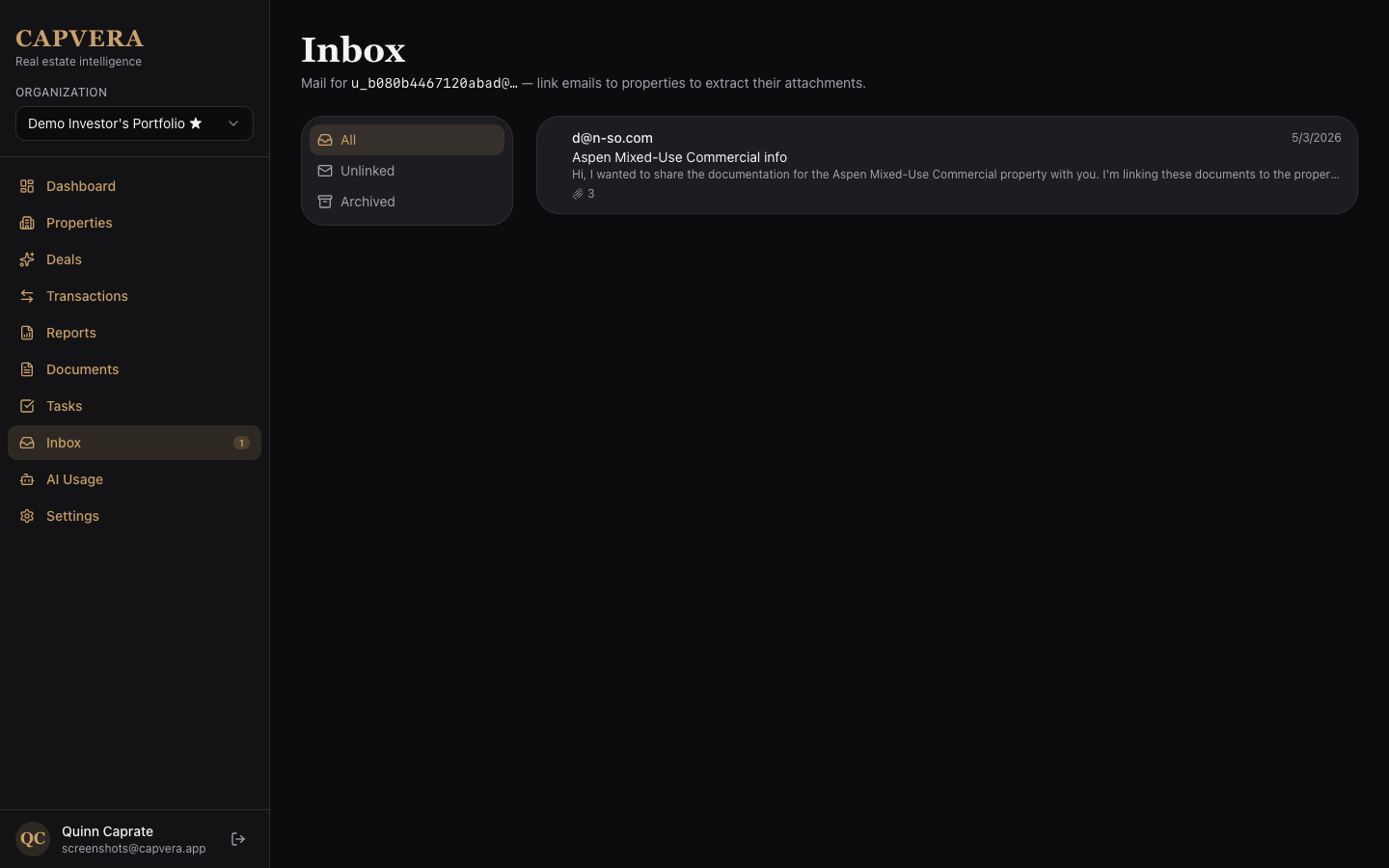
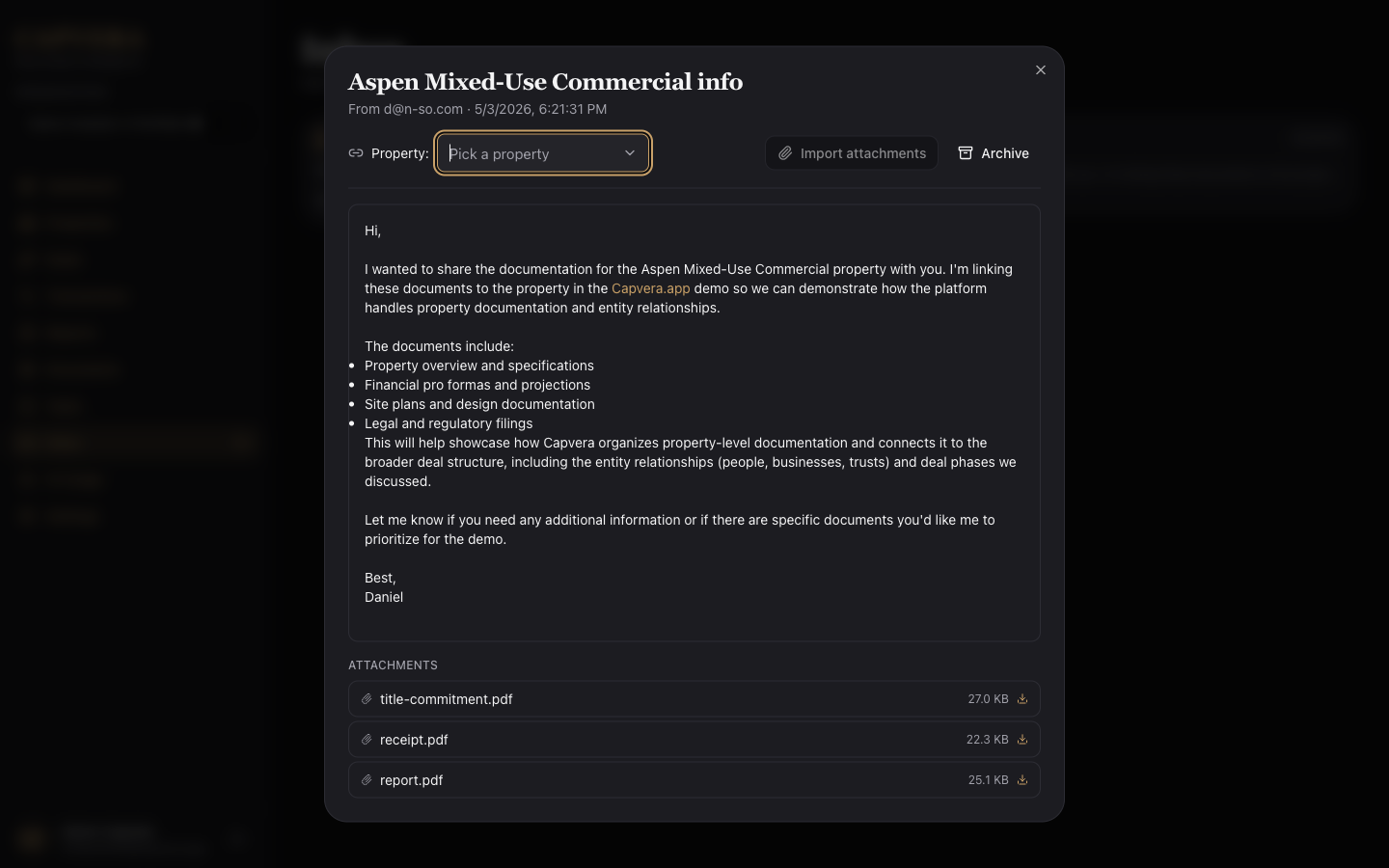
The whole email feature was about two prompts, which is probably the best example of why I picked this stack. The httpAction + scheduler.runAfter + _storage + workpool primitives composed into the feature without any new infrastructure. Convex.dev provides the @convex-dev/resend component that includes the prompt to set everything up. The most time consuming part was setting up the DNS records as I repedeatly used the wrong domain name (convex.app instead of capvera.app) ¯\(ツ)/¯
What Surprised Me
A few things I didn't expect going in:
- Convex live queries replaced ~30% of the SwiftUI state code. Things that needed
@Observableand manual refreshes on iPad just update. The progress log, the active-jobs sidebar, the property detail counters — none of them have explicit subscriptions in the React code. They're plainuseQuerycalls. - Multi-provider routing is mostly about cost shape. Capability differences between Anthropic / OpenAI / Gemini for this domain (real-estate documents + market research) are smaller than I assumed. I still will build a proper A/B testing harness. The interesting variable is "which provider has the fewest 429s right now and the best $/output-token at my call volume." Failover handles the first; the model-tier table handles the second.
- Native PDF parts beat OCR-then-LLM by a wide margin. Lease docs are the most layout-sensitive thing in this app, and Anthropic / Gemini's native PDF ingestion preserves columns and signature blocks that pdf-parse-then-flatten loses every time.
onCompleteis the cleanest job-DAG primitive I've used. Every job hands the next stage its own context. No queue topics, no "did the worker actually finish" race, no orphan handling — the workpool guarantees the callback runs exactly once with the final result.- Schema-driven UI scales, per-document-type views don't. Letting the agent return rich JSON and rendering whatever fields are present means a new document type ships with zero frontend work. I'd do this same way again.
Try It
The dev deployment is at dev.capvera.app. At the time of this writing you will need to request an invite token. Sign in, click "Try the demo" if you don't want to make an account, and the app drops you into a populated demo org with a few properties, leases, transactions, and document extractions already in place.
If you want the SwiftUI side of the story — the original iPad app, the SwiftData model, the financial calculations service — that's in the original Capvera post.
Reflections
Porting an iPad app to the web isn't usually fun. You lose the platform's affordances — drag-and-drop, Pencil, native sheets — and you spend a lot of time rebuilding things that were free. But the trade I got back was bigger than I expected: a real shareable URL, server-side AI that doesn't require every user to bring their own API key or be limited by Apple's AI models, batch processing on documents 30 at a time, and an email inbox that turns "forward this lease to my accountant" into a structured row in my database.
The Convex side of the stack is the part I keep coming back to in other projects. Once you stop reaching for separate queue / scheduler / storage / DB / API tools, building features feels noticeably faster. The model is genuinely different, and I think it's the model I want for everything I build next.
The other thing worth saying: I built this entire port — and every new feature on top of it (multi-provider failover, the workpool batches, the 3-pass market-intel agent, the Resend inbox) — with Claude 4.7, in roughly 50 prompts, zero hand-coding. I didn't open a file and type code. I described what I wanted, reviewed the diff, ran it, reported back what was wrong or what I wanted next, and let Claude iterate. Schema design, agent orchestration, webhook signature verification, the dynamic UI components — all of it. Two years ago I would have called that an exaggeration; today it's just how I work.
Timeline
Six evenings, start to finish. I worked from the Claude app on macOS, using plan-first for big changes (schema shape, market-intel orchestration, Resend inbound) and Auto mode for everything else. Model was Opus 4.7 Extra High with the 1M-token context window turned on, which kept the entire capvera-convex tree (and the original SwiftUI app) in scope without me having to re-summarize between sessions.
- Mon Apr 27 evening — First session. Project bootstrap, initial commit lands Tuesday morning.
- Tue Apr 28 — Initial commit; React + Convex + auth scaffolding.
- Wed Apr 29 — Background extraction queue (Workpool), document and property detail views, status badges, static hosting via Convex, first tests + Vitest config, responsive menu.
- Thu Apr 30 — Market Intel tab with versioned Opus 4.7 +
web_search, live progress streaming, budget caps and cooldowns, address autocomplete + Google Places + Street View, property timeline with decade filtering, document aggregation. - Fri May 1 — Property groups (replacing portfolios), AI usage analytics + Active Jobs sidebar, admin dashboard with metrics / top users / audit trail, invite-code-gated sign-in, refactored Properties + Transactions with bulk actions.
- Sat May 2 — Inbox + Resend inbound (signature verification, fetch-and-store, attachment promotion to documents), multi-provider AI with
MODEL_OVERRIDE, robust JSON parsing, multi-address support per property, file-size limits, public landing page + waitlist with email notifications, more admin metrics (queue snapshot, job latency, stuck jobs, model breakdown, error-rate outliers). - Sun May 3 — Gallery screenshots feature, calculations inventory for financial metrics, settings AI details + JSON-tab admin toggle,
FROM_ADDRESSenv wiring, landing-page SEO polish.
That's the lot. From "let me see if this is portable" Monday night to a feature-complete dev deployment by the following weekend.
Daniel Wanja is a developer and founder of Nouvelles Solutions, Inc. When not porting iPad apps to the web, he's exploring the intersection of AI, real estate, and serverless infrastructure.