Capvera: Building Portfolio Intelligence for Real Estate Investors with SwiftUI and AI
A technical deep dive into building Capvera, an iPad-native real estate portfolio management app created with Claude Opus 4.5 in Cursor IDE—from SwiftData modeling to macOS demo deployment
Sometimes you build an app because you see a market need. Other times, you build it as a technical exploration to see what's possible with modern SwiftUI and AI-assisted development. Capvera falls into both categories—a sophisticated iPad application for real estate portfolio management that I built with Claude Opus 4.5 in the Cursor IDE.
This app isn't ready for production. In fact, I'm not even sure if I'll ever deploy it publicly. My son has expressed interest in potentially using the concept for a college project, which might be where this ultimately goes. But the development journey was fascinating enough that I wanted to share the technical details and design decisions that went into creating a professional-grade real estate investment platform.
Quick Links
- Live Preview: capvera.surge.sh
- Demo Download: Capvera Demo 1.1 (DMG) (macOS, 7.4 MB)
The Vision: Portfolio Intelligence for Serious Investors
The idea behind Capvera was to build something that feels purpose-built for real estate investors—not a retrofitted spreadsheet, not a web app trying to be native, but a true iPad experience designed for the way investors actually work.
The target user is someone who owns anywhere from a few rental units to a portfolio of 30+ properties. They need to:
- Track cash flow, occupancy, and NOI in real time
- Underwrite new deals with professional-grade analysis
- Organize documents (leases, receipts, insurance certificates)
- Generate investor-ready reports for partners and lenders
- Collaborate with bookkeepers and partners
- Access everything on the go from their iPad
Key Features
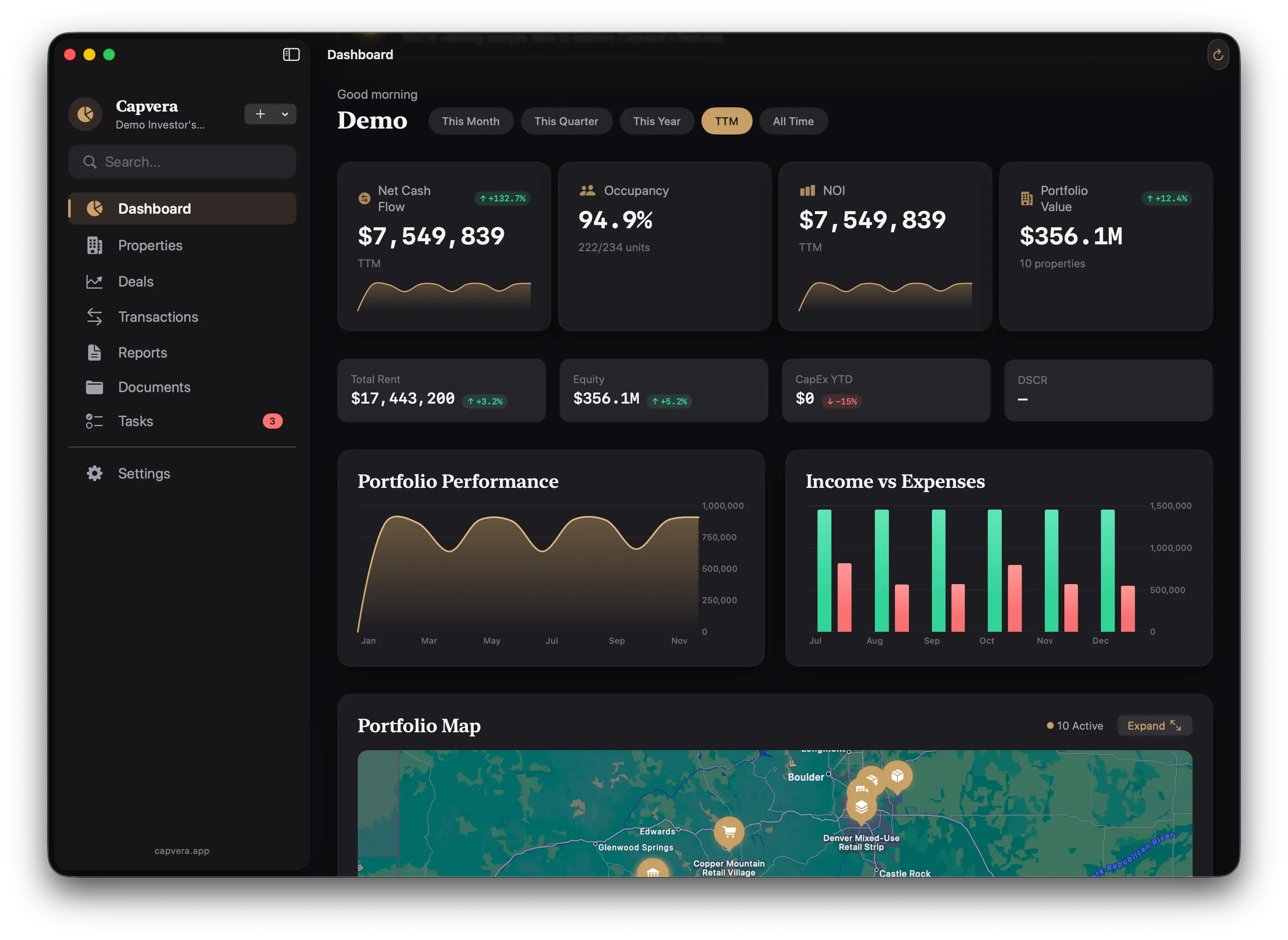
Portfolio Dashboard: Real-time KPIs across your entire portfolio—net cash flow, occupancy rates, NOI calculations, and equity tracking. Everything updates automatically as you record transactions.
Deal Analyzer: Underwrite acquisitions with multiple scenario comparison, sensitivity analysis on key assumptions, and all the metrics that matter (cap rate, cash-on-cash returns, DSCR).
Smart Tracking: Every transaction categorized and organized. Income, expenses, receipts—all linked to properties, units, and time periods.
Document Management: Drag-and-drop uploads with smart linking. Find any lease, insurance certificate, or repair receipt in seconds with full-text search.
Professional Reports: Generate beautiful PDFs and spreadsheets for partners, lenders, and tax preparation.
The Technical Stack
Building Capvera gave me a chance to work with Apple's latest frameworks. The entire app is written in Swift 6 using SwiftUI for the interface and SwiftData for persistence.
SwiftData: Modern Persistence Layer
One of the most interesting technical aspects is the data model. Real estate portfolio management involves complex relationships between entities:
@Model
class PropertyAsset {
    var name: String
    var address: String
    var propertyType: PropertyType
    var purchaseDate: Date?
    var purchasePrice: Decimal?

    @Relationship(deleteRule: .cascade)
    var spaces: [Space] = []

    @Relationship(deleteRule: .cascade)
    var documents: [Document] = []

    @Relationship(deleteRule: .cascade)
    var cashEvents: [CashEvent] = []

    var portfolio: Portfolio?
}
The data model includes:
- Properties with spaces (units), documents, and financial events
- Leases with charge schedules (rent, utilities, parking)
- Deals with multiple scenarios for acquisition analysis
- Cash events for income and expense tracking
- Loans with payment schedules and amortization
- Organizations and Parties for tenant and partner management
- Tasks and Milestones for deal tracking
SwiftData makes this feel natural with declarative relationships and automatic change tracking. The @Relationship macro handles cascading deletes, and queries become beautifully simple:
@Query(filter: #Predicate<PropertyAsset> { property in
    property.portfolio?.id == portfolioId
}, sort: \PropertyAsset.name)
var properties: [PropertyAsset]
Financial Calculations Service
Real estate investing requires precise financial calculations. Capvera includes a dedicated FinancialCalculationService that handles:
Property-Level Metrics:
- Gross Scheduled Income (GSI)
- Effective Gross Income (EGI)
- Net Operating Income (NOI)
- Cash Flow calculations
- Cap Rate computation
- Cash-on-Cash Return
- Internal Rate of Return (IRR)
Deal Analysis:
- Multiple scenario modeling
- Sensitivity analysis on key assumptions
- Debt Service Coverage Ratio (DSCR)
- Loan amortization schedules
- Return on Investment (ROI) projections
The service is structured to be testable and reusable across different views:
class FinancialCalculationService {
    static func calculateNOI(
        for property: PropertyAsset,
        in period: DateInterval
    ) -> Decimal {
        let income = calculateGrossIncome(property, period)
        let expenses = calculateOperatingExpenses(property, period)
        return income - expenses
    }

    static func calculateCapRate(
        noi: Decimal,
        propertyValue: Decimal
    ) -> Decimal {
        guard propertyValue > 0 else { return 0 }
        return (noi / propertyValue) * 100
    }
}
Document Intelligence with AI
One of the most ambitious features is document extraction powered by AI. The idea: drag in a lease PDF, and Capvera automatically extracts key information—tenant name, lease dates, rent amounts, security deposits.
The DocumentExtractionService uses a multi-step process:
- Text Extraction: Pull text from PDFs using
PDFTextExtractorServiceor Word documents usingWordTextExtractorService - AI Analysis: Send extracted text to an LLM with structured prompts requesting specific fields
- Entity Creation: Parse the AI response and create structured data (leases, tenants, charge schedules)
class DocumentExtractionService {
    func extractLeaseInformation(
        from document: Document,
        modelContext: ModelContext
    ) async throws -> LeaseExtractionResult {
        // Extract text from PDF/Word
        let text = try await extractText(from: document)

        // Send to AI with structured prompt
        let prompt = DocumentExtractionPrompts.leaseExtraction(text)
        let response = try await llmService.complete(prompt)

        // Parse and create entities
        return try parseLeaseData(response, modelContext: modelContext)
    }
}
The prompts are carefully crafted to request JSON responses with specific schemas, making parsing reliable:
struct DocumentExtractionPrompts {
    static func leaseExtraction(_ text: String) -> String {
        """
        You are analyzing a residential or commercial lease document.
        Extract the following information and return it as JSON:

        {
            "tenant_name": "string",
            "landlord_name": "string",
            "property_address": "string",
            "lease_start_date": "YYYY-MM-DD",
            "lease_end_date": "YYYY-MM-DD",
            "monthly_rent": number,
            "security_deposit": number,
            "unit_number": "string"
        }

        Document text:
        \(text)
        """
    }
}
Component Architecture
The UI is built from reusable components that maintain consistency across the app:
Data Display:
DataTable: Sortable, filterable tables for rent rolls and transaction listsMetricCard: KPI displays with trend indicatorsFinancialSummaryCard: Income, expense, and NOI summariesKPIPanel: Dashboard metrics with visual emphasis
Interactive Components:
DrillDownSheet: Hierarchical data explorationSearchBar: Full-text search across documents and propertiesPropertyCard: Property preview with key metricsRentRollTable: Tenant and lease information display
Maps and Visualization:
PortfolioMapView: Geographic distribution of propertiesAddressMapView: Individual property location with contextAddressAutocomplete: Smart address entry with validation
Document Handling:
PDFKitView: Native PDF viewing and annotationQuickLookPreviewView: System-level document previewExtractionProgressView: AI extraction status with progress
Each component is designed to be composable and reusable. For example, MetricCard can show any KPI with appropriate formatting:
struct MetricCard: View {
    let title: String
    let value: String
    let change: Decimal?
    let trend: Trend

    var body: some View {
        VStack(alignment: .leading, spacing: 8) {
            Text(title)
                .font(.caption)
                .foregroundStyle(.secondary)

            HStack(alignment: .firstTextBaseline) {
                Text(value)
                    .font(.title2.bold())

                if let change = change {
                    Label {
                        Text(formatPercent(change))
                    } icon: {
                        Image(systemName: trend.icon)
                    }
                    .foregroundStyle(trend.color)
                }
            }
        }
    }
}
CloudKit Sync (Designed, Not Implemented)
The architecture includes CloudKitSyncService designed to synchronize data across devices, but this isn't fully implemented yet. The structure is there for:
- Portfolio sharing between partners
- Automatic backup to iCloud
- Cross-device sync for iPad and Mac
- Conflict resolution for collaborative editing
Design Tokens and Theming
Capvera uses a design system with centralized tokens for colors, spacing, typography, and effects:
struct DesignTokens {
    // Spacing scale
    static let spacing1: CGFloat = 4
    static let spacing2: CGFloat = 8
    static let spacing3: CGFloat = 12
    static let spacing4: CGFloat = 16

    // Color semantics
    static let accentColor = Color.blue
    static let successColor = Color.green
    static let warningColor = Color.orange
    static let errorColor = Color.red

    // Typography scale
    static let headingFont = Font.system(.largeTitle, design: .rounded)
    static let bodyFont = Font.system(.body, design: .default)
}
This makes the app feel cohesive and makes theme changes trivial—adjust the tokens, and the entire app updates.
Building with AI: The Cursor Experience
Developing Capvera with Claude Opus 4.5 in Cursor was a revelation. I could describe complex requirements in natural language and get production-quality SwiftUI code:
"Create a drill-down sheet that shows properties → spaces → leases with inline editing" → Complete implementation with navigation, state management, and data binding.
"Add a financial summary card showing income, expenses, and NOI with trend indicators" → Beautifully styled component with proper number formatting and color coding.
"Implement document extraction for leases using AI with structured JSON responses" → Complete service with error handling, progress tracking, and entity creation.
The AI understood SwiftUI idioms, SwiftData relationships, and even macOS design patterns. It maintained architectural consistency across features and made sensible technology choices without me needing to specify every detail.
Areas Where AI Struggled
Not everything was smooth:
- Complex state management across multiple views sometimes required manual refinement
- Swift concurrency patterns occasionally needed correction (actors,
@MainActor, etc.) - Xcode project configuration and entitlements had to be manually verified
- Performance optimization required human insight about lazy loading and caching
But overall, the AI accelerated development by an order of magnitude compared to writing everything manually.
The iPad Experience
On iPad, Capvera really shines. The larger screen makes the dashboard KPIs readable at a glance. Drag-and-drop document uploads feel natural. The pencil-friendly interface works beautifully for annotating PDFs.
The multi-column layouts adapt to portrait and landscape orientations. The navigation uses SwiftUI's NavigationSplitView for a sidebar + detail arrangement that feels right at home on iPadOS.
But here's the problem: in the US, you can't distribute or sideload iPad apps without going through the App Store or enterprise distribution. For a side project that's not production-ready, that's a dealbreaker.
The macOS Demo Workaround
Since Capvera is built entirely in SwiftUI, it compiles for macOS with minimal changes. The Mac version isn't ideal—some iPad-specific interactions don't translate perfectly, and the UI was optimized for touch rather than mouse—but it gives a reasonable preview of what the app does.
That's why I've made a macOS demo available for download. It's not the intended platform, but it lets people see the interface, explore the features, and get a sense of the design aesthetic.
What Works on macOS:
- All views and navigation
- Data entry and editing
- Financial calculations
- Document management (drag-and-drop PDFs)
- Reports and exports
What Feels Different:
- Hover states instead of touch feedback
- Menu bar instead of iPad toolbars
- Window management instead of full-screen sheets
Current State: Not Production-Ready
Let me be clear: Capvera is not ready for production. It's missing:
- CloudKit sync implementation
- Comprehensive error handling
- Data import/export tools
- User onboarding flow
- Accessibility features
- Performance optimization for large portfolios
- Comprehensive testing
- Documentation
It's a technical prototype that demonstrates what's possible, not a finished product ready for the App Store.
What's Next?
I'm genuinely unsure about Capvera's future. A few possibilities:
- College Project: My son is interested in the concept and might adapt it for academic work
- Open Source: Release the code as a learning resource for SwiftUI + SwiftData
- Continue Development: Polish it to production quality and pursue App Store release
- Archive It: Accept it as a valuable learning experience and move on
For now, it exists as a beautiful experiment in modern iOS development with AI assistance.
Technical Highlights Worth Noting
Soft Deletion Pattern
Capvera implements a SoftDeletable protocol for entities that shouldn't be permanently deleted immediately:
protocol SoftDeletable {
    var isDeleted: Bool { get set }
    var deletedAt: Date? { get set }
}

extension SoftDeletable {
    mutating func softDelete() {
        isDeleted = true
        deletedAt = Date()
    }

    mutating func restore() {
        isDeleted = false
        deletedAt = nil
    }
}
This allows "undo" functionality and prevents accidental data loss.
Schema Versioning
The app includes SchemaVersions to manage SwiftData migrations as the model evolves:
enum CapveraSchemaV1: VersionedSchema {
    static var versionIdentifier = Schema.Version(1, 0, 0)

    static var models: [any PersistentModel.Type] {
        [PropertyAsset.self, Portfolio.self, Deal.self, /* ... */]
    }
}
This makes future schema changes safer and more predictable.
Extension Organization
The codebase uses extensions thoughtfully:
Date+Extensions: Fiscal quarter calculations, period generationDecimal+Extensions: Currency formatting, percentage displayView+Accessibility: Consistent accessibility labels and hintsModelContext+SafeSave: Error handling for save operations
Form Field Component
Data entry uses a reusable FormField component that handles labels, validation, and styling:
struct FormField<Content: View>: View {
    let label: String
    let required: Bool
    @ViewBuilder let content: () -> Content

    var body: some View {
        VStack(alignment: .leading, spacing: 4) {
            HStack {
                Text(label)
                    .font(.subheadline.weight(.medium))
                if required {
                    Text("*").foregroundStyle(.red)
                }
            }
            content()
        }
    }
}
Design Aesthetic
The visual design was something I'm particularly pleased with. Clean, professional, with just enough visual interest to feel modern without being distracting.
The color scheme uses:
- Blue accents for primary actions and emphasis
- Green for positive metrics (income, gains)
- Red for negative values (expenses, losses)
- Gray scale for backgrounds and secondary content
- Semantic colors for status indicators (warning, error, success)
Typography is clean and hierarchical. Spacing is consistent. Cards have subtle shadows and borders. The whole thing feels like it belongs on an iPad Pro.
Lessons Learned
Building Capvera taught me several things:
- SwiftData is powerful: The declarative syntax makes complex relationships feel simple
- AI accelerates development: Claude in Cursor made me 10x more productive
- iPad constraints are real: Sideloading limitations affect development workflow
- Financial modeling is complex: Real estate investment calculations have edge cases
- Component architecture matters: Reusable components save time and ensure consistency
- Design systems scale: Central design tokens make polish achievable
- SwiftUI is mature: Building professional apps is very feasible now
Try the Demo
If you're curious about what a SwiftUI real estate portfolio management app looks like, download the macOS demo. It's not perfect, but it gives you a sense of the interface and capabilities.
Or visit capvera.surge.sh to see the marketing site and learn more about the intended feature set.
Reflections
Whether Capvera becomes a real product or remains a prototype, the development journey was valuable. It pushed my SwiftUI skills forward, demonstrated the power of AI-assisted development, and resulted in something genuinely polished (even if incomplete).
Sometimes you build apps to solve problems. Sometimes you build them to learn. Capvera was definitely the latter—and I'm pleased with how it turned out.
Daniel Wanja is a developer and founder of Nouvelles Solutions, Inc. When not building experimental iPad apps, he's usually exploring the intersection of AI and software development.