DocIQ: From Real Estate Documents to Universal Document Intelligence with SwiftUI and AI
A technical deep dive into building DocIQ, a macOS document intelligence engine that extracts structured data from PDFs across multiple industries—evolved from Capvera and built entirely with Claude Opus 4.5
What happens when you build a feature so useful that it deserves to become its own product? That's the story of DocIQ—a document intelligence engine that started as the extraction layer inside Capvera and evolved into a standalone application for processing documents across healthcare, legal, finance, and a dozen other industries.
The extraction capabilities in Capvera were designed specifically for real estate documents—leases, purchase agreements, insurance certificates. But the underlying architecture was general enough to handle any structured document. So I extracted it, generalized it, and built DocIQ: a macOS application that turns unstructured PDFs and Word documents into structured, searchable, actionable data.
Everything was built with Claude Opus 4.5 in the Cursor IDE. The entire codebase—from the Swift Package to the dashboard analytics—generated through AI-assisted development.
Quick Links
- Demo Download: DocIQ 1.0 (DMG) (macOS, 4.3 MB)
The Vision: Universal Document Intelligence
Every industry drowns in documents. Healthcare practices process insurance forms, patient intake documents, and medical records. Law firms handle contracts, court filings, and discovery materials. Accounting teams wade through invoices, receipts, and tax forms. Real estate investors manage leases, closing documents, and inspection reports.
The problem is the same everywhere: extracting structured data from unstructured documents is tedious, error-prone, and expensive.
DocIQ solves this by combining:
- AI-powered classification to automatically identify document types
- Industry-specific extraction that knows what fields matter for each document
- Structured output that integrates with your existing workflows
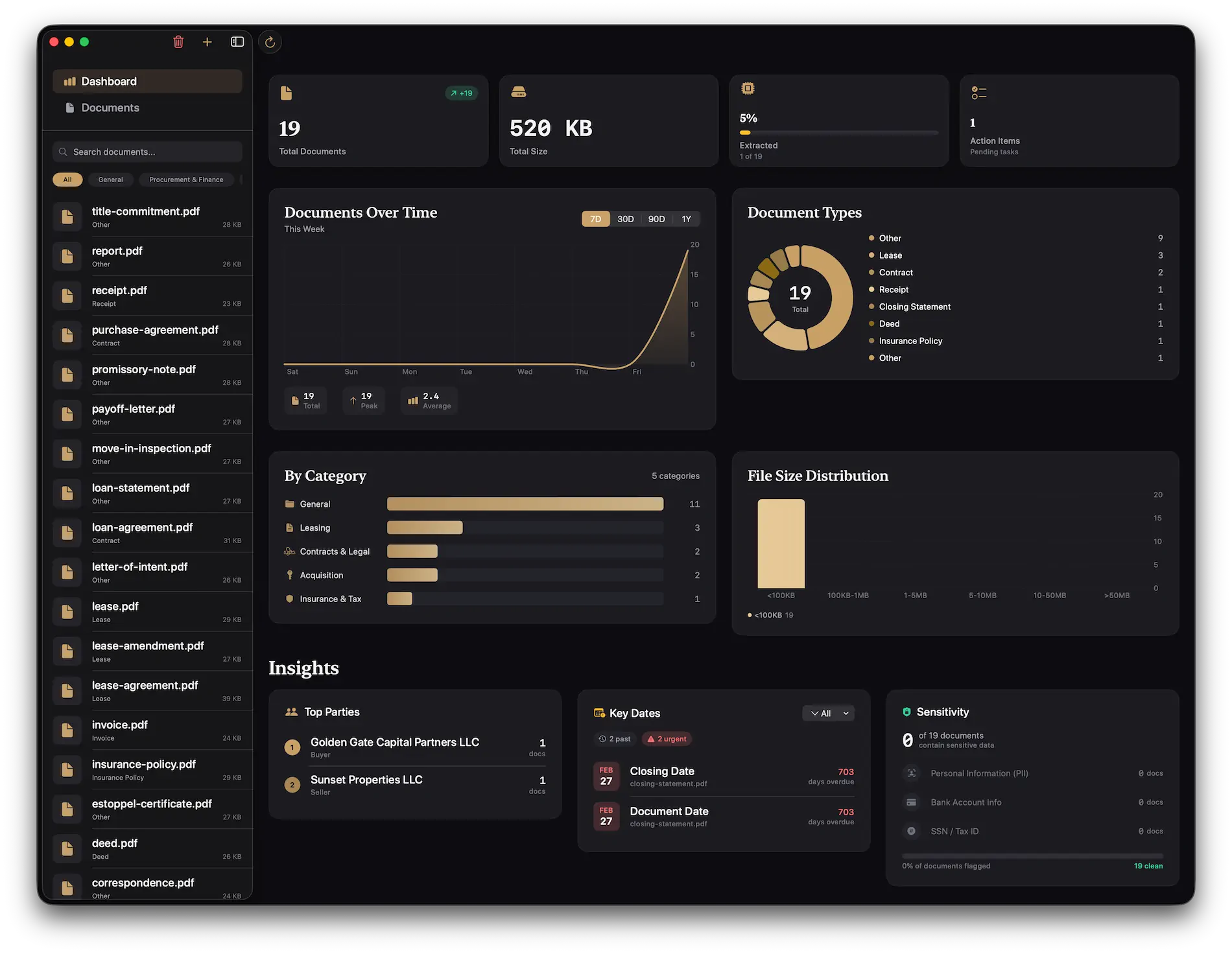
- Dashboard analytics to understand your document portfolio at a glance
Key Features
Smart Classification: Drop a document, and DocIQ identifies whether it's an invoice, contract, medical form, or one of 200+ other document types—automatically routing it to the appropriate extraction pipeline.
Industry-Aware Extraction: A healthcare intake form needs different fields than a commercial lease. DocIQ understands these distinctions and extracts the right information for each context.
Live Extraction Feed: Watch as AI processes your documents in real-time, extracting entities, dates, amounts, and relationships as they're discovered.
Analytics Dashboard: Visualize your document portfolio with charts showing document types, processing timelines, category distributions, and file size patterns.
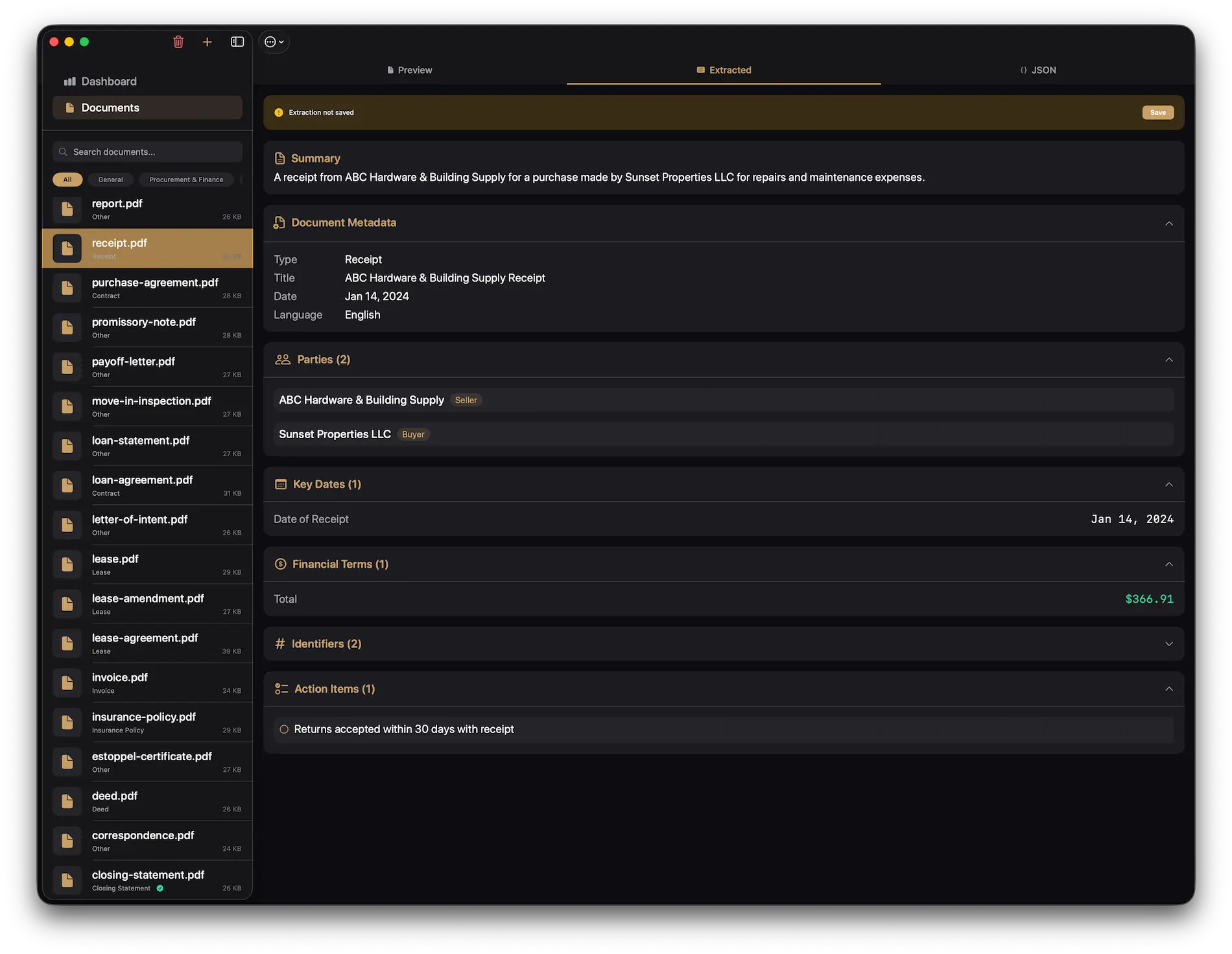
Structured Views: Extracted data is presented in organized, hierarchical views—not just raw JSON, but meaningful cards showing parties, dates, amounts, and key terms.
Supported Industries
DocIQ ships with extraction templates for 15 industries, each with document types and field definitions tailored to real-world workflows:
| Industry | Example Documents | Key Extracted Fields |
|---|---|---|
| Healthcare | Patient intake, insurance claims, medical records | Patient info, diagnosis codes, provider details, dates of service |
| Legal | Contracts, court filings, discovery documents | Parties, effective dates, terms, obligations, case numbers |
| Finance | Invoices, bank statements, loan documents | Amounts, account numbers, transaction dates, payment terms |
| Real Estate | Leases, purchase agreements, inspection reports | Property address, rent amounts, lease terms, parties |
| Insurance | Policies, claims, certificates of insurance | Coverage amounts, policy numbers, effective dates, named insureds |
| Accounting | Receipts, expense reports, tax forms | Vendor, amount, date, category, tax ID |
| Human Resources | Employment contracts, W-4s, I-9s | Employee info, compensation, start dates, tax withholding |
| Construction | Contracts, change orders, lien waivers | Project details, amounts, parties, completion dates |
| Manufacturing | Purchase orders, invoices, quality reports | Part numbers, quantities, specifications, vendors |
| Retail | Receipts, purchase orders, vendor agreements | Items, prices, quantities, payment terms |
| Education | Transcripts, enrollment forms, financial aid | Student info, courses, grades, award amounts |
| Government | Permits, licenses, regulatory filings | License numbers, expiration dates, compliance requirements |
| Transportation | Bills of lading, shipping manifests, customs forms | Origin, destination, cargo details, carrier info |
| Energy | Utility bills, service agreements, compliance docs | Usage, rates, service periods, account details |
| Non-Profit | Grant applications, donation receipts, 990 forms | Donor info, amounts, program details, tax status |
Each industry template was designed by analyzing real documents and identifying the fields that matter most for operational workflows.
Document Types
Beyond industry categorization, DocIQ recognizes 200+ document types with specialized extraction logic, organized into 25 categories:
enum DocumentType: String, CaseIterable, Codable {

    // MARK: - General / Cross-Industry
    case receipt = "Receipt"
    case invoice = "Invoice"
    case photo = "Photo"
    case report = "Report"
    case correspondence = "Correspondence"

    // MARK: - Procurement & Finance
    case purchaseOrder = "Purchase Order"
    case quote = "Quote / Estimate"
    case creditMemo = "Credit Memo"
    case accountStatement = "Account Statement"
    case bankStatement = "Bank Statement"
    case expenseReport = "Expense Report"

    // MARK: - Contracts & Legal
    case nda = "NDA / Confidentiality Agreement"
    case msa = "Master Service Agreement"
    case sow = "Statement of Work"
    case contract = "Contract"

    // MARK: - Logistics & Shipping
    case billOfLading = "Bill of Lading"
    case packingList = "Packing List"
    case proofOfDelivery = "Proof of Delivery"
    case customsDocument = "Customs Document"

    // MARK: - Real Estate
    case purchaseAgreement = "Purchase Agreement"
    case deed = "Deed"
    case titleCommitment = "Title Commitment"
    case lease = "Lease"
    case leaseAmendment = "Lease Amendment"
    case estoppel = "Estoppel Certificate"
    case rentRoll = "Rent Roll"

    // MARK: - Financing
    case loanAgreement = "Loan Agreement"
    case promissoryNote = "Promissory Note"
    case mortgageDeed = "Mortgage/Deed of Trust"
    case payoffLetter = "Payoff Letter"

    // MARK: - Insurance & Tax
    case insurancePolicy = "Insurance Policy"
    case insuranceClaim = "Insurance Claim"
    case taxBill = "Tax Bill"
    case taxReturn = "Tax Return"
    case appraisal = "Appraisal"

    // MARK: - Healthcare
    case patientIntake = "Patient Intake"
    case clinicalNote = "Clinical Note"
    case labResult = "Lab Result"
    case prescription = "Prescription"
    case eob = "Explanation of Benefits"
    case dischargeSummary = "Discharge Summary"

    // MARK: - Construction
    case permit = "Permit"
    case certificateOfOccupancy = "Certificate of Occupancy"
    case changeOrder = "Change Order"
    case lienWaiver = "Lien Waiver"
    case punchList = "Punch List"

    // ... and 150+ more across Manufacturing, Government,
    // Education, Legal Services, Technology, Agriculture,
    // Oil & Gas, Transportation, Hospitality, Nonprofit,
    // Retail, and Pharmaceutical industries
}
Document Type Categories
The full taxonomy spans 25 categories:
| Category | Document Count | Examples |
|---|---|---|
| General / Cross-Industry | 6 | Receipt, Invoice, Report, Correspondence |
| Procurement & Finance | 7 | Purchase Order, Quote, Credit Memo, Bank Statement |
| Contracts & Legal | 5 | NDA, Master Service Agreement, Statement of Work |
| Operations & Compliance | 5 | Work Order, Audit Report, Incident Report, Safety Data Sheet |
| Logistics & Shipping | 4 | Bill of Lading, Packing List, Proof of Delivery |
| Identity & KYC | 3 | Driver's License, Passport, Government ID |
| Real Estate | 14 | Purchase Agreement, Deed, Lease, Rent Roll, Estoppel |
| Financing | 7 | Loan Agreement, Promissory Note, Mortgage, Payoff Letter |
| Insurance & Tax | 7 | Insurance Policy, Claims, Tax Bill, Tax Return, Appraisal |
| Entity / Corporate | 5 | Operating Agreement, Articles of Organization, Board Minutes |
| Property & Construction | 14 | Survey, Permit, Change Order, Lien Waiver, Punch List |
| Healthcare | 7 | Patient Intake, Clinical Note, Lab Result, Prescription |
| Manufacturing & Quality | 7 | Bill of Materials, Batch Record, Certificate of Conformance |
| Government & Grants | 5 | RFP, Government Contract, Grant Agreement |
| Education | 5 | Enrollment Agreement, Transcript, Financial Aid Letter |
| Legal Services | 5 | Engagement Letter, Pleading, Court Order, Discovery |
| Technology & SaaS | 5 | SaaS Agreement, DPA, SLA, SOC Report |
| Agriculture | 6 | Farm Lease, Crop Plan, Grain Ticket, Organic Certification |
| Oil & Gas | 6 | Oil & Gas Lease, Division Order, AFE, Run Ticket, Well Log |
| Transportation | 5 | Rate Confirmation, Driver Log, Freight Invoice, DOT Inspection |
| Hospitality | 5 | Reservation, Folio, Banquet Event Order, Liquor License |
| Nonprofit | 3 | Donation Receipt, Program Report, 990 Filing |
| Retail & eCommerce | 5 | Supplier Agreement, Product Catalog, RMA, Inventory Report |
| Pharmaceutical | 4 | Clinical Trial Protocol, Informed Consent, IRB Approval |
The classification service uses AI to analyze document content and structure, returning both the detected type and a confidence score:
struct ClassificationResult {
    let documentType: DocumentType
    let confidence: Double
    let suggestedIndustry: Industry
    let extractedTitle: String?
}
The Technical Architecture
DocIQ is built as two components: DocIQKit (a Swift Package containing the extraction engine) and the DocIQ app (a SwiftUI macOS application with dashboard and document management).
DocIQKit: The Extraction Engine
The Swift Package provides a clean API for document processing:
import DocIQKit

// Classify a document
let classifier = DocumentClassificationService()
let classification = try await classifier.classify(document: pdfURL)

// Extract structured data
let extractor = DocumentExtractionService()
let extractedInfo = try await extractor.extract(
    from: pdfURL,
    documentType: classification.documentType,
    industry: classification.suggestedIndustry
)

// Access structured fields
print(extractedInfo.parties)      // ["Acme Corp", "John Smith"]
print(extractedInfo.dates)        // [Date: "Effective Date", Date: "Expiration"]
print(extractedInfo.amounts)      // [Decimal: "Total", Decimal: "Deposit"]
print(extractedInfo.keyTerms)     // ["30-day notice", "auto-renewal"]
Document Classification Service
The classification pipeline analyzes document structure and content to determine type:
class DocumentClassificationService {
    private let llmService: LLMService
    private let pdfExtractor: PDFTextExtractorService
    private let wordExtractor: WordTextExtractorService

    func classify(document url: URL) async throws -> ClassificationResult {
        // Extract text based on file type
        let text = try await extractText(from: url)

        // Build classification prompt
        let prompt = ClassificationPromptBuilder.build(
            documentText: text.prefix(4000),
            availableTypes: DocumentType.allCases,
            availableIndustries: Industry.allCases
        )

        // Get AI classification
        let response = try await llmService.complete(prompt)

        // Parse structured response
        return try parseClassificationResponse(response)
    }

    private func extractText(from url: URL) async throws -> String {
        switch url.pathExtension.lowercased() {
        case "pdf":
            return try await pdfExtractor.extractText(from: url)
        case "docx", "doc":
            return try await wordExtractor.extractText(from: url)
        default:
            throw ExtractionError.unsupportedFormat
        }
    }
}
Extraction Prompt Builder
The key to reliable extraction is well-crafted prompts. The ExtractionPromptBuilder generates industry and document-type specific prompts:
class ExtractionPromptBuilder {
    static func build(
        documentText: String,
        documentType: DocumentType,
        industry: Industry
    ) -> String {
        let schema = schemaFor(documentType: documentType, industry: industry)

        return """
        You are a document analysis expert specializing in \(industry.displayName) documents.

        Analyze the following \(documentType.displayName) and extract structured information.

        Return your response as valid JSON matching this schema:
        \(schema)

        Guidelines:
        - Extract exact values as they appear in the document
        - Use ISO 8601 format for dates (YYYY-MM-DD)
        - Use numeric values without currency symbols for amounts
        - Include confidence scores (0.0-1.0) for uncertain extractions
        - Mark fields as null if not found in the document

        Document text:
        ---
        \(documentText)
        ---

        Extracted JSON:
        """
    }

    private static func schemaFor(
        documentType: DocumentType,
        industry: Industry
    ) -> String {
        // Return JSON schema based on document type
        switch documentType {
        case .invoice:
            return invoiceSchema
        case .lease:
            return leaseSchema
        case .medicalRecord:
            return medicalRecordSchema
        // ... schemas for each document type
        default:
            return genericDocumentSchema
        }
    }
}
Extracted Document Info Model
All extractions conform to a unified model that captures common patterns across document types:
struct ExtractedDocumentInfo: Codable {
    // Core identification
    let documentType: DocumentType
    let documentTitle: String?
    let documentDate: Date?

    // Parties and entities
    let parties: [ExtractedParty]
    let organizations: [String]

    // Temporal data
    let dates: [ExtractedDate]
    let effectiveDate: Date?
    let expirationDate: Date?

    // Financial data
    let amounts: [ExtractedAmount]
    let totalAmount: Decimal?
    let currency: String?

    // Content analysis
    let keyTerms: [String]
    let obligations: [String]
    let summaryText: String?

    // Metadata
    let extractionConfidence: Double
    let processingTime: TimeInterval
    let warnings: [String]
}

struct ExtractedParty: Codable {
    let name: String
    let role: String?  // "Landlord", "Tenant", "Vendor", etc.
    let address: String?
    let email: String?
    let phone: String?
}

struct ExtractedDate: Codable {
    let date: Date
    let label: String  // "Effective Date", "Due Date", etc.
    let confidence: Double
}

struct ExtractedAmount: Codable {
    let value: Decimal
    let label: String  // "Monthly Rent", "Total Due", etc.
    let currency: String?
    let confidence: Double
}
The Dashboard Experience
The DocIQ app wraps the extraction engine in a polished macOS interface with analytics and document management.
Analytics Charts
The dashboard provides visual insights into your document portfolio:
Document Types Pie Chart: See the distribution of document types at a glance—how many invoices vs. contracts vs. medical records.
struct DocumentTypesPieChart: View {
    let data: [DocumentTypeCount]

    var body: some View {
        Chart(data) { item in
            SectorMark(
                angle: .value("Count", item.count),
                innerRadius: .ratio(0.5),
                angularInset: 1
            )
            .foregroundStyle(by: .value("Type", item.type.displayName))
            .cornerRadius(4)
        }
        .chartLegend(position: .bottom, spacing: 20)
    }
}
Category Bar Chart: Compare document volumes across categories or time periods.
Document Timeline Chart: Visualize when documents were created, signed, or expire—critical for compliance tracking.
File Size Histogram: Understand the distribution of document sizes in your portfolio.
Insight Cards
Beyond charts, the dashboard surfaces actionable insights:
Upcoming Dates Card: Documents with approaching deadlines—lease expirations, contract renewals, compliance due dates.
struct UpcomingDatesCard: View {
    let upcomingDates: [UpcomingDate]

    var body: some View {
        VStack(alignment: .leading, spacing: 12) {
            Label("Upcoming Dates", systemImage: "calendar.badge.exclamationmark")
                .font(.headline)

            ForEach(upcomingDates.prefix(5)) { item in
                HStack {
                    VStack(alignment: .leading) {
                        Text(item.documentTitle)
                            .font(.subheadline.weight(.medium))
                        Text(item.dateLabel)
                            .font(.caption)
                            .foregroundStyle(.secondary)
                    }

                    Spacer()

                    Text(item.date, style: .date)
                        .font(.caption.weight(.semibold))
                        .foregroundStyle(item.isUrgent ? .red : .primary)
                }
            }
        }
        .padding()
        .background(.regularMaterial, in: RoundedRectangle(cornerRadius: 12))
    }
}
Parties Insight Card: Most frequent parties across your documents—vendors, clients, counterparties.
Sensitivity Summary Card: Documents flagged as containing sensitive information (SSNs, financial data, medical records).
Document List and Detail Views
The document management interface provides:
- Sortable, filterable document list with search across all extracted fields
- Quick Look preview for viewing original documents
- Structured extraction view showing all extracted data in organized cards
- Export capabilities for extracted data (JSON, CSV)
The Live Extraction Feed
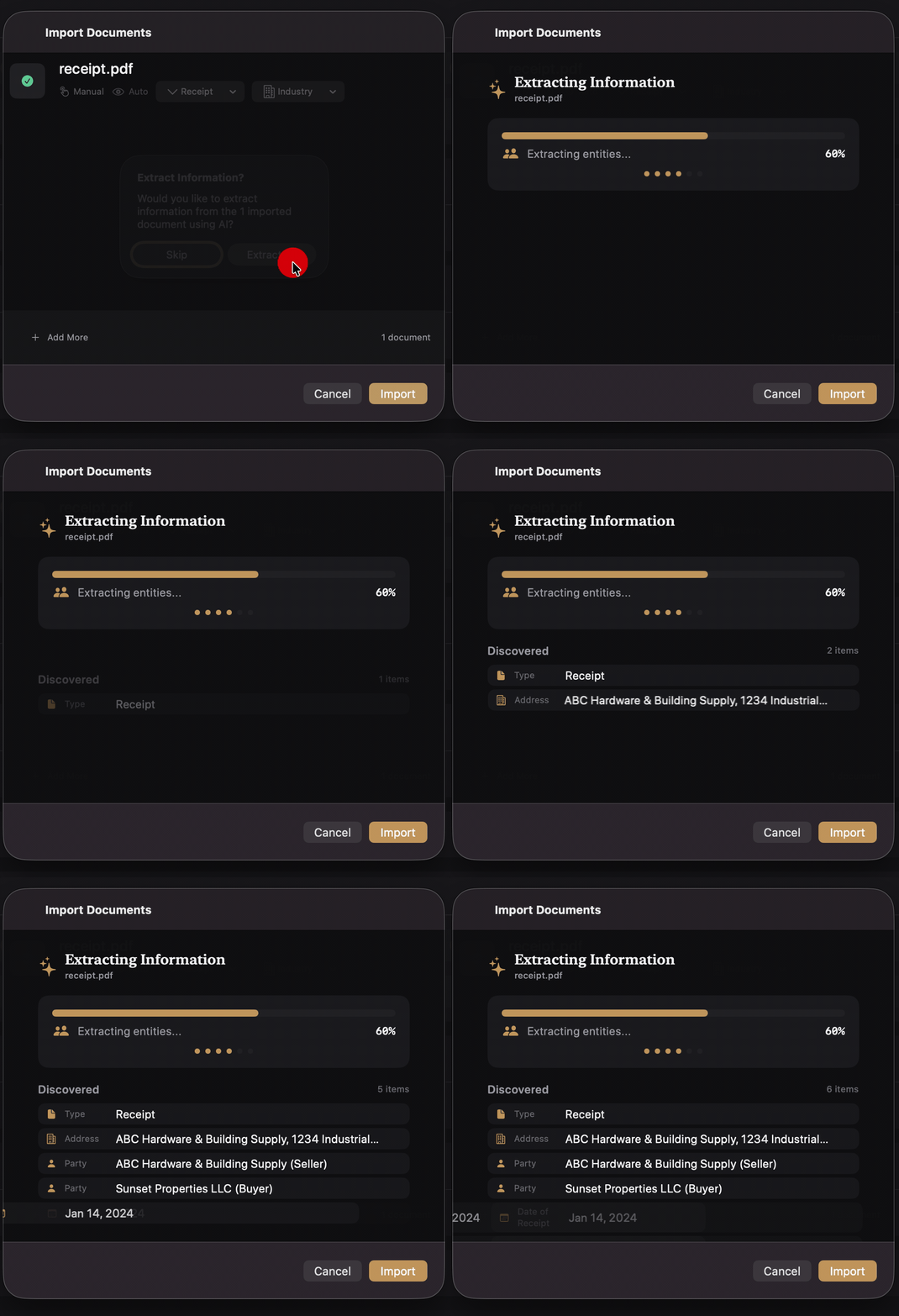
One of my favorite features is the LiveExtractionFeed—a real-time view that shows extraction progress as it happens:
struct LiveExtractionFeed: View {
    @ObservedObject var extractionService: DocumentExtractionService

    var body: some View {
        ScrollView {
            LazyVStack(alignment: .leading, spacing: 8) {
                ForEach(extractionService.extractionEvents) { event in
                    ExtractionEventRow(event: event)
                }
            }
        }
    }
}

struct ExtractionEventRow: View {
    let event: ExtractionEvent

    var body: some View {
        HStack(spacing: 12) {
            Image(systemName: event.icon)
                .foregroundStyle(event.color)

            VStack(alignment: .leading) {
                Text(event.message)
                    .font(.subheadline)

                if let detail = event.detail {
                    Text(detail)
                        .font(.caption)
                        .foregroundStyle(.secondary)
                }
            }

            Spacer()

            Text(event.timestamp, style: .time)
                .font(.caption2)
                .foregroundStyle(.tertiary)
        }
        .padding(.horizontal)
    }
}
As the AI processes a document, you see events like:
- 📄 "Extracting text from document..."
- 🔍 "Classifying document type..."
- ✅ "Identified as: Commercial Lease"
- 👥 "Found 2 parties: Acme Corp, Smith Holdings"
- 📅 "Extracted 4 dates"
- 💰 "Extracted 3 amounts"
- ✨ "Extraction complete (confidence: 0.94)"
It's satisfying to watch—and useful for understanding what the AI is doing.
Building with Claude Opus 4.5
The entire DocIQ codebase was generated with Claude Opus 4.5 in Cursor. The extraction from Capvera and generalization to multiple industries was a fascinating exercise in AI-assisted refactoring.
The Extraction Process
I started with Capvera's document extraction code, which was tightly coupled to real estate concepts. Rather than adding industries one at a time, I took a two-step approach:
Step 1: Generate the Industry Taxonomy
Me: "I want to extract the document extraction capabilities from Capvera into a standalone Swift Package that can handle documents from any industry, not just real estate. First, generate a comprehensive list of industries that would benefit from document extraction."
Claude: Generated a taxonomy of 15+ industries—Healthcare, Legal, Finance, Insurance, Manufacturing, Government, Education, Transportation, Agriculture, Oil & Gas, Hospitality, Retail, Pharmaceutical, Construction, and Nonprofit—each with descriptions of their document processing needs.
Step 2: Generate Attributes and Prompts for Each Industry
Me: "Now for each industry, generate the document types they commonly process, the key fields that need to be extracted, and the AI prompts that would reliably extract that information."
Claude: Produced the complete Industry enum, the 200+ DocumentType cases organized by category, extraction schemas for each document type, and the prompt templates in ExtractionPromptBuilder. All in a single comprehensive generation.
This two-step approach was remarkably efficient. Instead of iterating industry-by-industry, Claude understood the pattern after seeing the real estate extraction code and could generalize it across all domains simultaneously.
What the AI Got Right
- Architectural decisions: Clean separation between the Swift Package (engine) and the app (UI)
- Protocol design: Abstractions that made adding new document types trivial
- SwiftUI patterns: Modern, idiomatic views with proper state management
- Prompt engineering: Effective prompts that produce reliable JSON extraction
- Error handling: Graceful degradation when extraction confidence is low
What Required Human Guidance
- Domain expertise: Knowing which fields actually matter for each industry
- Edge cases: Handling multi-page documents, scanned PDFs, handwritten annotations
- UX polish: Deciding what information to surface vs. hide in the interface
- Performance tuning: Optimizing for large document batches
The Real Work Ahead
Here's the honest truth: generating 200+ document types and 15 industries was the easy part. Claude produced comprehensive extraction schemas in hours. But this is a beta—a starting point, not a finished product.
The bulk of the work for a production-ready document intelligence application isn't the code. It's validating and refining each extraction template against real-world documents:
- Do the extracted fields match what practitioners actually need?
- Are the prompts reliable across different document formats and layouts?
- What edge cases break the extraction logic?
- Which industries need more granular document type distinctions?
- What compliance or regulatory requirements affect how data should be extracted?
Each industry has its own quirks. A healthcare EOB from Blue Cross looks different than one from Aetna. A commercial lease in Texas has different standard clauses than one in New York. An oil & gas division order varies by basin and operator.
AI can generate the scaffolding, but domain experts need to validate the details. That's the roadmap for DocIQ: systematically working through each industry with practitioners who process these documents daily, refining the extraction schemas until they're production-grade.
Design System
DocIQ uses a centralized design token system for consistency:
struct DesignTokens {
    // Spacing
    static let spacing4: CGFloat = 4
    static let spacing8: CGFloat = 8
    static let spacing12: CGFloat = 12
    static let spacing16: CGFloat = 16
    static let spacing24: CGFloat = 24

    // Colors
    static let primaryAccent = Color.blue
    static let successColor = Color.green
    static let warningColor = Color.orange
    static let errorColor = Color.red

    // Card styling
    static let cardCornerRadius: CGFloat = 12
    static let cardShadowRadius: CGFloat = 4

    // Typography
    static let headingFont = Font.system(.title2, design: .rounded, weight: .semibold)
    static let bodyFont = Font.system(.body)
    static let captionFont = Font.system(.caption)
}
This makes theming changes trivial and ensures visual consistency across all views.
Current State
DocIQ is functional and useful, but there's room for improvement:
What Works Well:
- PDF and Word document text extraction
- AI-powered classification with high accuracy
- Structured data extraction for common document types
- Dashboard analytics and visualization
- Document management and search
Future Enhancements:
- OCR for scanned documents (currently requires text-based PDFs)
- Batch processing with progress tracking
- Export to spreadsheet and database formats
- Custom extraction templates for organization-specific documents
- Integration with cloud storage (iCloud, Dropbox, Google Drive)
The Journey from Capvera
Building DocIQ reinforced something I've learned repeatedly: general solutions often emerge from specific ones. Capvera's document extraction was built for real estate, but the patterns—text extraction, AI analysis, structured output—apply everywhere.
The refactoring process was surprisingly smooth with AI assistance. Claude understood the architectural goal and helped identify the abstractions needed to generalize the code. What might have taken weeks of manual refactoring happened in hours of conversation.
Try It Yourself
Download the macOS demo and try processing some documents. The classification is surprisingly accurate, and the extraction captures the fields that actually matter for each document type.
Whether you're processing invoices for accounting, contracts for legal review, or medical forms for healthcare administration, DocIQ turns unstructured documents into structured, actionable data.
Extract structured data from PDFs across 15 industries. AI-powered classification and extraction for invoices, contracts, medical forms, and 200+ document types.
⬇️ Download (4.5 MB)
Free download • Requires macOS 26+
Daniel Wanja is a developer and founder of Nouvelles Solutions, Inc. He builds macOS and iOS applications with AI assistance, exploring the intersection of document intelligence and modern Swift development.