Spaceship Dashboard: A Starship Console for Your Mac That Now Lives on Your Apple TV
How a Star Trek–inspired SwiftUI dashboard grew from a Mac window into a wall console: a Core Animation render path that idles at zero CPU, a native tvOS receiver synced over Bonjour instead of a laggy video stream, fit-to-screen scaling, a holographic HUD theme, and three new telemetry categories for developers — git, containers, ports, latency, weather.
I have a TV on the wall of my office that spends most of its life turned off. I also have a weakness for the control surfaces of 1990s starship bridges — the warm black panels, the pill-shaped rails, the telemetry that is always scrolling for reasons nobody explains. At some point those two facts collided, and the result is Spaceship Dashboard: a SwiftUI app that shows real telemetry from my Mac in a cinematic console, and, as of this week, casts it to the Apple TV where it belongs.
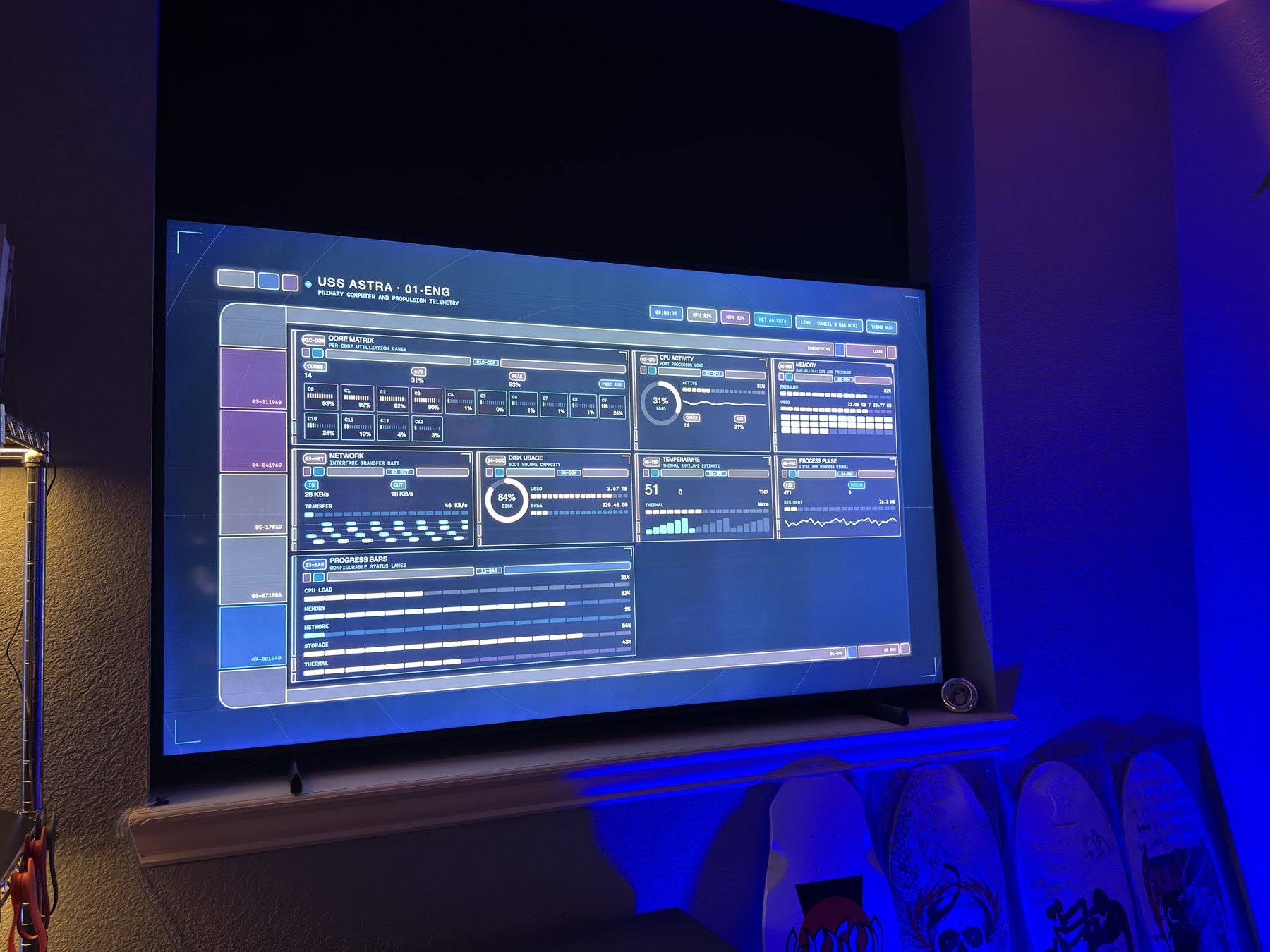
This post is about the three phases that got it there: making a continuously animating dashboard cost nothing, getting it onto a TV without a five-second delay, and then turning it from a toy into something a developer actually looks at during the day.
Quick Links
- Source: github.com/danielwanja/star-trek-inspired-swift-dashboard — open source, MIT licensed
- Stack: Swift 6, SwiftUI, Core Animation, Network framework (Bonjour), SwiftPM. One shared library, a macOS executable, a tvOS app. ~9,800 lines of Swift, no dependencies.
- Widgets: 43 across eight groups — documented with screenshots in docs/TELEMETRY.md
- Built with: Claude Fable 5.1, in Claude Code and Cowork
An Original Design Language, On Purpose
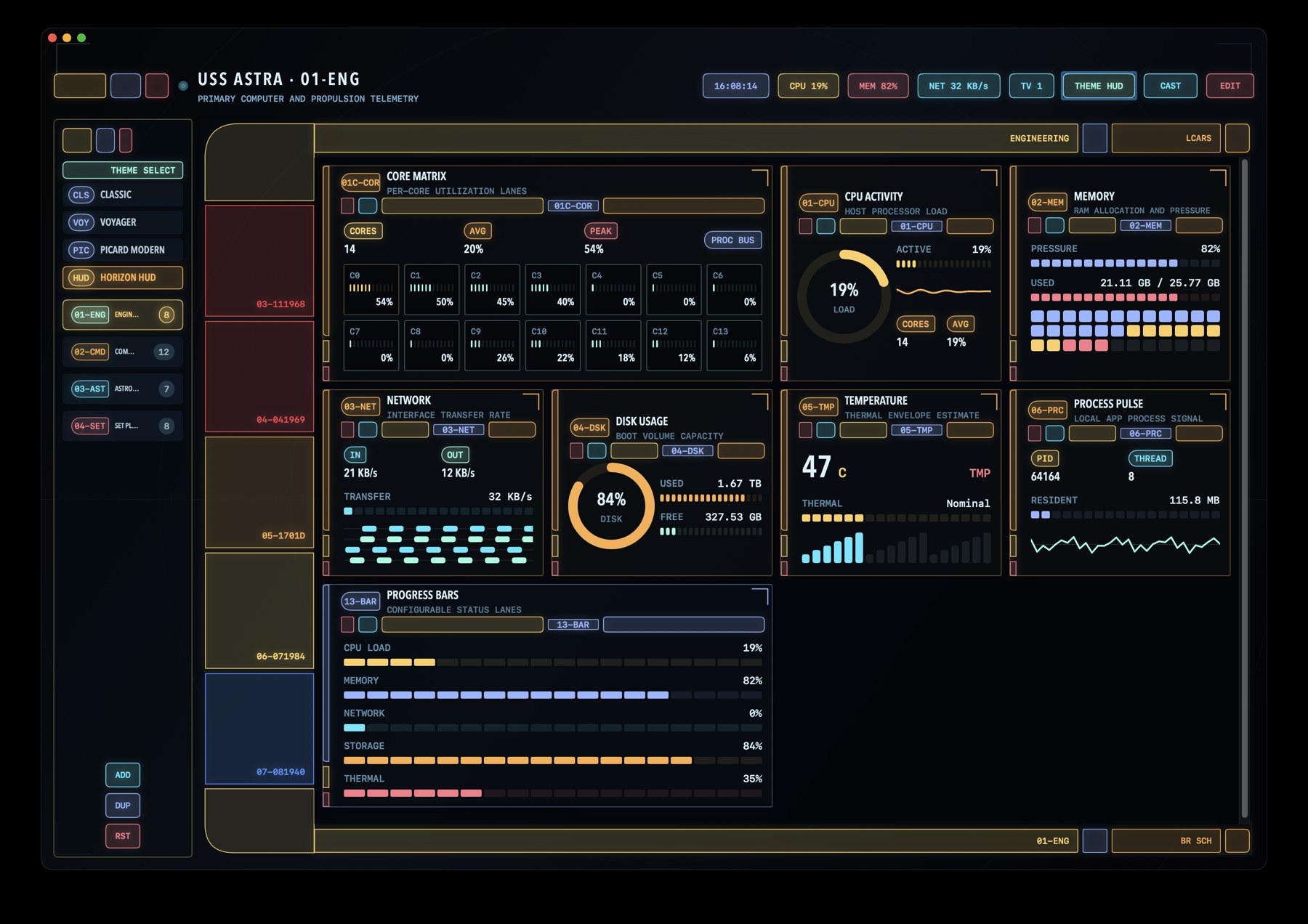
The look is what I call the Astra Console Interface: black as the primary surface, thick modular chrome, asymmetric elbows, compressed uppercase labels, dark channels between bars that read as grid lines. It is unashamedly inspired by the LCARS era, and just as deliberately not a copy of it — the repository carries a style guide with a legal boundary section, and the research images in it are references only; the app never loads or traces them. Every shape is SwiftUI geometry with theme tokens.
Themes are data, not code. A theme is a palette, a set of metrics (rail thickness, corner radii, gaps), typography and — since this phase — a chrome style:
/// How colored chrome is rendered.
enum AstraChromeStyle: Sendable, Equatable {
    /// LCARS-era: solid colored bars with black labels.
    case solid
    /// Holographic: thin luminous outlines over a faint tint, labels in the
    /// accent color, optional glow.
    case hairline
}
Components never fill a role color directly anymore. They ask the theme:
Text(title)
    .foregroundStyle(theme.chromeText(color))          // black on solid, accent on hairline
    .astraChrome(color, in: AstraPartialRoundedRectangle(
        leadingRadius: theme.metrics.terminalRadius, trailingRadius: 6))
That one indirection is what made the fourth theme, Horizon HUD, a data change rather than a rewrite: ice-cyan hairline outlines with a soft glow, labels in the accent color, small radii, a reticle backdrop (dot lattice, range rings, a graduated horizon line, corner brackets) instead of the grid texture, a condensed geometric display face. The three warm themes — Classic, Voyager, Picard Modern — render exactly as before, because their chrome style is solid.
Animating Forever at Zero Cost
A dashboard like this has a sweep rotating, dashes flowing along power conduits, a scan band drifting across every deck, a live dot breathing in the header, waveforms, a boot flash on every switch. The obvious SwiftUI implementation — a TimelineView(.animation) per widget — pegs a core and makes the fans audible. The rules that keep this one idle are worth spelling out, because they are the reason the Apple TV port was even thinkable.
One aligned clock. Every periodic widget ticks through AlignedPeriodicSchedule, a TimelineSchedule whose entries share a single epoch. Simultaneous timelines land on the same wall-clock instants, so eight widgets at 12 Hz are one main-thread wakeup twelve times a second, not ninety-six:
func entries(from startDate: Date, mode: TimelineScheduleMode) -> Entries {
    guard !paused, interval > 0 else { return Entries(upcoming: nil, interval: 1) }
    let step = mode == .lowFrequency ? max(interval, 1) : interval
    let since = startDate.timeIntervalSince(Self.epoch)
    let aligned = Self.epoch.addingTimeInterval((since / step).rounded(.up) * step)
    return Entries(upcoming: aligned, interval: step)
}
A tick invalidates a Canvas, not a view tree. Anything that changes per tick is drawn in a single Canvas with a small set of GraphicsContext helpers (drawMetricRow, drawSegmentedBar, drawChip). Static chrome lives outside the timeline closure. The boot sequence's six-line log, the ten-row Top CPU list, the hourly weather chart — each is one draw call.
Steady-state loops run on the render server. The radar wedge, the flowing dash routes, the scan band and the pulse dot are CAShapeLayer/CAGradientLayer animations installed once. After that the app does nothing per frame — Core Animation on the render server does. The host view is NSView on macOS and UIView on tvOS behind a tiny shim; the layer code is identical on both:
private func installAnimation() {
    wedge.removeAnimation(forKey: "sweep")
    guard period > 0 else { return }
    let spin = CABasicAnimation(keyPath: "transform.rotation.z")
    spin.fromValue = 0.0
    // Layer y-axes point in opposite directions on the two platforms;
    // flip the sign so the sweep turns the same way on screen.
    spin.toValue = flipsY ? -2.0 * Double.pi : 2.0 * Double.pi
    spin.duration = period
    spin.repeatCount = .infinity
    spin.isRemovedOnCompletion = false
    wedge.add(spin, forKey: "sweep")
}
Transitions are synchronous. Switching decks is a single state change; the boot flash is a cosmetic overlay above the already-mounted dashboard, anchored to the switch time so the progress bar, the log and the status blocks tell one coherent 0-to-100% story over 650 ms. A performance harness in the test target guards these budgets: a switch must return in under 20 ms, a builder toggle in under 10, and nothing may pause animations except the boot flash.
Getting It onto the TV
Here is where the project became interesting. I wanted the console on the Apple TV, and the constraint was latency: a dashboard that lags its own data by several seconds feels broken, even if nobody can tell you why.
The approaches ranked like this:
- AirPlay as a separate display. macOS can already treat the Apple TV as a second screen. Zero code, a couple of hundred milliseconds of latency, and it looked right on the wall the first evening. What the app needed was a presentation mode: a borderless, chromeless, full-screen window that moves onto the AirPlay display when it appears, hides the pointer, keeps a TV-safe margin, and turns the main window into a remote — dashboard list, builder, a
STOP CASTbutton — while dropping its own widget canvas, so the dashboard renders exactly once. - A video stream (ScreenCaptureKit → H.264 → HLS → AirPlay or Chromecast). One pipeline for both TV brands, but three to eight seconds of latency and a permanent encode load on the Mac. Rejected.
- A native tvOS app. The whole point of the render-server architecture above: the TV renders at 60 fps by itself, and the Mac only has to send data.
I did 1 and 3. Chromecast is deferred; there is no native Cast SDK for macOS, and a custom receiver would mean rewriting the UI in JavaScript.
The Sync Protocol
The split was cheaper than I expected because the code was already portable: of fifteen source files, only the Core Animation host view used AppKit, and only the builder's text field is Mac-only. The package became a shared AstraConsole library plus a one-line macOS executable (SpaceshipDashboardApp.main()), and the tvOS app in an Xcode project is another one-liner depending on the same library.
The Mac advertises itself over Bonjour as _spaceship._tcp and pushes length-prefixed JSON frames: a full state (layouts, selection, theme) whenever anything changes, a telemetry snapshot once a second, and the slower categories on their own cadence. The receiver can send select and theme back, so the Siri Remote acts as a second remote control for the Mac.
What I cared most about was that the network could never stall the UI. Everything network-side is confined to its own serial queue, encodes off-main, and sends latest-wins: at most one frame in flight per peer, one pending slot per message kind. A sleeping Apple TV causes dropped snapshots, never a growing buffer or backpressure into the main actor:
private func enqueue(_ frame: Data, slot: SyncSlot) {
    if pending[slot] == nil { pendingOrder.append(slot) }
    pending[slot] = frame            // a newer state replaces a queued older one
    flush()
}

private func flush() {
    guard !inFlight, !isCancelled, let slot = pendingOrder.first else { return }
    pendingOrder.removeFirst()
    guard let frame = pending.removeValue(forKey: slot) else { flush(); return }
    inFlight = true
    connection.send(content: frame, completion: .contentProcessed { [weak self] error in
        guard let self else { return }
        inFlight = false
        if error != nil { cancel(); return }
        flush()
    })
}
The Apple TV keeps its own clock ticking, persists the last synced layouts, and only takes telemetry from the link — so the Set Playback and Astrometrics decks work with the Mac asleep, and the header chip honestly says LINK · SEARCHING until a Mac shows up.
Fit-to-Screen, the Hard Way
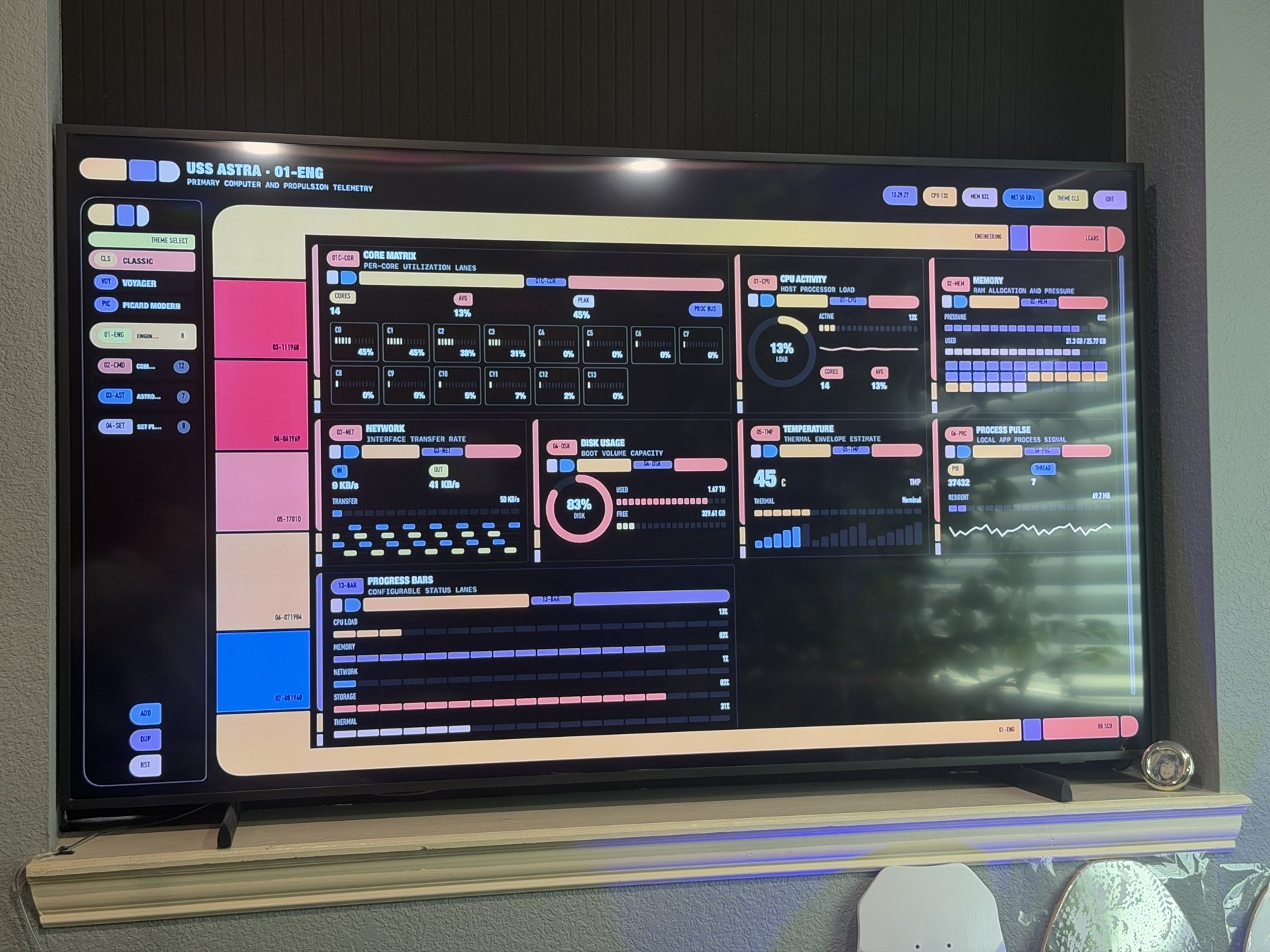
My first attempt at making a dashboard fill a 1080p TV modelled the canvas height from the widgets' nominal minimum heights and scaled to that. The photo from the wall was instructive: content clipped, the frame's rail running past the bottom bar. Real widgets are 200–250 pt tall, not 150, and the console frame has an intrinsic minimum height of its own.
The version that works measures instead of modelling. The canvas lays out at its ideal height for a width of available ÷ scale, reports that height back, and the surface scales uniformly so every row and the frame's rail land on the screen edge:
DashboardCanvas(dashboard: displayedDashboard, /* … */ presentation: true)
    .frame(width: proxy.size.width / scale)
    .fixedSize(horizontal: false, vertical: true)
    .onGeometryChange(for: CGFloat.self) { $0.size.height } action: { height in
        // Grow-only: a narrower canvas can re-wrap into more rows, and accepting
        // only increases keeps the measure→scale loop from flip-flopping.
        if height > measuredCanvasHeight + 1 { measuredCanvasHeight = height }
    }
    .scaleEffect(scale, anchor: .topLeading)
Grow-only was the subtle part: scaling up narrows the canvas, a widget like Core Matrix re-wraps into an extra row, the height grows, the scale shrinks, the widget re-wraps back — and without that guard the layout oscillates between two wrap states forever.
The dashboard grid itself also stopped being a SwiftUI Grid. Grid sizes flexible rows from the height proposal and would hand a tall card less than its content, drawing the tenth process row past the card border; making cards rigid fixed the height and broke the column widths. A sixty-line custom Layout — WidgetGridLayout, columns from the container width, rows from each card's content, cards stretched to the tallest in their row — ended a whole class of problems on the Mac, the TV and in exported screenshots.
Telemetry a Developer Actually Wants
The original widgets were host telemetry: CPU, per-core lanes, memory, network, disk, a thermal estimate. Good for a screensaver, thin for a workday. This phase added three groups, each sampled on its own cadence off the main thread and synced to the TV as its own message kind so a weather refresh never re-sends process lists.
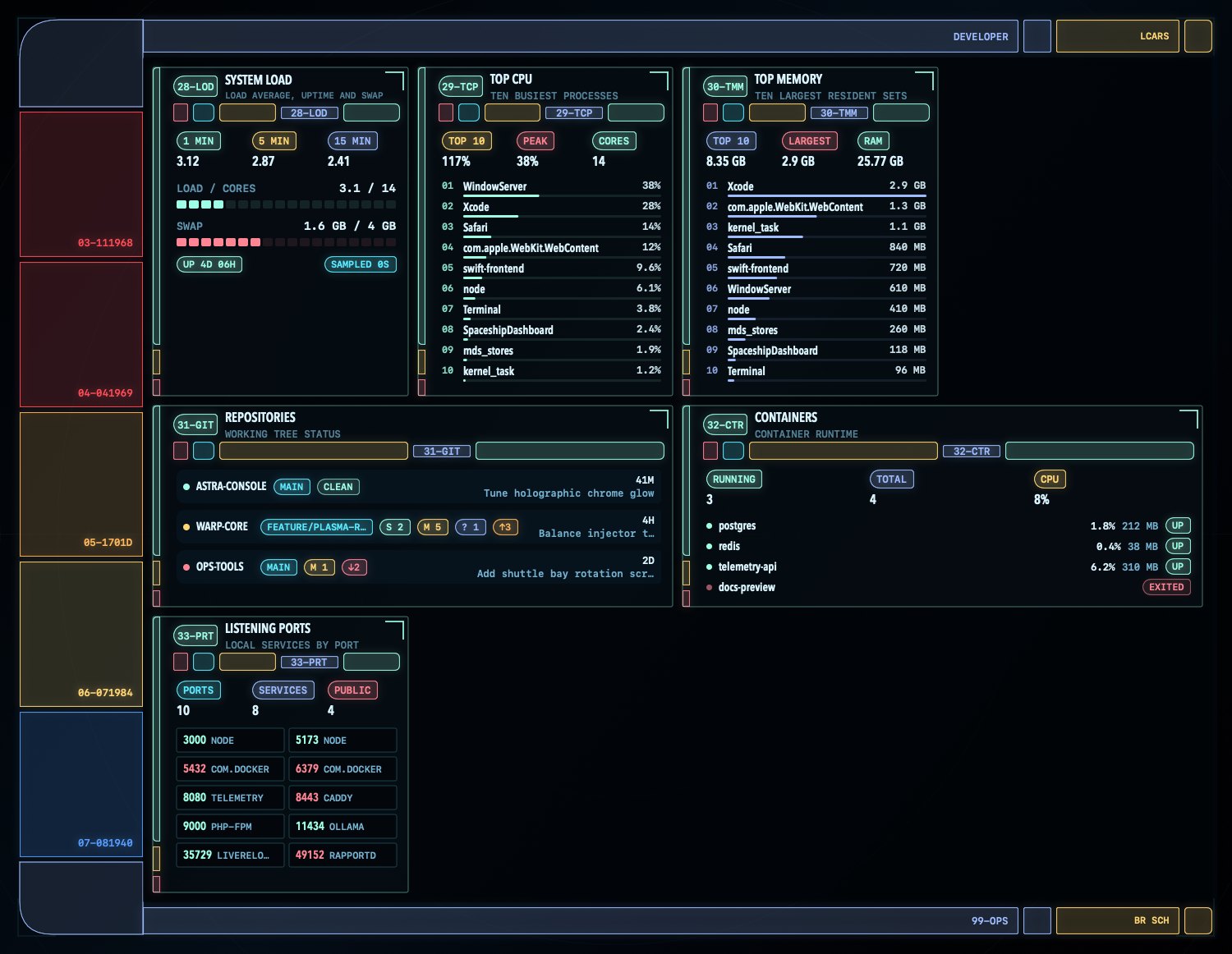
Developer. Load average, uptime and swap from getloadavg and sysctl vm.swapusage; the ten busiest processes by CPU and the ten largest by memory from ps; git status of the repositories you point it at — branch, staged/modified/untracked counts, ahead/behind, last commit — via git status --porcelain=v2 --branch; containers from whichever CLI it finds (Docker Desktop, Homebrew, OrbStack, Podman) with docker stats; and every TCP port in LISTEN state with its owning process via lsof. All of the shelling-out goes through one ShellRunner: a utility queue, a timeout that terminates the child, an output cap, GIT_OPTIONAL_LOCKS=0 so a status never blocks your real git work. Nothing runs on the main thread, and nothing blocks the Swift cooperative pool either — the blocking read and waitUntilExit happen on a dispatch queue and the caller awaits a continuation.
Connectivity. Wi-Fi link via CoreWLAN (RSSI, rate, channel, band, SNR — macOS withholds the SSID without Location permission, so the widget says HIDDEN rather than lying), TCP-connect round trips to hosts you configure with a thirty-sample trace and loss ratio, public IP, DNS servers, VPN state from scutil --nc list, local addresses. The latency probe is a small NWConnection timed from start to .ready, with .waiting treated as failure and a hard timeout — the honest kind of ping that doesn't need raw sockets.
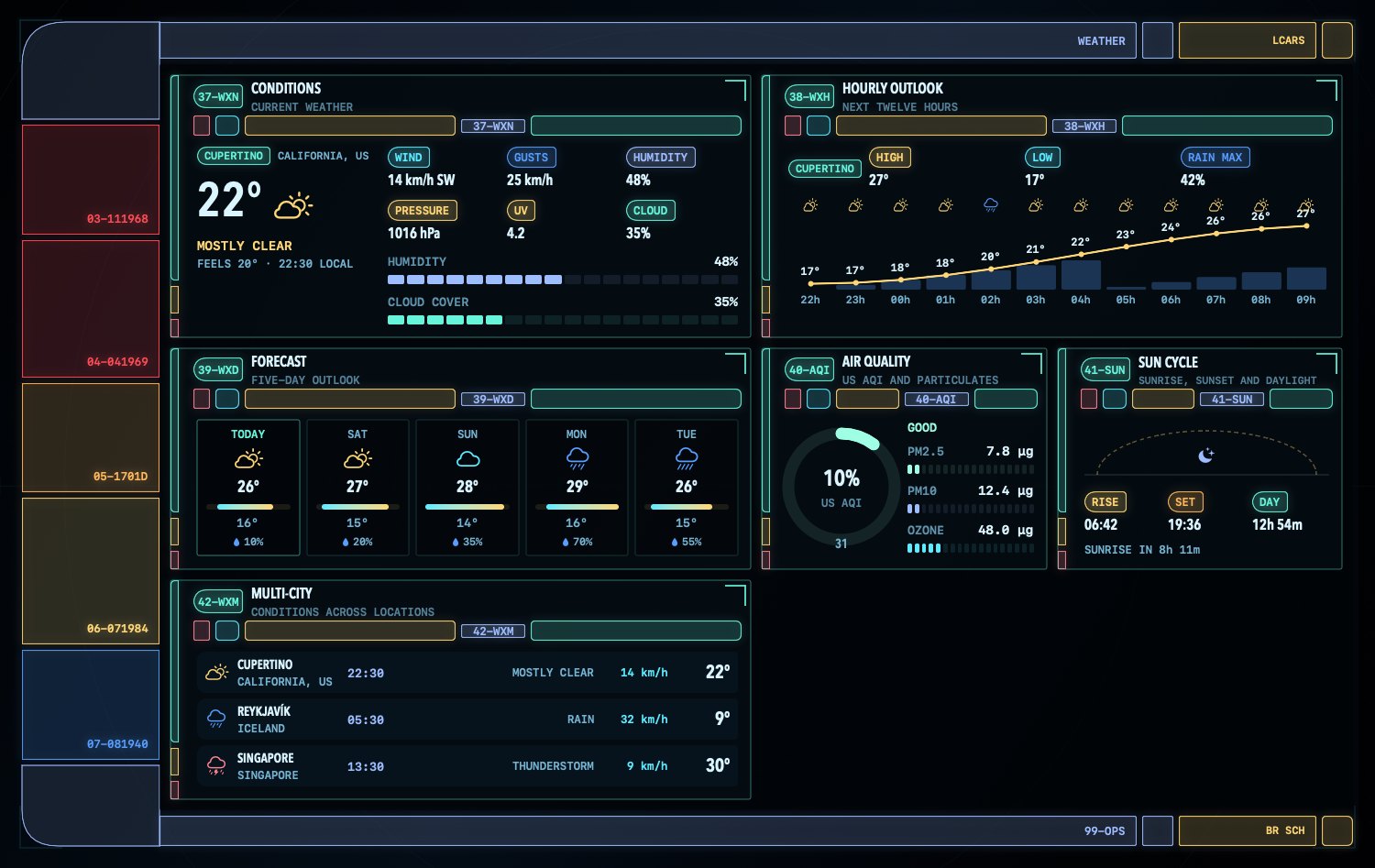
Weather. Open-Meteo — free, no API key — every ten minutes for the locations you add: current conditions, a twelve-hour outlook drawn as a temperature curve over precipitation-probability bars, a five-day forecast with each day's range placed inside the week's, US AQI with particulates, a sun arc with the sun's current position, and a multi-city row with local times. Everything is fetched in metric and converted at display time, so switching units never refetches.
All of it is configured in a SOURCES tab inside the builder: repository paths (or a folder picker), host:port probes, cities found through Open-Meteo's geocoder, units. The Apple TV never needs any of it; it receives the results.
The Screenshot That Taught Me Something
For the widget reference I wanted a screenshot of every widget in the HUD theme, so the app grew a Gallery › Export Widget Gallery… command that renders all 43 widgets plus one composite per group with ImageRenderer, using live data. Two lessons fell out of that.
The first was technical: ImageRenderer cannot draw AppKit-hosted views, so every Core Animation overlay came out as a yellow no-entry tile, and the group composites were entirely covered because the scan band sits over the whole content well. The overlays now honor an astraStaticRendering environment flag the exporter sets — the sweep becomes a fixed wedge, the routes static dashes — and the live app is untouched.
The second was about publishing. The first export of the Network Identity widget contained my public IP. Next to it sat a Listening Ports widget advertising twenty services bound to all interfaces, a DNS server that names my ISP, and default weather locations that say where I live — all headed for a public repository. So the exporter now renders the developer, connectivity and weather widgets from a fictional dataset (RFC 5737 documentation addresses, invented repositories and cities), the defaults became Cupertino and London, and the commit that had the real images was amended away before it was ever pushed. A dashboard that shows everything about your machine is exactly the kind of thing you should not screenshot casually.
An Icon, Once
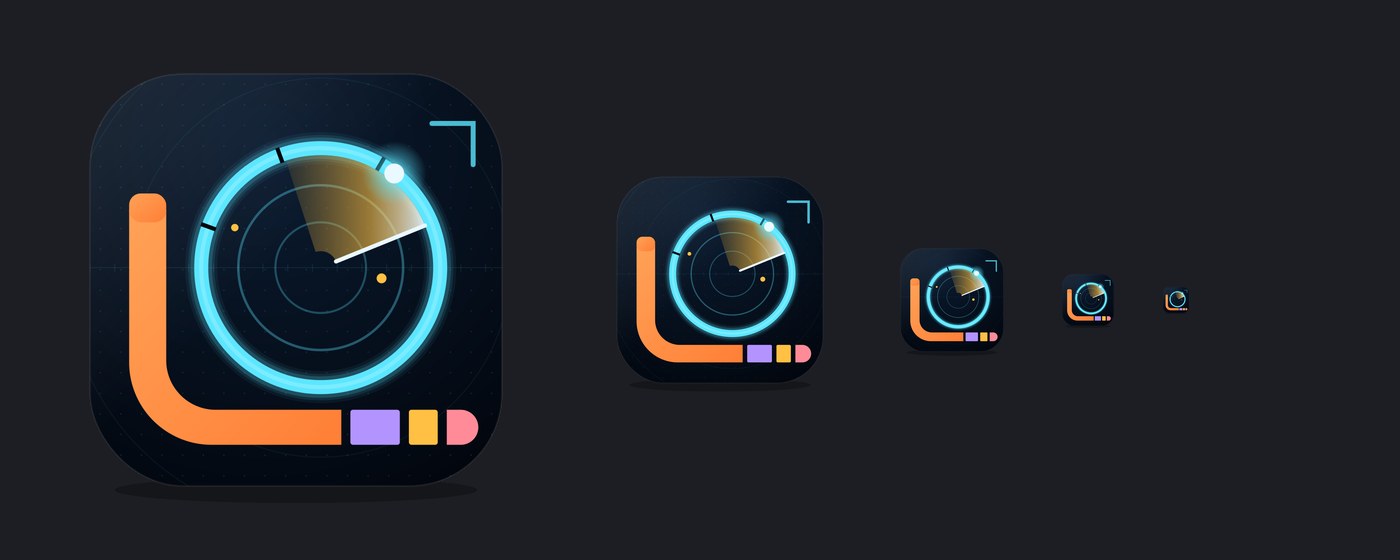
Both apps needed icons, and tvOS wants a lot of them — a layered parallax icon at two scales, an App Store icon, two Top Shelf banner sizes. Rather than draw eleven PNGs I described the mark once as vector art in a Python script and render every asset from it: an apricot elbow rail with violet, gold and rose segments, a glowing ice-cyan sensor ring with a gold sweep and a bright contact, on the Horizon reticle. The macOS .icns follows Apple's 1024 grid with an 824 pt squircle; the Apple TV gets Back, Middle and Front layers so the ring and sweep float over the backdrop when you hover the remote over it.
A bare swift run executable has no bundle and therefore no Dock icon, so the app also sets NSApp.applicationIconImage from a package resource at launch, and Packaging/make-app.sh assembles a real, double-clickable .app when you want one.
What Surprised Me
- The performance work was the port. Because the widgets already animated on the render server and ticked through one aligned clock, the Apple TV version was a Bonjour link and a UIKit shim, not a rewrite. Discipline you adopt for one reason keeps paying for others.
- A photo beat every model. The clipped canvas looked fine on the Mac and in every modelled height calculation; one phone picture of the TV showed rows cut off mid-card. Measure the real thing; scale from the measurement.
- SwiftUI
Gridis not a layout you own. For content-sized cards spanning columns, a sixty-line customLayoutwas less code than the workarounds and removed the ambiguity entirely. - Latest-wins is the whole networking design. One in-flight frame, one pending slot per message kind. It is a dozen lines and it is why a sleeping TV cannot hurt the Mac.
Text("\(int)")localizes. A thirteen-digit millisecond counter grew thousands separators and overflowed its card; port numbers rendered as1,804.Text(verbatim:)for identifiers, always.
Try It
Clone the repository and ./run.sh (macOS 14+, Swift 6). Pick the Apple TV in Control Center → Screen Mirroring → Use As Separate Display and the console moves there by itself; or open AppleTV/SpaceshipDashboardTV.xcodeproj, drop your team ID into AppleTV/Signing.local.xcconfig, and run the native receiver — ./run-tv.sh does it in the simulator. Cycle themes from the header, and press EDIT › SOURCES to point the developer widgets at your own repositories.
Reflections
This one didn't start as a tool. It started as a screensaver with ambitions, and the ambitions turned out to be a reasonable design method: if a dashboard has to look like a film set, it cannot stutter, so you learn to animate for free; if it has to be on a wall, it cannot lag, so you learn to send data instead of pixels; if it has to be useful on that wall, you end up with the git status of your projects and the latency to GitHub glowing in cyan above your desk, which is, I have to admit, exactly what I wanted.
The three phases — casting, the UI pass, the telemetry — were built with Claude Fable 5.1 in Claude Code and Cowork, including the parts I would have put off indefinitely: the tvOS asset catalog, the hand-written Xcode project, the Bonjour transport. My side of the work was the part that doesn't fit in a terminal: running the builds, watching the wall, and saying what a starship console should feel like. Fable did the heavy lifting.
Daniel Wanja is a developer and founder of Nouvelles Solutions, Inc. His office TV now has a job.