MermaidViewer: Rewriting MermaidJS in Swift – A Fresh Take on Diagram Rendering
Building a native macOS Mermaid diagram viewer by rewriting the entire MermaidJS rendering engine in Swift. Early preview of an ambitious project that brings native performance to diagram creation.
Sometimes you take the sensible path: use existing libraries, follow established patterns, and ship quickly. Other times, you look at a 15MB JavaScript library and think, "I wonder what it would take to rewrite this entire thing in Swift?" MermaidViewer is the result of choosing the latter path—a native macOS app for viewing and editing Mermaid diagrams, powered by a completely fresh Swift implementation of the MermaidJS rendering engine.
This is hot out of the oven—I started this yesterday. It's buggy, incomplete, and definitely not production-ready. But the core concept is working, and I wanted to share the technical journey of reimplementing a complex visualization library from scratch.
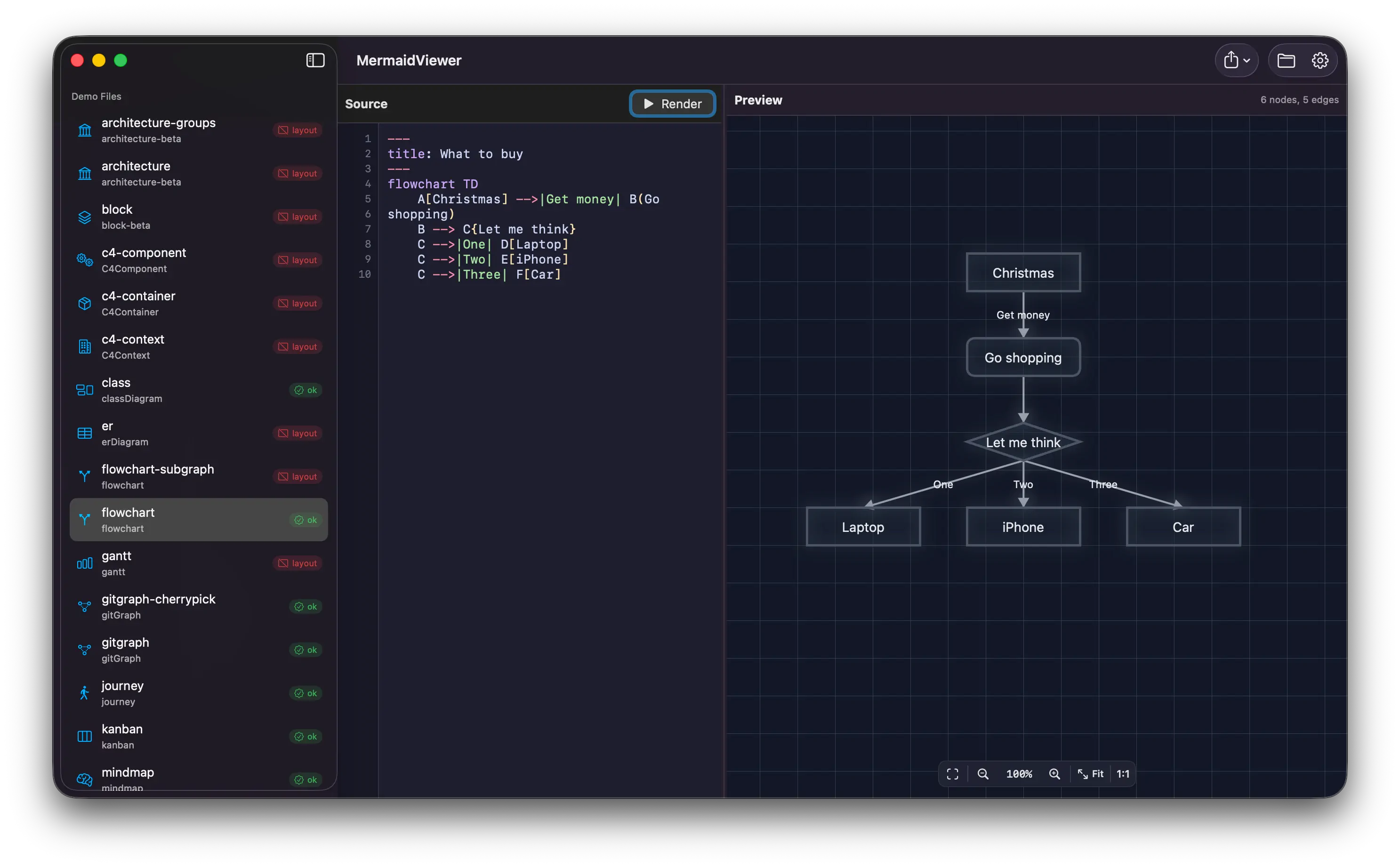
Quick Links
- Download: MermaidViewer v1.0 (DMG) (macOS, 12.3MB)
- What is Mermaid?: mermaid.js.org
The Challenge: Why Rewrite MermaidJS?
Mermaid is an incredibly popular library for creating diagrams and charts from text-based definitions. You write something like:
image generate by mermmaidjs
And it generates a beautiful flowchart. It's used everywhere—GitHub, Notion, Confluence, VS Code—because text-based diagrams are version-controllable, easy to edit, and incredibly portable.
But here's the thing: MermaidJS is a massive JavaScript library. It's built on D3.js, includes complex parsing logic, and requires a JavaScript runtime to render diagrams. For a native macOS app, that means either:
- Embedding a WebView and running the JavaScript version
- Using JavaScriptCore to execute the library
- Accepting the overhead and complexity that comes with JS interop
Or... you could rewrite it in Swift.
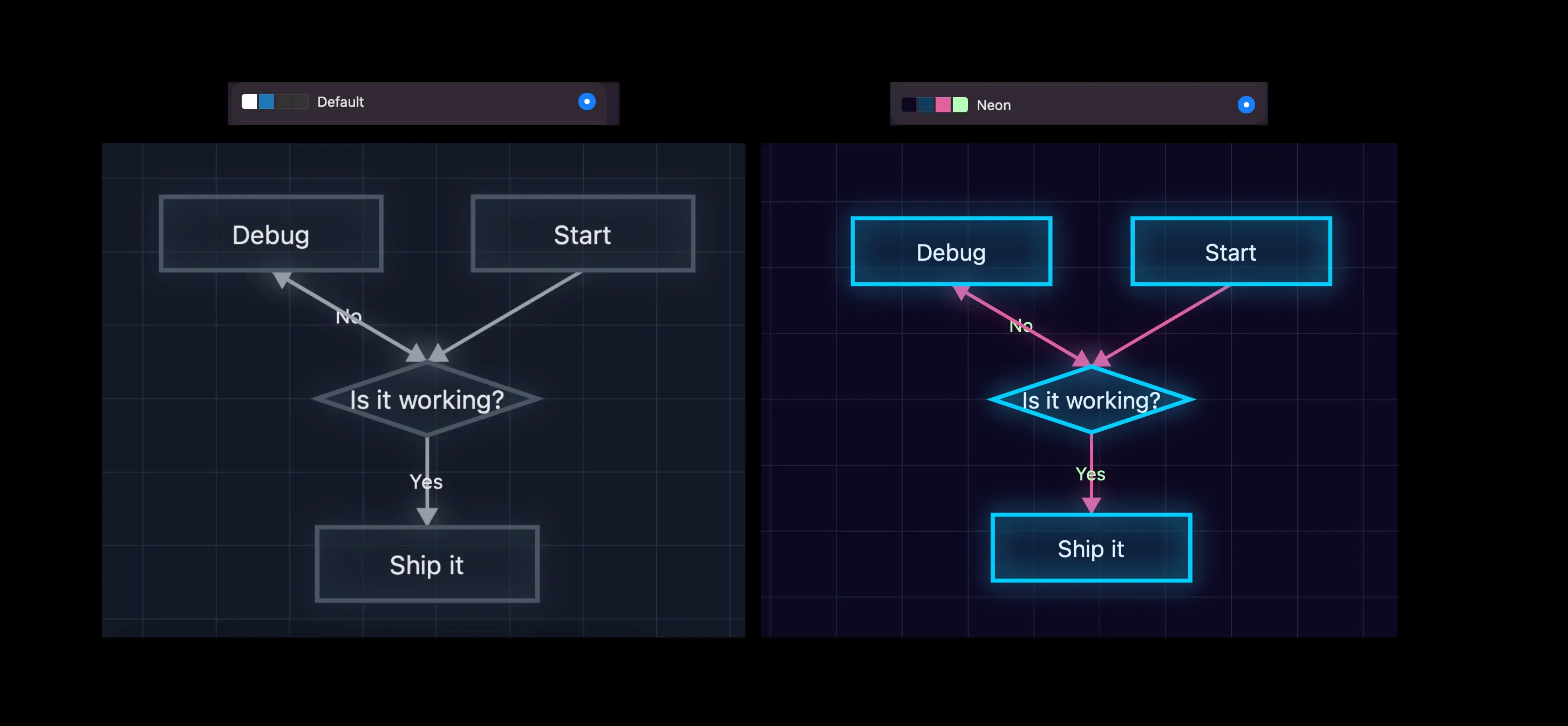
image generate by the MermaidSwift library
As you see I still have some work todo ¯_(ツ)_/¯
The Ambitious Goal: MermaidSwift
That's exactly what I decided to do. I created MermaidSwift—a Swift library that parses Mermaid syntax and renders diagrams natively using SwiftUI and Core Graphics. No JavaScript runtime. No WebView. Pure Swift.
The library handles:
- Lexical analysis: Tokenizing Mermaid syntax
- Parsing: Building abstract syntax trees from diagram definitions
- Layout algorithms: Positioning nodes, routing edges, calculating dimensions
- Rendering: Drawing diagrams with SwiftUI shapes and paths
This is not a small undertaking. Mermaid supports numerous diagram types:
- Flowcharts (
graph,flowchart) - Sequence diagrams
- Class diagrams
- State diagrams
- Entity relationship diagrams
- Gantt charts
- Pie charts
- Mindmaps
- And more...
For now, I'm focusing on flowcharts and basic graphs—the most commonly used diagram types. Even this subset is complex, with different node shapes, arrow types, styling options, and layout requirements.
The Technical Stack
MermaidViewer is built entirely in Swift and SwiftUI, targeting macOS 15 (Sequoia) and later.
Key Components
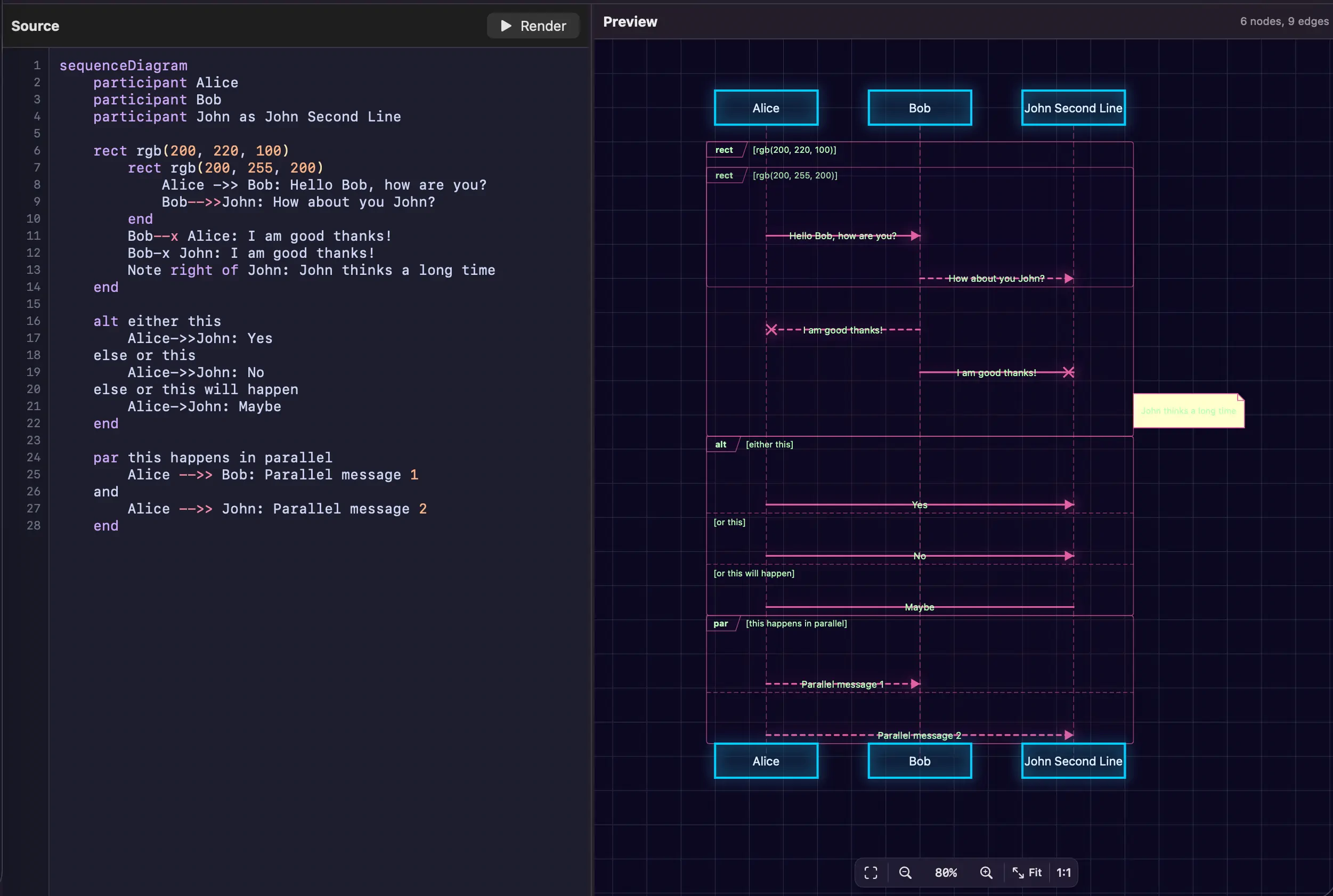
MermaidCodeEditor: A custom text editor built on top of NSTextView with:
- Real-time syntax highlighting
- Line numbers
- Custom color schemes matching the diagram theme
- Monospace font (SF Mono) for code clarity
MermaidSyntaxHighlighter: Analyzes Mermaid code and applies syntax coloring:
- Keywords (
graph,flowchart,subgraph, etc.) in purple - Node IDs in blue
- Strings and labels in green
- Operators and arrows in orange
- Comments in gray
MermaidTextView: The native SwiftUI rendering surface that displays the parsed diagram:
- Uses
PathandShapefor drawing - Handles node positioning with custom layout algorithms
- Renders connections with Bézier curves
- Supports pan and zoom gestures
SettingsView: Configuration for editor preferences:
- Theme selection (light/dark)
- Font size adjustment
- Line number visibility
- Syntax highlighting toggles
The Rendering Pipeline
Here's how MermaidViewer processes a diagram:
// 1. Parse the Mermaid syntax
let parser = MermaidParser()
let diagram = try parser.parse(mermaidCode)

// 2. Calculate layout
let layoutEngine = LayoutEngine()
let positions = layoutEngine.layout(diagram)

// 3. Render with SwiftUI
struct DiagramView: View {
    let diagram: MermaidDiagram
    let positions: NodePositions

    var body: some View {
        Canvas { context, size in
            // Draw nodes
            for node in diagram.nodes {
                let position = positions[node.id]
                drawNode(context, node, at: position)
            }

            // Draw edges
            for edge in diagram.edges {
                let path = calculateEdgePath(edge, positions)
                context.stroke(path, with: .color(.blue))
            }
        }
    }
}
Parsing Mermaid Syntax
The parser is a hand-written recursive descent parser that handles Mermaid's unique syntax:
class MermaidParser {
    func parseGraph(_ tokens: [Token]) throws -> Graph {
        // Parse graph direction (TD, LR, etc.)
        let direction = try parseDirection()

        var nodes: [Node] = []
        var edges: [Edge] = []

        while !tokens.isEmpty {
            if isNodeDefinition() {
                nodes.append(try parseNode())
            } else if isEdgeDefinition() {
                edges.append(try parseEdge())
            } else if isSubgraphStart() {
                let subgraph = try parseSubgraph()
                nodes.append(contentsOf: subgraph.nodes)
                edges.append(contentsOf: subgraph.edges)
            }
        }

        return Graph(direction: direction, nodes: nodes, edges: edges)
    }
}
The challenge is handling Mermaid's flexible syntax. These are all valid:
A --> B
A[Label] --> B
A[Label] -->|Edge Label| B{Decision}
A --> B & C & D
The parser needs to handle optional labels, different node shapes (rectangles, diamonds, circles), edge labels, and multi-target connections.
Layout Algorithms
Once parsed, the diagram needs layout. I implemented a Sugiyama-style layered graph layout for hierarchical diagrams:
- Layer assignment: Nodes are assigned to horizontal layers based on dependencies
- Crossing minimization: Reorder nodes within layers to minimize edge crossings
- Position assignment: Calculate exact X/Y coordinates with proper spacing
- Edge routing: Route edges around nodes using orthogonal or curved paths
class LayoutEngine {
    func layout(_ graph: Graph) -> NodePositions {
        // Assign nodes to layers
        let layers = assignLayers(graph)

        // Minimize crossings
        let ordered = minimizeCrossings(layers)

        // Calculate positions
        var positions: [NodeID: CGPoint] = [:]

        for (layerIndex, layer) in ordered.enumerated() {
            let y = CGFloat(layerIndex) * layerSpacing

            for (nodeIndex, node) in layer.enumerated() {
                let x = CGFloat(nodeIndex) * nodeSpacing
                positions[node.id] = CGPoint(x: x, y: y)
            }
        }

        return positions
    }
}
This is simplified—the real implementation includes:
- Dummy nodes for long edges that span multiple layers
- Barycentric ordering to minimize crossings
- Coordinate assignment with centering and balancing
- Edge routing with port assignment
Syntax Highlighting
The syntax highlighter scans the code and applies NSAttributedString attributes:
class MermaidSyntaxHighlighter {
    let keywords = ["graph", "flowchart", "subgraph", "end", "classDef", "class"]
    let nodeShapes = ["[", "]", "(", ")", "{", "}", "[[", "]]", "((", "))"]
    let arrows = ["-->", "---", "-.->", "==>", "~~>"]

    func highlight(_ code: String) -> NSAttributedString {
        let attributed = NSMutableAttributedString(string: code)

        // Apply base font
        attributed.addAttribute(.font,
                              value: NSFont.monospacedSystemFont(ofSize: 13, weight: .regular),
                              range: NSRange(location: 0, length: code.count))

        // Highlight keywords
        for keyword in keywords {
            let ranges = code.ranges(of: keyword)
            for range in ranges {
                attributed.addAttribute(.foregroundColor,
                                      value: NSColor.systemPurple,
                                      range: NSRange(range, in: code))
            }
        }

        // Highlight arrows
        for arrow in arrows {
            // Similar coloring logic...
        }

        return attributed
    }
}
The result is a code editor that feels native and responsive, with instant syntax feedback as you type.
Current State: Early Preview
Let me be completely honest: MermaidViewer is not ready for production use. Here's what's working and what's not:
✅ What Works
- Basic flowchart parsing (graph TD, graph LR)
- Node definitions with labels
- Simple edges (-->, ---)
- Rectangle and circle node shapes
- Basic syntax highlighting
- Live preview updates
- Pan and zoom gestures
- Dark/light theme support
🐛 Known Issues
- Layout bugs: Complex graphs sometimes overlap
- Edge routing: Curves don't always avoid nodes properly
- Parser limitations: Many Mermaid features not yet supported
- Styling: Limited support for colors and custom styles
- Subgraphs: Implemented but buggy
- Other diagram types: Only flowcharts work currently
This is literally a day-old project. The foundation is there, but there's extensive work ahead.
Why This Matters
You might wonder: "Why not just use the JavaScript version in a WebView?"
Fair question. Here's why native matters:
- Performance: No JavaScript VM overhead. Pure Swift rendering is fast.
- Integration: Native text editing, native gestures, native menus
- Offline: No web dependencies, no CDN loading, fully local
- Control: Complete control over rendering, layout, and behavior
- Learning: Understanding how diagram libraries actually work
Plus, there's something deeply satisfying about implementing a complex library from scratch. You learn the algorithms, understand the edge cases, and build something truly yours.
The Architecture
MermaidViewer follows a clean separation of concerns:
MermaidViewer/
├── App/
│   ├── MermaidViewerApp.swift      # App entry point
│   ├── ContentView.swift           # Main split view
│   └── SettingsView.swift          # Preferences
├── Editor/
│   ├── MermaidCodeEditor.swift     # NSTextView wrapper
│   ├── MermaidSyntaxHighlighter.swift
│   └── EditorTheme.swift
├── Rendering/
│   └── MermaidTextView.swift       # Diagram canvas
└── Settings/
    └── AppSettings.swift           # User preferences
The MermaidSwift library lives separately and handles:
- Lexing and tokenization
- Parsing and AST generation
- Layout algorithms
- Rendering primitives
This separation means the library could be used in iOS apps, server-side rendering, or CLI tools—not just macOS.
Technical Challenges
Challenge 1: Mermaid's Flexible Syntax
Mermaid's syntax is designed for humans, not parsers. It's forgiving, flexible, and context-dependent. For example:
A[This is a label with [brackets]]
How do you know which brackets are part of the label vs. the node shape delimiter? Context matters. The parser needs to be smart about when to interpret special characters literally vs. as syntax.
Challenge 2: Layout is Hard
Graph layout is a well-studied problem in computer science, but that doesn't make it easy. The Sugiyama algorithm has multiple phases, each with its own complexity:
- Cycle removal: DAGs only, so cycles must be detected and temporarily reversed
- Layer assignment: Minimize height while respecting dependencies
- Crossing minimization: NP-complete problem requiring heuristics
- X-coordinate assignment: Balance spacing while minimizing edge length
Getting this right takes careful implementation and lots of testing.
Challenge 3: Edge Routing
Drawing straight lines between nodes is easy. Drawing aesthetic curves that avoid overlapping other nodes? Much harder. Options include:
- Straight lines: Simple but ugly when crossing
- Orthogonal routing: 90-degree bends, looks clean
- Curved routing: Bézier curves, smooth but complex
- Bundled edges: Group similar edges together
For now, I'm using simple Bézier curves. Future versions will need smarter routing.
What's Next
The roadmap for MermaidViewer (if I continue developing it):
Phase 1: Stabilize Flowcharts
- Fix layout bugs
- Improve edge routing
- Support all node shapes
- Handle subgraphs properly
- Add styling support
Phase 2: Polish
- Improve Export to PNG/SVG
- Diagram validation
- Improve Error messages
- Example library
- Keyboard shortcuts
Phase 3: MermaidSwift Library
- Publish as Swift package
- Complete documentation
- Improve Unit test coverage
- Performance optimization
**Phase 4: Features
- Quick Look support
- CLI
Building With AI
Like my other recent apps, I built MermaidViewer entirely with AI assistance (100% Claude Opus 4 in Claude Code). What made this project remarkable was that I didn't write any code myself, I simply described what I wanted the app to do, and the AI handled the implementation. I didn't need to understand parsing theory, graph layout algorithms, or Bézier curve mathematics. I just needed to clearly articulate the desired behavior and iterate on the results.
The AI helped with boilerplate, suggested algorithms, and caught edge cases. But the core design decisions were mine. This felt more like a product owner telling it's talented coder team what to implement.
Try It (With Cautions)
If you're curious and don't mind rough edges, download the demo. Open it, paste some Mermaid code, and see what happens. It might work beautifully. It might crash. It might render gibberish.
That's the joy of early preview software.
Example to try:
graph TD
    Start[Start] --> Parse[Parse Mermaid Code]
    Parse --> Layout[Calculate Layout]
    Layout --> Render[Render with SwiftUI]
    Render --> Display[Display Diagram]
    Display --> Edit{Edit Code?}
    Edit -->|Yes| Parse
    Edit -->|No| Done[Done]
Reflections
Rewriting MermaidJS in Swift is probably overkill for a simple diagram viewer. I could have wrapped the JavaScript version and shipped something functional in hours instead of days (or weeks, or months).
But where's the fun in that?
This project is about understanding how complex visualization libraries work under the hood. It's about pushing SwiftUI's capabilities. It's about seeing if native performance makes a real difference.
And honestly? It's about the pure engineering joy of building something from scratch.
Whether MermaidViewer becomes a production app or remains an educational experiment, the journey has been worth it. I now understand the challenges of graph layout algorithms, SwiftUI's Canvas API, and the intricacies of parsing diagram syntax.
Sometimes you build apps to ship. Sometimes you build them to learn.
Daniel Wanja is a developer and founder of Nouvelles Solutions, Inc. When not rewriting JavaScript libraries in Swift, he's exploring the boundaries of what's possible with native macOS development.