Gitsanity 2.0 for Mac: A Rust Engine Inside a SwiftUI App
The Mac app now runs on the Rust engine from the terminal version. DuckDB is gone, the Linux kernel is readable in two seconds, and there are new screens for the questions I actually had: who owns this code, and what happens when they leave.
Two days ago I rewrote Gitsanity as a terminal app in Rust and it indexed the Linux kernel in 51 seconds. That left the Mac app, the one I built in February, sitting on DuckDB, a star schema and a git log pipeline, looking slow next to its own command-line cousin.
So I asked Claude Code what I called the crazy request: load the repository through the Rust engine from the Mac app, drop DuckDB, and give the app a new look. Plan first, then build.
Gitsanity 2.0 for Mac is the result. Same engine as the terminal version, native SwiftUI on top, and a set of screens the old app never had.
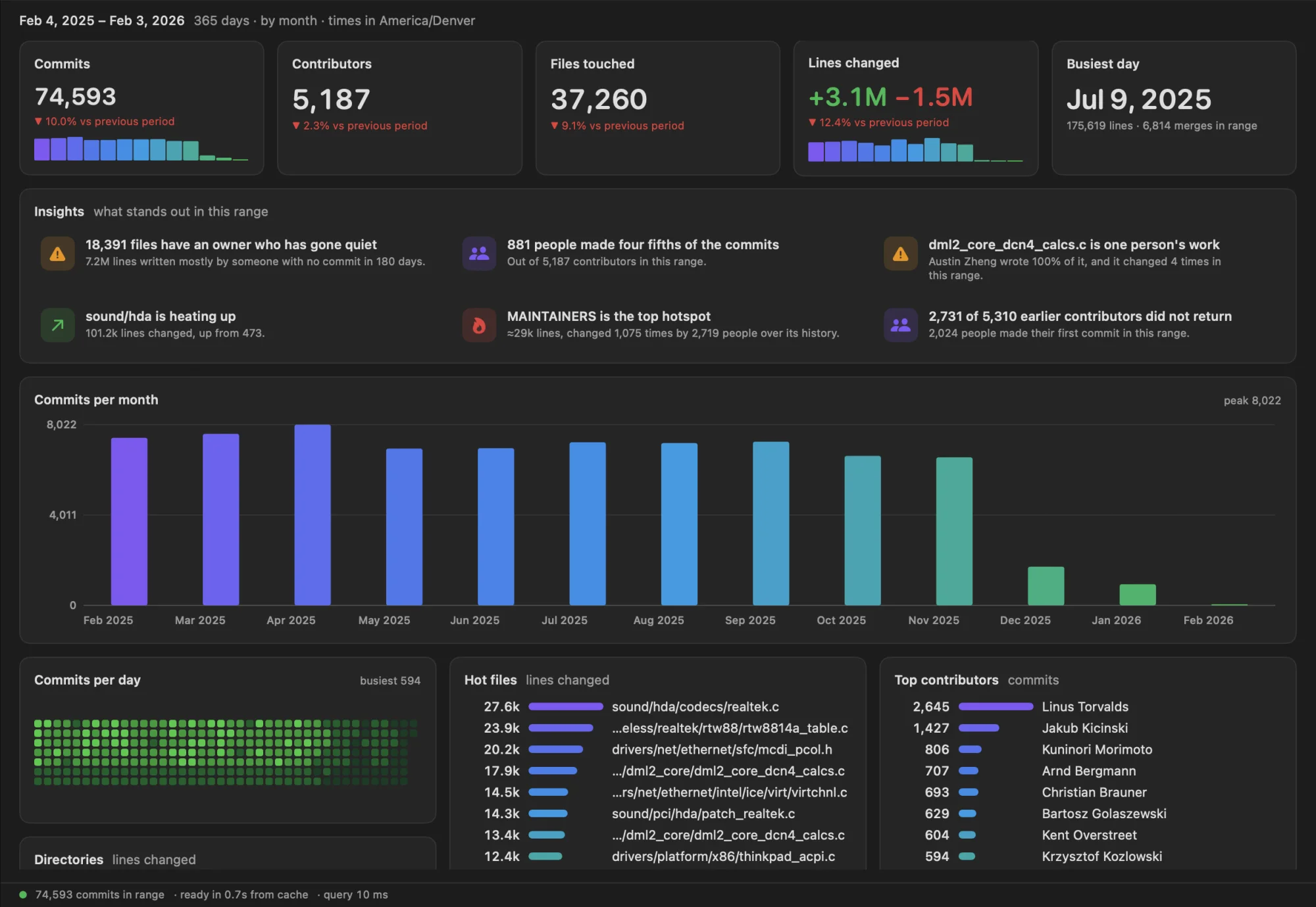
Update, the same afternoon: Gitsanity 2.1 is out. It adds Ask, which answers questions about a repository through Claude or Apple Intelligence: how it was measured and built. The download links below now point to 2.1.
Quick Links
- Download: Gitsanity 2.1 (DMG), the current version, for macOS 26 or later, Apple Silicon and Intel
- On an older macOS: Gitsanity 1.0 (DMG) still works from macOS 14
- In the lab: Gitsanity
- Terminal version and engine source: github.com/danielwanja/gitsanity (MIT),
brew install danielwanja/tap/gitsanity - Stack: SwiftUI, Rust, gitoxide, UniFFI, Sparkle for updates
The numbers
The Linux kernel, 1,414,234 commits, in the Mac app on a 14-core Apple Silicon Mac. These are measured from Swift, through the bridge, not from the Rust side:
| Gitsanity 2.0 | |
|---|---|
| First screen (commits, contributors, timelines) | 2.3 s |
| Which files each commit touched | 11 s |
| Fully indexed, with line counts | 52 to 61 s |
| Reopening the app on the same repository | 0.39 s |
| Recomputing the dashboard for all 21 years | 89 ms |
| Recomputing it for one year | 8 ms |
| Ownership of every file, over the whole history | under 0.1 s |
I don't have a measured kernel run of the February version to put next to these, only its targets. Its performance notes set "under five minutes" as the goal for indexing the kernel, and its benchmark tool budgeted 700 ms for the slowest dashboard query. The new app is fully indexed in about one, and its slowest query is the 89 ms one.
The numbers match the terminal version to within the cost of crossing from Rust to Swift, which turns out to be a few milliseconds.
One engine, two apps
The terminal app was a single Rust binary. The first step was to split it: the engine became a library, and the terminal UI moved behind a feature flag so the Mac app doesn't carry ratatui around.
[features]
default = ["tui"]
tui = ["dep:clap", "dep:ratatui", "dep:unicode-width"]
Next to it sits a small ffi crate that exposes the engine to Swift with UniFFI. You annotate ordinary Rust, and UniFFI generates the Swift:
#[derive(uniffi::Object)]
pub struct Repo { /* the open repository, its index, a few caches */ }

#[uniffi::export]
impl Repo {
    #[uniffi::constructor]
    pub fn open(
        path: String,
        reference: Option<String>,
        cache_dir: Option<String>,
    ) -> Res<Arc<Self>> { /* ... */ }

    /// Who wrote what as of the end of the query's window, where knowledge
    /// rests on one person, and which large files keep changing.
    pub fn ownership(&self, query: Query, limit: u32) -> Res<OwnershipReport> { /* ... */ }
}
A script builds that crate for both Mac architectures, glues them into one static library, generates the Swift bindings from the compiled library, and wraps it all as an XCFramework:
lipo -create \
  "$ffi_dir/target/aarch64-apple-darwin/release/libgitsanity_ffi.a" \
  "$ffi_dir/target/x86_64-apple-darwin/release/libgitsanity_ffi.a" \
  -output "$work/libgitsanity_ffi.a"

# The bindings are read out of the compiled library, so they cannot drift from it.
cargo run --quiet --release --bin uniffi-bindgen -- \
  --swift-sources --headers --modulemap \
  --module-name gitsanity_ffiFFI --modulemap-filename module.modulemap \
  "target/aarch64-apple-darwin/release/libgitsanity_ffi.a" "$work/gen"

xcodebuild -create-xcframework \
  -library "$work/libgitsanity_ffi.a" -headers "$work/headers" \
  -output "$out/GitsanityEngineFFI.xcframework"
On the Swift side the engine is one more package. Every engine call blocks, so a thin client pushes each one onto a background task:
public final class EngineClient: Sendable {
    private let repo: Repo

    private func run<T: Sendable>(_ work: @escaping @Sendable (Repo) throws -> T) async throws -> T {
        let repo = repo
        return try await Task.detached(priority: .userInitiated) { try work(repo) }.value
    }

    public func summary(_ query: Query) async throws -> Summary { try await run { try $0.summary(query: query) } }
    public func ownership(_ query: Query, limit: UInt32 = 150) async throws -> OwnershipReport {
        try await run { try $0.ownership(query: query, limit: limit) }
    }
}
The app pins the engine by commit hash in a one-line file, so a release always knows exactly which engine it was built from.
The engine fills in three stages: commits, then the files each commit touched, then line counts. The app polls its progress and redraws as each stage lands, which is why there is something to look at after two seconds:
let poll = Task { @MainActor in
    while !Task.isCancelled {
        let now = client.progress
        self.progress = now
        if now.stage > shown {
            shown = now.stage
            await self.refresh()
        }
        try? await Task.sleep(for: .milliseconds(120))
    }
}
What went away
About 27,000 lines of Swift. The DuckDB layer alone, with both indexers, the rollup builder, the time-window router and the caches, was 6,400 of them. What replaced it all is roughly 5,500 lines of Swift for the whole app, on top of about 6,000 lines of Rust that the terminal version shares.
The app no longer runs git, so Git doesn't need to be installed. There is no database file to build, migrate or clean up, apart from deleting the old .duckdb files once on first launch.
The questions I actually had
The February app counted things: commits, lines, hot files. Useful, but the questions I open a tool like this for are different. Who knows this code? What happens if they leave?
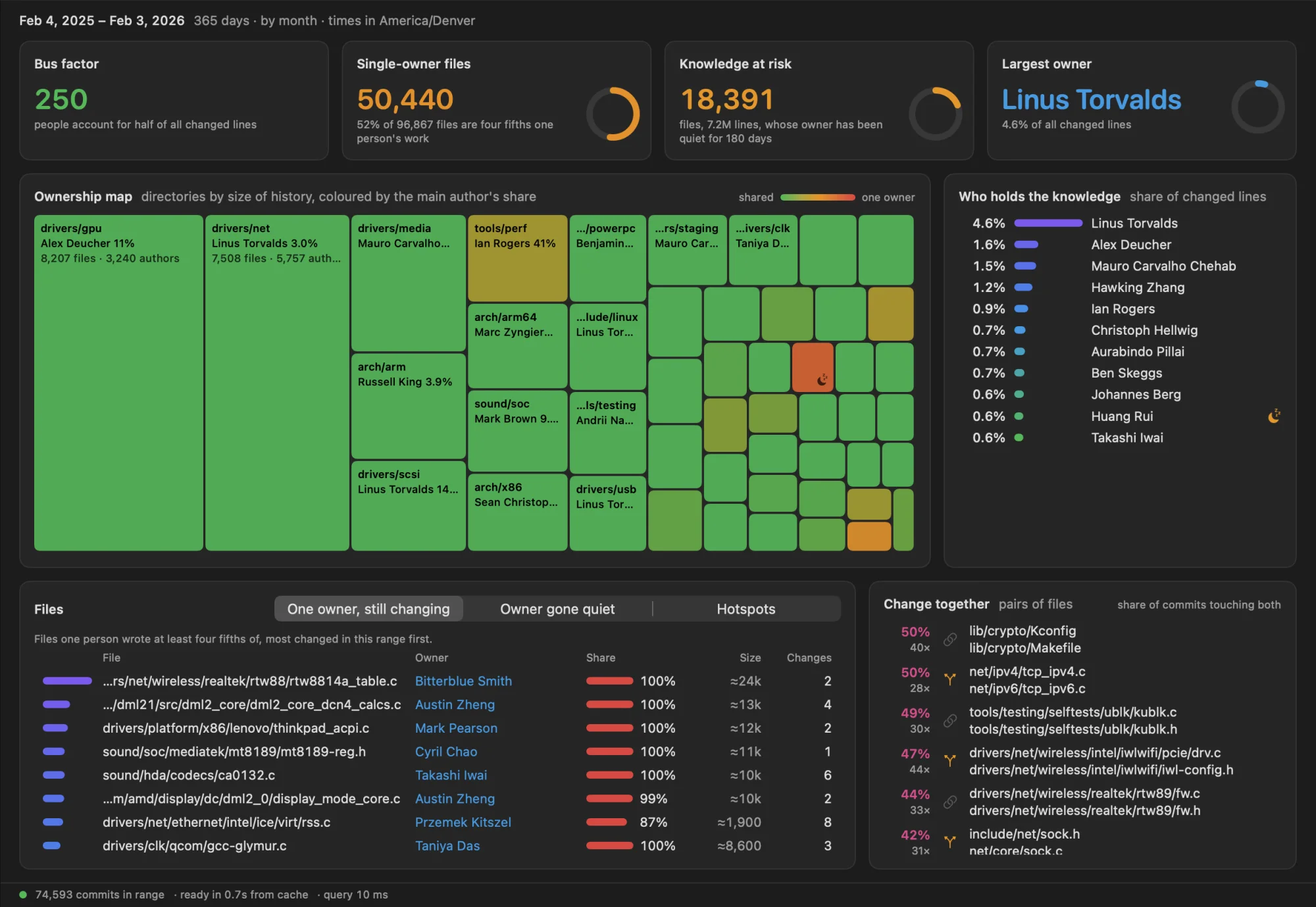
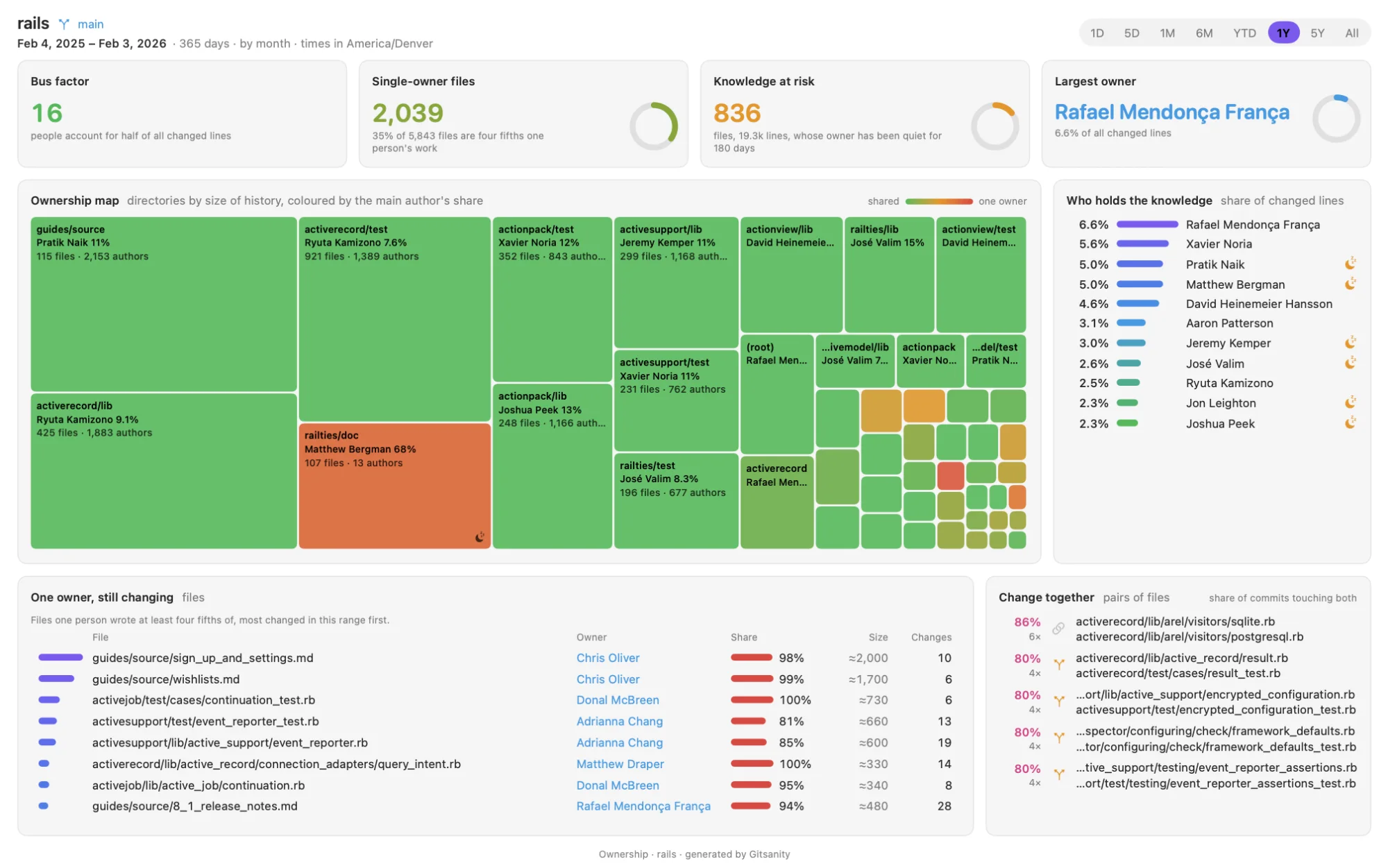
Ownership answers that. For every file it works out who changed the most lines over the file's whole history, then:
- Bus factor: the fewest people who account for half of all changed lines. For Rails it's 16.
- Single-owner files: files one person wrote at least four fifths of. In Rails that's 2,039 of 5,843, a third of the tree.
- Knowledge at risk: single-owner files whose author hasn't committed in 180 days. Rails has 836.
- The map: one rectangle per directory, sized by its history and coloured from green, where the work is shared, to red, where it's nearly all one person's.
Renames were the fiddly part. After git mv a b, the history belongs to b, and a new file later called a must start from nothing. So the engine keeps a path and the history it carries as two separate things:
// A path and the history it carries are two things: after `git mv a b`,
// b continues a's history, and a new file called a starts from nothing.
let moved = entity[from];
entity[file] = moved;
name[moved as usize] = file as u32;
entity[from] = name.len() as u32;
name.push(from as u32);
Insights sit at the top of the Overview: up to six sentences on what stands out, like "Activity is down 36%" or "wishlists.md is one person's work". No language model involved. Each one is a rule over numbers the app already shows, and clicking it narrows the app to that file, person or screen.
Changes together shows, for a selected file, what changes in the same commits. A high share with a file somewhere else in the tree is a dependency your folders don't show.
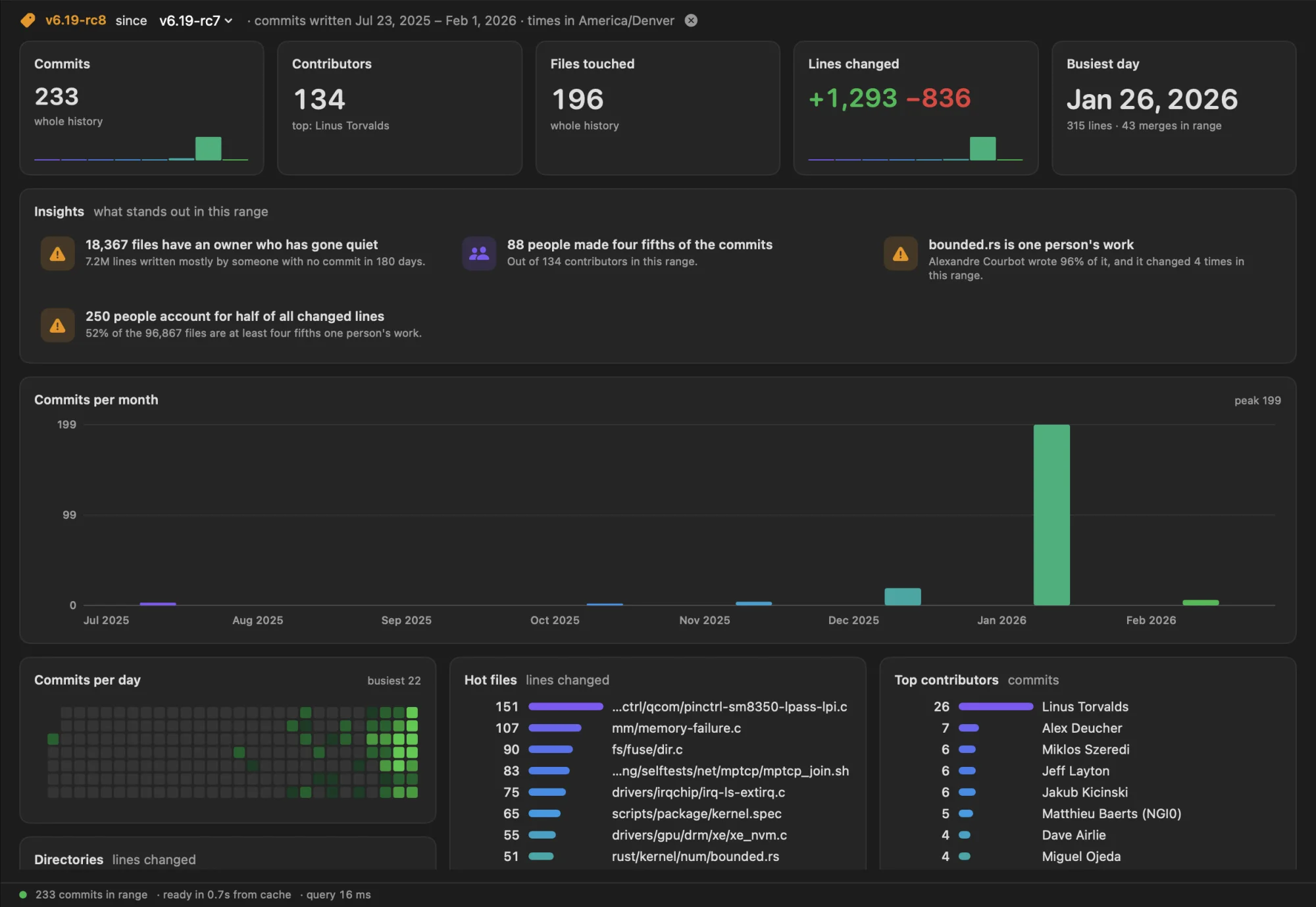
Releases let you look at one release instead of a span of time. A release is not a date range. It is what git log v1..v2 lists: the commits you can reach from one tag and not from the other. The store already keeps parents as commit indices, so it's a short walk:
/// The commits reachable from `tip` and not from `base`: what `git log
/// base..tip` lists. With no base, everything up to `tip`.
pub fn between(store: &Store, base: Option<usize>, tip: usize) -> Vec<bool> {
    // 0 not visited, 1 part of the range, 2 already in the base
    let mut state = vec![0u8; store.len()];
    // ... mark everything under `base` as 2, then walk from `tip` marking 1
    state.into_iter().map(|s| s == 1).collect()
}
That set of commits then runs through the same summary as any time range. Here is the kernel's v6.19-rc8 since v6.19-rc7, 233 commits by 134 people:
Checked against git
Fast and plausible isn't the bar. On Rails:
- A release range of 2,483 commits matches
git rev-list --countexactly. - The 2,093 changed lines of one file match
git log --numstat. - A "changes together" count came out as 6 where
git log --sincesays 7. The seventh was written in December and committed in February. Gitsanity counts a commit when its author wrote it, git's--sincewhen it was committed. Both are right, and the Help window now says which is which.
One number is an estimate and the app marks it with ≈. File size is lines added minus lines removed over the history, and merges carry no line counts. For a file with a long, branchy past that drifts: one Rails guide shows 4,799 lines where the real file has 4,518. Good enough to rank hotspots, not good enough to state as fact.
Looking like a Mac app
The first 2.0 build drew its own chrome inside the window. I asked for mockups of something more native and picked two of the three: the toolbar holds the period stepper, the time range, releases, search and export; Commits, Contributors and Files are real tables with resizable columns; the selected commit or contributor lives in an inspector you can hide.
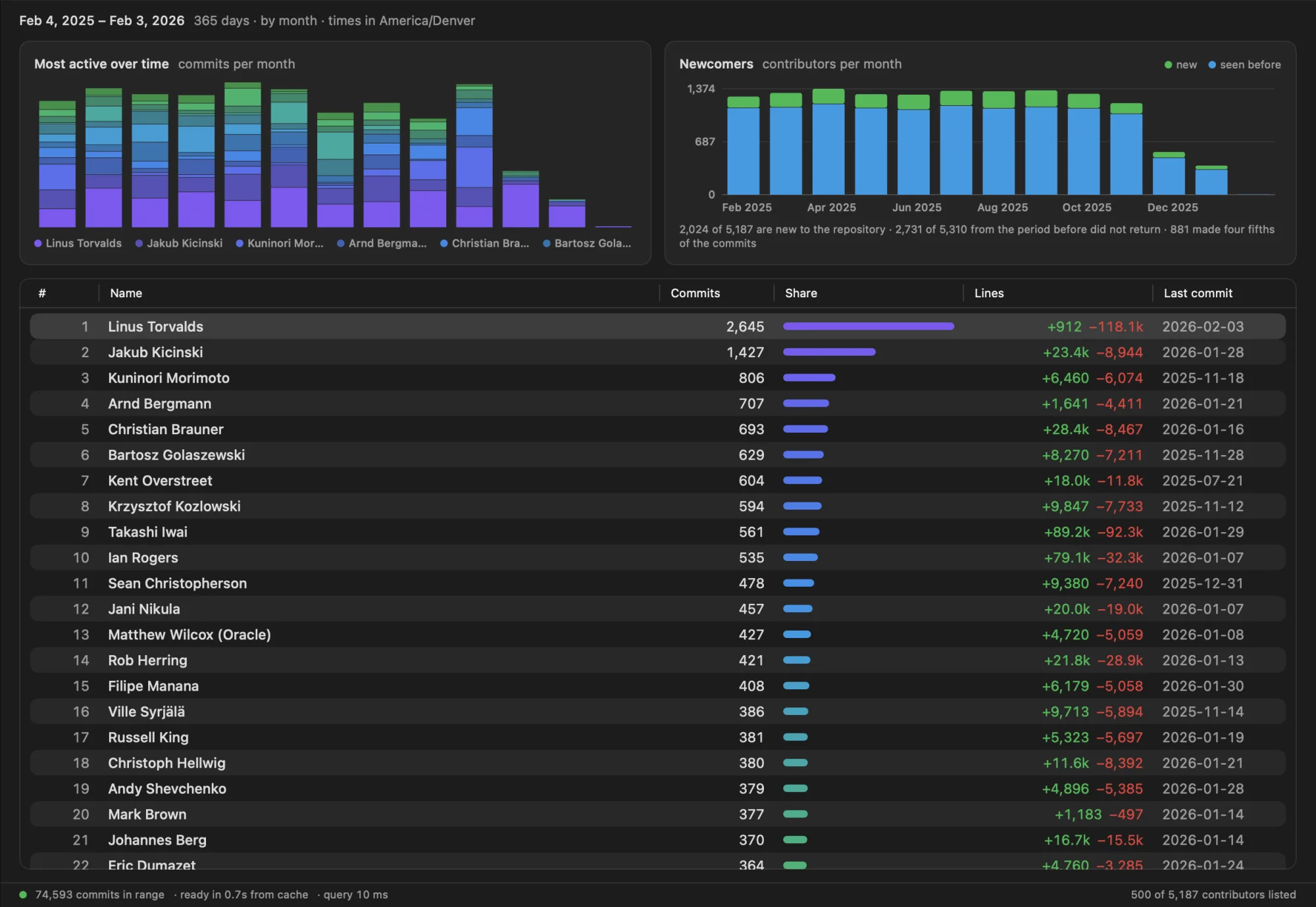
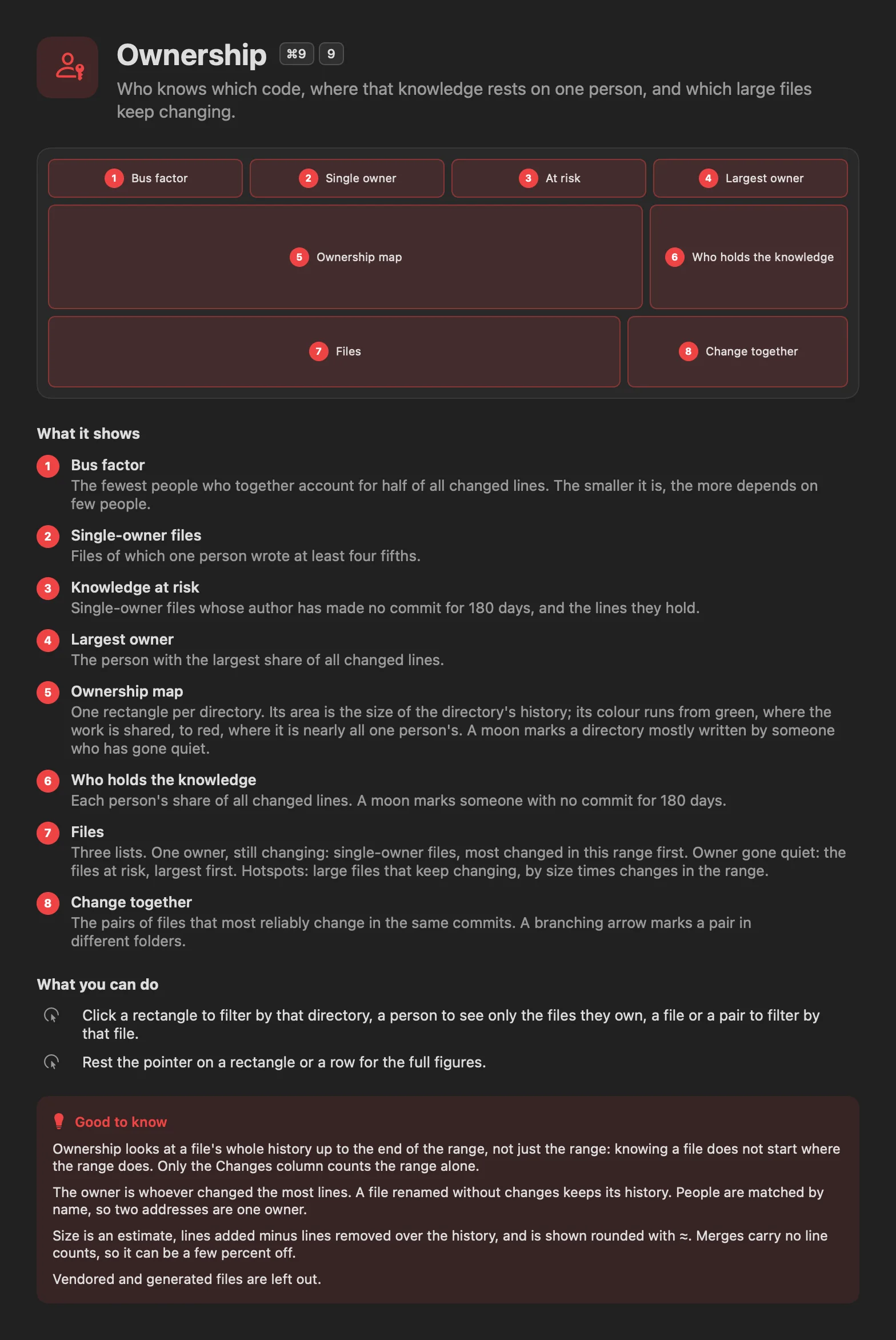
There is a Settings window for appearance and time zone, menus for every shortcut, and a Help window with a page per screen: a numbered sketch of the layout, what each panel shows, and what you can do there.
The PDF report is always light, whatever the app looks like, because that's what prints.
What broke
The crash between screens. Going from Lens to Commits to Ownership ended the app with "needs another Update Constraints in Window pass". SwiftUI hands a split-view column's minimum size to AppKit. While the inspector opens or closes, that minimum can change on every layout pass, and after enough passes AppKit gives up. Claude had patched two triggers of this already and called it fixed twice. The real fix was to stop the columns from having a minimum at all:
struct UnconstrainedColumn<Content: View>: View {
    @ViewBuilder let content: Content

    var body: some View {
        GeometryReader { geo in
            content
                .frame(width: geo.size.width, height: geo.size.height, alignment: .topLeading)
                .clipped()
        }
    }
}
What found it was a seeded random walk: hundreds of screen changes, window resizes and inspector toggles in a real window. Two of the first three walks crashed. After the fix, twenty passed, including four with the old triggers put back on purpose. That walk is now a test.
The list that didn't scroll. Arrow keys moved the selection below the fold and the list stayed put. The row id was being passed to scrollTo wrapped in AnyHashable, which SwiftUI silently doesn't match against plain integer ids.
The checks that checked nothing. For a day, Claude reported that the app "ran for nine seconds on the Commits screen without crashing". Those instances, launched from its shell, never opened a window. It found that out itself while chasing the crash, by listing the windows, and said so. In the terminal post the same thing happened with a zero-column terminal. I've stopped being surprised and started asking "how do you know?"
What's not there yet
- No mailmap. One person with two addresses is two contributors, except on the Ownership screen, which matches by name.
- No column sorting. The lists are the engine's top 500, so sorting them in the app would mislead.
- Memory. Reopened from cache, the kernel takes about 310 MB. Right after a full first index it holds about 1.35 GB until you restart the app.
- Tags on other branches aren't offered as releases. Rails tags its stable branches, so
mainonly sees some of them. - macOS 26 only. The 1.0 download is still there for older systems.
- The terminal version shares the engine but doesn't have the new screens yet.
Try It
Download Gitsanity (now 2.1), drag it to Applications, and open a repository or drop a folder on the window. Press ? on any screen for the Help page about that screen.
Or stay in the terminal:
brew install danielwanja/tap/gitsanity
gitsanity ~/code/some-repo
Timeline
Thursday evening was the terminal rewrite. At 11:58pm the plan for the Mac app was committed, and by 12:39am eight phases were in: the bridge, the new data layer, DuckDB removed, six screens, storage, hygiene, the report. Friday afternoon went to the Mac look and Settings. Saturday morning brought ownership, insights, releases, the Help window, one crash report from me and its fix. By lunchtime Apple had notarized the build.
I still didn't type the code. I asked for a plan before any of it, picked designs from mockups, sent back what looked wrong, and reported the crash. The February version taught me what to ask for. This one taught me to ask how it was checked.
Daniel Wanja is a developer and founder of Nouvelles Solutions, Inc. When not rewriting his own apps, he's finding out which of his files only he understands.