Gitsanity: A Git Analytics Dashboard Built in Four Days with OpenAI Codex
How I built a native macOS Git analytics dashboard with DuckDB, star schemas, and parallel indexing — entirely using OpenAI Codex for Mac in just four days
Four days ago, OpenAI released Codex for Mac. I decided to put it through its paces by building something ambitious: a full-blown Git analytics dashboard that could handle repositories with hundreds of thousands of commits. The result is Gitsanity — and the fact that it exists at all is a testament to how impressive these AI coding tools have become.
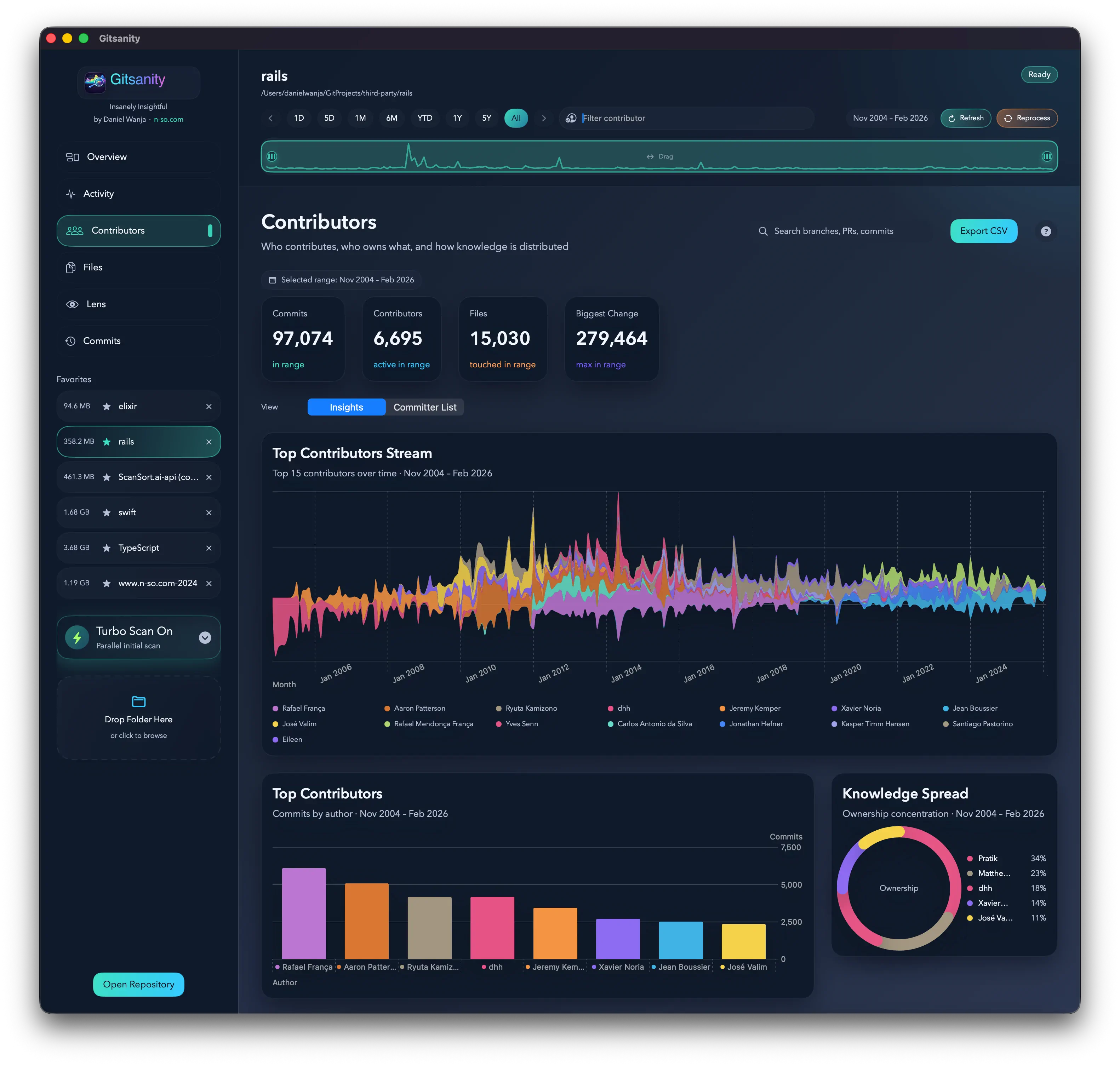
The Vision: Git History as a Data Warehouse
I've always wanted a tool that treats Git history like what it really is: a rich dataset waiting to be analyzed. Who are your most active contributors? Which files churn the most? What time of day does your team commit? Are you following conventional commit patterns?
Most Git analytics tools either require cloud services, work only with specific hosting providers, or choke on large repositories. I wanted something that runs entirely locally, handles massive repos with ease, and provides instant, interactive dashboards.
The result is a native macOS app built with Swift, SwiftUI, and — here's the interesting part — DuckDB as an embedded analytics engine.
See Your Repository at a Glance
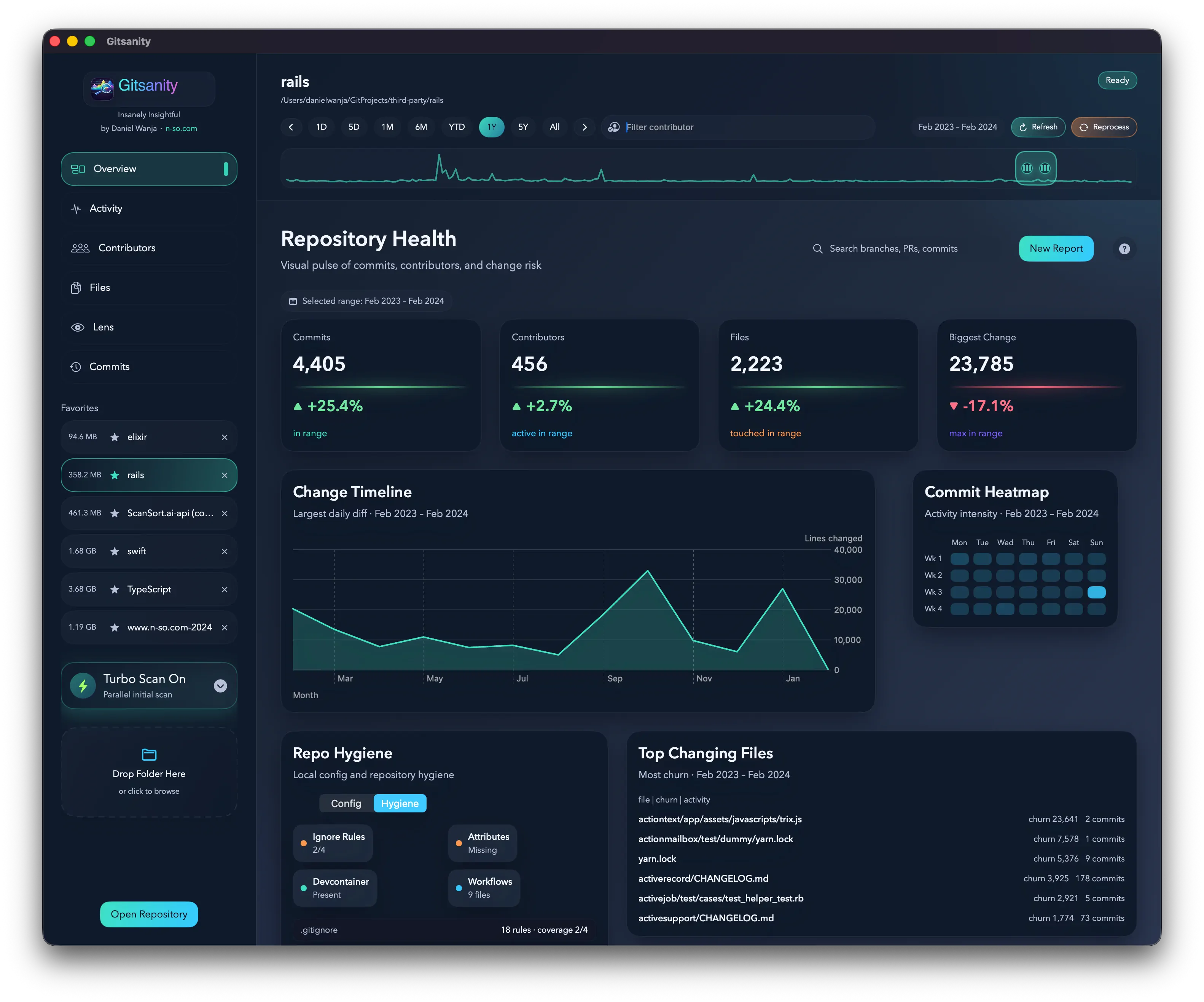
The Overview tab gives you an instant snapshot of your repository's health: total commits, active contributors, code churn trends, and commit type distribution. Everything updates in real-time as you select different time ranges.
Quick Links
- Download: Gitsanity v1.0 (6) (DMG)
Built with OpenAI Codex for Mac
Let me be upfront: the technical architecture behind Gitsanity is not simple. We're talking about:
- A star schema data warehouse design with fact tables and dimension tables
- Parallel sharded indexing using Swift's structured concurrency
- Streaming git process I/O with constant memory usage
- Tiered query optimization that routes queries to pre-computed rollups
- Custom binary CSV writers for maximum throughput
This is the kind of architecture you'd expect from a team of data engineers, not a side project built in four days. But here's the thing: I didn't write most of this code by hand. I described the architecture I wanted, and Codex generated the implementations. I guided the design decisions, reviewed the output, and iterated on the prompts — but the raw code generation happened at a pace that would have been impossible otherwise.
Is it perfect? No. Did I have to debug some concurrency issues? Absolutely. But the productivity multiplier is real, and Gitsanity is living proof.
The Technical Stack
Gitsanity is built entirely in Swift and SwiftUI, targeting macOS 14 (Sonoma - Intel/Apple Silicon) and later. But the real magic is in the data layer.
DuckDB: Not Your Average Embedded Database
Instead of SQLite, Gitsanity uses DuckDB — a columnar, OLAP-optimized embedded database. If you've never heard of it, think of it as "SQLite, but designed for analytics." It's the same engine that powers tools like MotherDuck and is increasingly popular in the data engineering world.
public final class DuckDBClient {
    private let database: Database
    private let connection: Connection

    public init(path: String) throws {
        database = try Database(store: .file(at: URL(fileURLWithPath: path)))
        connection = try database.connect()

        // DuckDB tuning: use all but one core
        try exec("PRAGMA threads=\(max(ProcessInfo.processInfo.activeProcessorCount - 1, 1));")
    }

    public func exec(_ sql: String) throws {
        _ = try connection.query(sql)
    }
}
DuckDB's columnar storage means queries like "total churn per author per month" are blazingly fast — exactly the kind of analytical queries a dashboard needs.
Star Schema Design
Here's where things get interesting. Gitsanity models Git history using a star schema — the same data warehouse pattern used by enterprise BI tools like Looker and Tableau. Fact tables sit at the center, dimension tables radiate outward:
                            ┌──────────────────┐
                            │    dim_day       │
                            │──────────────────│
                            │ day_sk       (PK)│
                            │ day, year        │
                            │ quarter, month   │
                            │ week, day_of_week│
                            │ is_weekend       │
                            └────────▲─────────┘
                                     │
     ┌───────────────┐    ┌──────────┴───────────────────┐    ┌────────────────┐
     │  dim_person   │    │       fact_commit            │    │ dim_commit_type│
     │───────────────│    │────────────────────────────  │    │────────────────│
     │ person_sk (PK)│◄───│ commit_sk          (PK)      │───►│commit_type_sk  │
     │ name, email   │    │ commit_oid                   │    │ label          │
     │ email_domain  │    │ authored_day_sk    (FK→dim)  │    │ is_merge       │
     │ is_bot        │    │ committed_day_sk   (FK→dim)  │    │ is_revert      │
     │ identity_     │    │ author_sk          (FK→dim)  │    │ conventional_  │
     │  group_sk     │    │ committer_sk       (FK→dim)  │    │  prefix        │
     └───────────────┘    │ commit_type_sk     (FK→dim)  │    └────────────────┘
                          │ parent_count, is_merge       │
                          │ files_changed                │
                          │ insertions, deletions        │
                          │ churn, net_lines             │
                          │ authored_at, committed_at    │
                          │ subject, subject_len         │
                          └──────────┬──────────────────-┘
                                     │
                                     │ 1:N
                                     ▼
     ┌───────────────┐    ┌─────────────────────────────┐    ┌─────────────────┐
     │  dim_file     │    │     fact_commit_file        │    │ dim_change_type │
     │───────────────│    │─────────────────────────────│    │─────────────────│
     │ file_sk  (PK) │◄───│ commit_sk      (PK, FK)     │───►│change_type_sk   │
     │ path          │    │ file_sk        (PK, FK)     │    │ code            │
     │ dir_sk   (FK) │    │ authored_day_sk (FK→dim)    │    │ (A/M/D/R/U)     │
     │ extension     │    │ change_type_sk  (FK→dim)    │    └─────────────────┘
     │ language_group│    │ insertions, deletions       │
     │ is_vendor     │    │ churn, net_lines            │
     │ is_generated  │    │ is_binary                   │
     └───────┬───────┘    │ old_file_sk (renames)       │
             │            └─────────────────────────────┘
             │
             ▼
     ┌───────────────┐
     │ dim_directory  │
     │───────────────│
     │ dir_sk    (PK)│
     │ path          │
     │ parent_dir_sk │
     │ depth         │
     └───────────────┘
Why a Star Schema for Git?
- Fast aggregation — Queries become simple
GROUP BYoperations on fact tables joined to dimensions - Surrogate keys everywhere — The
dim_daytable usesYYYYMMDDintegers as keys, which are both human-readable and fast to compare - Pre-computed rollups — Daily, monthly, and yearly aggregate tables mean dashboards load instantly
Dimension Tables
| Table | Purpose |
|---|---|
dim_day | Calendar dimension with year, quarter, month, week, day_of_week, is_weekend |
dim_person | Author/committer identity with email domain and bot detection |
dim_file | File metadata including extension, language group, vendor/generated flags |
dim_directory | Self-referencing directory tree with depth tracking |
dim_change_type | Git change codes (A/M/D/R/U) |
dim_commit_type | Conventional commit categories (feat, fix, docs, etc.) |
Fact Tables
| Table | Grain |
|---|---|
fact_commit | One row per commit |
fact_commit_file | One row per file changed per commit |
fact_commit_graph | Topological ordering for visualization |
The Dashboards
Activity Over Time
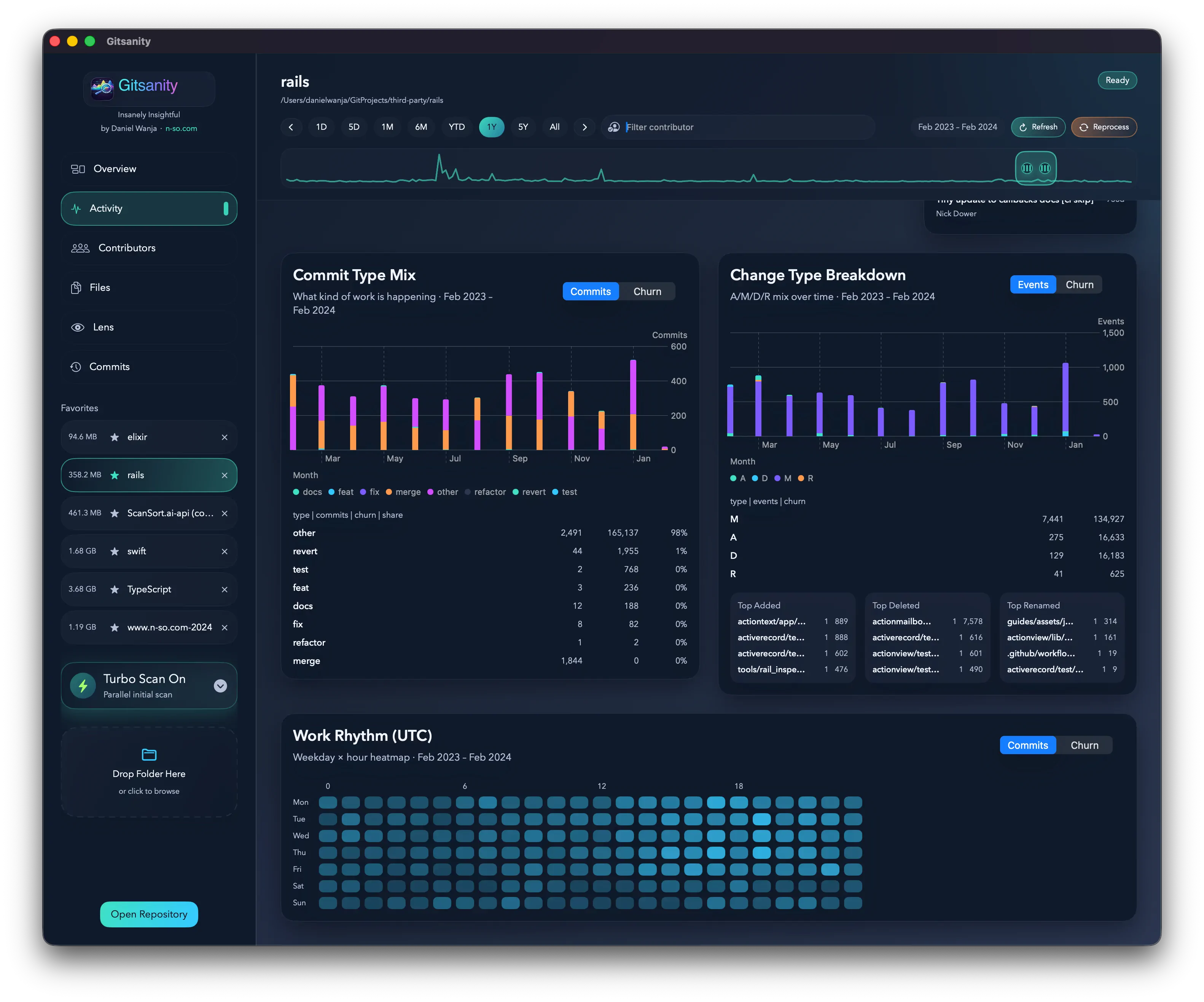
The Activity view shows commit patterns over time — daily, weekly, or monthly trends. You can instantly see periods of high activity, quiet stretches, and how your team's velocity has changed.
Commit Analysis
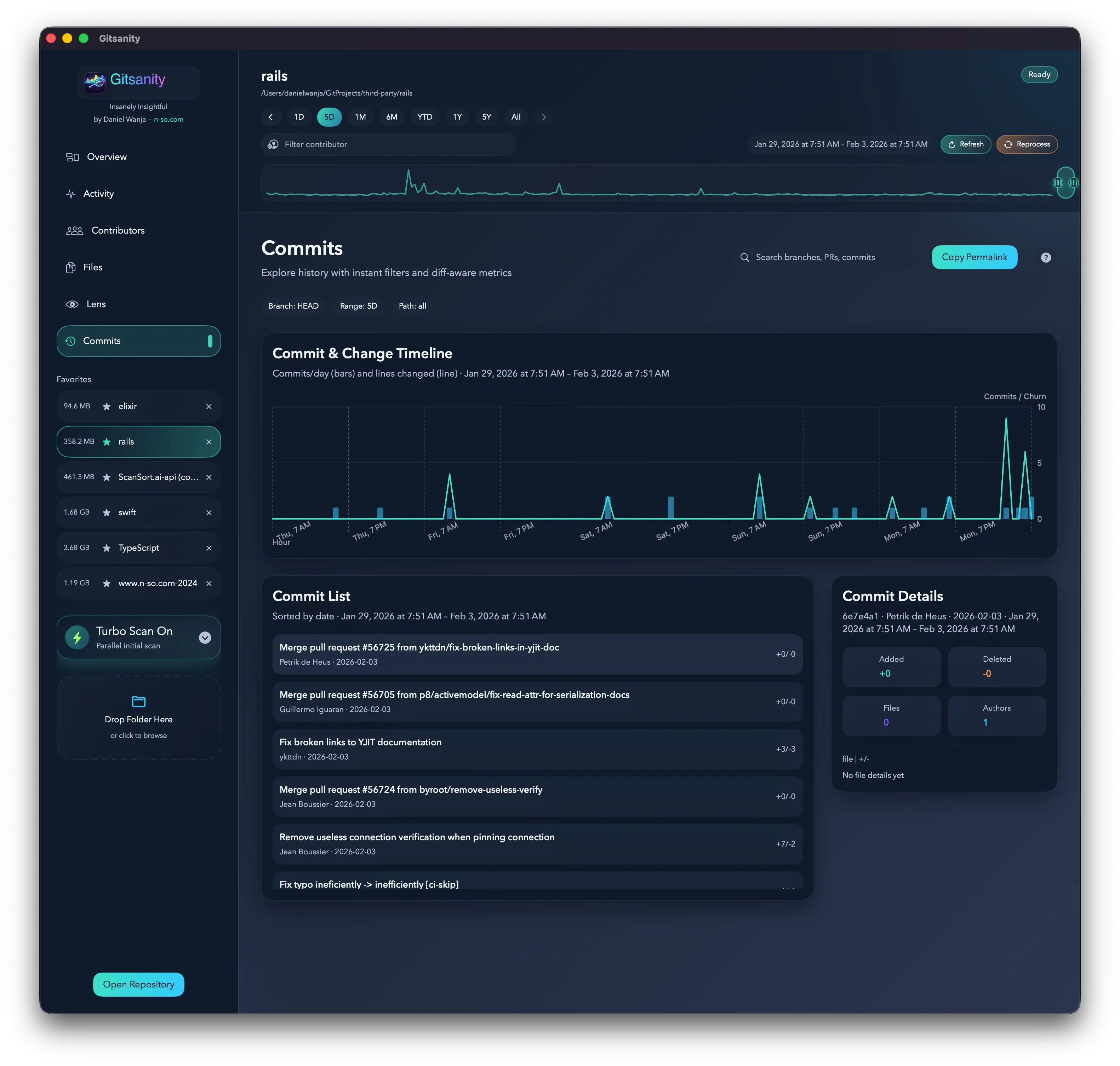
The Commits tab breaks down your history by type. Are you following conventional commits? How many merges vs. feature work? The pie chart gives you instant visibility into your commit hygiene.
File Analytics
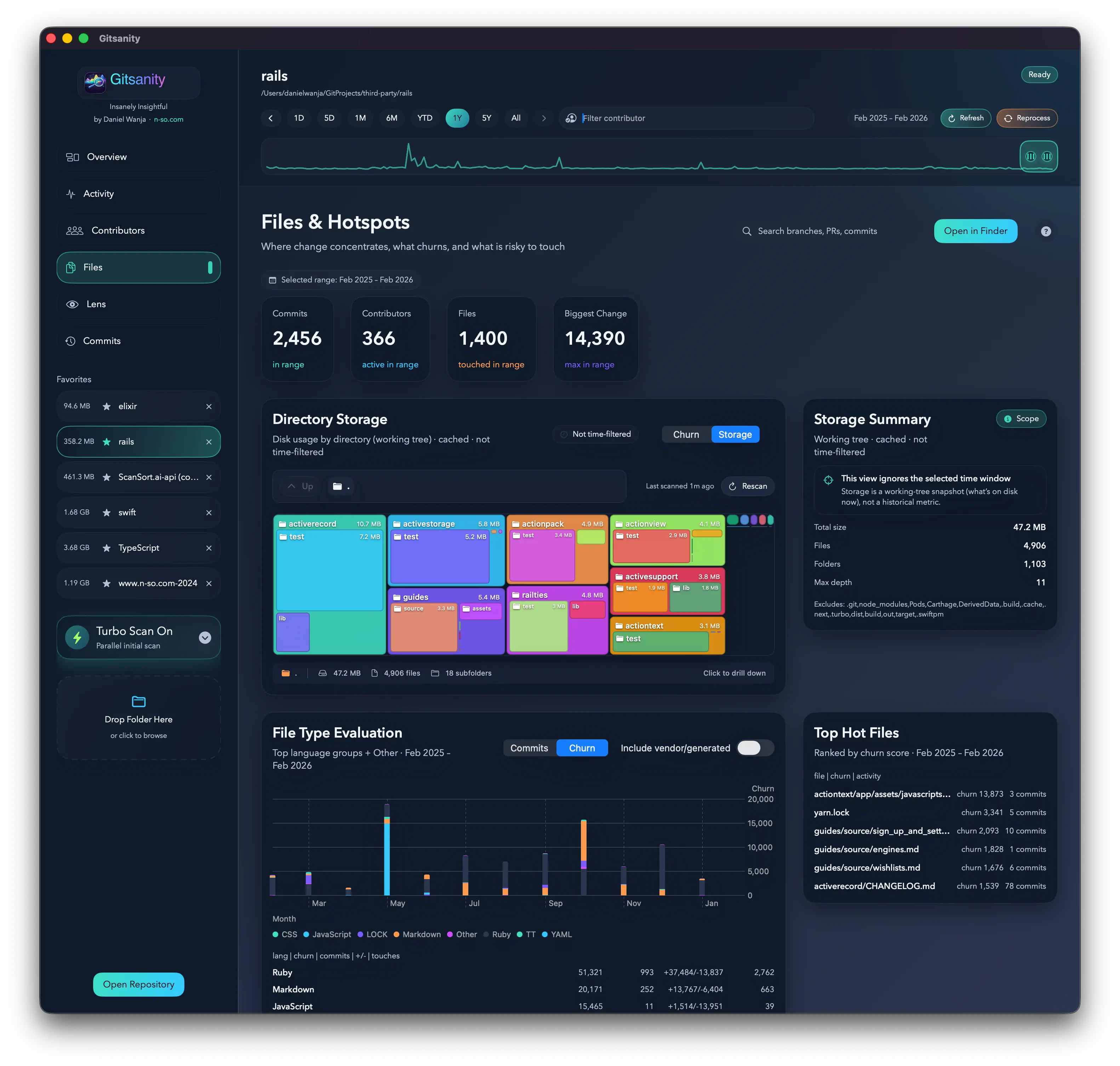
Which files have the most churn? Which directories see the most activity? The Files view helps you identify hotspots in your codebase — the places where bugs are likely hiding and where refactoring might pay off.
Interactive Lens
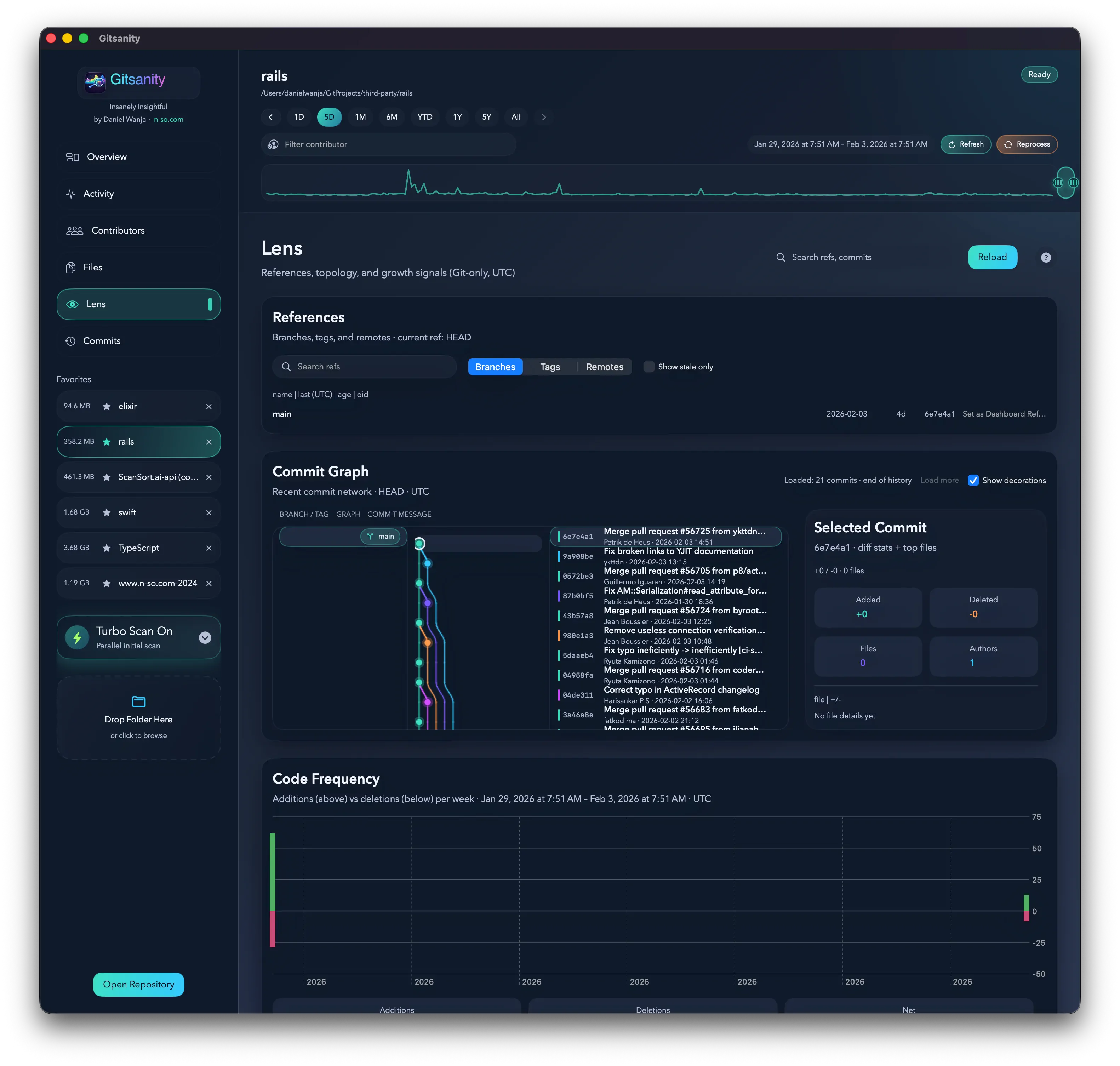
The Lens view is my favorite feature — an interactive commit explorer that lets you navigate your repository's history visually. Filter by author, time range, or file type, and dive into specific commits.
The CSV Pipeline: Git Log → DuckDB
One of the most interesting design decisions is how commits are ingested. Rather than inserting rows one-by-one (which would be painfully slow), the indexer:
- Streams
git logoutput line-by-line via a custom reader - Writes CSV files to a temp directory
- Bulk-loads the CSVs into DuckDB using
read_csv()
// The git log command that feeds the indexer
let pretty = "--pretty=format:--%H%x1f%P%x1f%an%x1f%ae%x1f%cn%x1f%ce%x1f%at%x1f%ct%x1f%s"
logArgs.append(contentsOf: [pretty, "--raw", "--numstat", "-M"])

let reader = try GitProcessLineReader(args: logArgs, repo: context.repoURL)

while let line = try reader.nextLine() {
    if line.hasPrefix("--") {
        // New commit header
        try flushCurrentCommit()
    } else if let status = parseDiffStatus(line) {
        // :100644 100644 ... M\tpath
    } else if let num = parseNumstat(line) {
        // 42\t10\tpath/to/file.swift
    }
}
The CSV import uses DuckDB's native read_csv() with explicit column typing:
func makeInsertFromCSVSQL(table: String, path: String) -> String {
    return """
        INSERT INTO fact_commit
        SELECT commit_sk::BIGINT, commit_oid::VARCHAR, ...
        FROM read_csv(
            '\(path)',
            delim=',', header=false, nullstr='',
            columns={
                'commit_sk':'BIGINT',
                'commit_oid':'VARCHAR',
                'authored_day_sk':'INTEGER',
                ...
            }
        );
        """
}
DuckDB's read_csv() is dramatically faster than row-by-row SQL inserts — it can leverage vectorized I/O and bulk column stores. For a repository with 100K+ commits, this makes the difference between seconds and minutes.
Parallel Sharded Indexing
For truly massive repositories, Gitsanity splits the commit list into shards and processes them in parallel:
final class ParallelGitIndexer: GitIndexingWorker, @unchecked Sendable {
    struct ShardingConfig {
        var smallRepoCommitThreshold: Int = 5_000
        var minWorkers: Int = 2
        var maxWorkers: Int = 8
        var enableFallbackToSingleWorker: Bool = true
    }
}
The strategy is automatic:
- < 5,000 commits → Single worker
- ≥ 5,000 commits → Sharded across 2–8 workers
If a shard fails, the system falls back gracefully to single-worker mode:
if shouldFallbackToSingleWorker(after: error, initialStrategy: strategy) {
    strategy = .singleWorker
    state.message = "Shard extraction failed, retrying single worker"
}
Time Window Partitioning
When querying across a time range, Gitsanity uses a clever three-tier partitioning strategy:
struct TimeWindowSegments: Equatable {
    let dayRanges: [ClosedRange<Int>]      // Edge days → agg_day_*
    let monthRange: ClosedRange<Date>?      // Full months → agg_month_*
    let yearRange: ClosedRange<Date>?       // Full years → agg_year_*
}

// Example: querying Jan 15, 2020 – Nov 20, 2025
// Decomposes into:
//   yearRange:  2021-01-01 ... 2024-01-01  (4 full years)
//   monthRange: 2020-02-01 ... 2020-12-01  (partial year months)
//   dayRanges:  [20200115...20200131]      (edge days)
A 5-year query might touch only 4 rows from yearly aggregates, ~20 rows from monthly, and ~47 rows from daily — instead of scanning thousands of individual day records.
Streaming Git Output
Instead of running git log and waiting for the entire output, Gitsanity streams line-by-line using a custom reader:
final class GitProcessLineReader {
    private let process: Process
    private let handle: FileHandle
    private var buffer = Data()

    func nextLine() throws -> String? {
        while true {
            if let range = buffer.firstRange(of: Data([0x0A])) {
                let lineData = buffer.subdata(in: buffer.startIndex..<range.lowerBound)
                buffer.removeSubrange(buffer.startIndex...range.lowerBound)
                return String(data: lineData, encoding: .utf8)
            }
            let chunk = try? handle.read(upToCount: 4096)
            if let chunk, !chunk.isEmpty {
                buffer.append(chunk)
                continue
            }
            if buffer.isEmpty { return nil }
            let line = String(data: buffer, encoding: .utf8)
            buffer.removeAll()
            return line
        }
    }
}
This keeps memory usage constant regardless of repository size — even for repos with millions of commits.
Conventional Commit Classification
Every commit is classified into one of 13 types:
private func commitTypeSk(isMerge: Bool, subject: String) -> Int {
    if isMerge { return 1 }  // merge
    let trimmed = subject.trimmingCharacters(in: .whitespacesAndNewlines)
    if trimmed.lowercased().hasPrefix("revert") { return 2 }

    let prefixes: [(String, Int)] = [
        ("feat", 3), ("fix", 4), ("docs", 5), ("refactor", 6),
        ("chore", 7), ("test", 8), ("build", 9), ("ci", 10),
        ("perf", 11), ("style", 12)
    ]
    for (prefix, sk) in prefixes {
        if lowered.hasPrefix(prefix + ":") || lowered.hasPrefix(prefix + "(") {
            return sk
        }
    }
    return 13  // other
}
This powers the commit type breakdowns in the dashboard, giving you instant visibility into whether your team follows conventional commit patterns.
In-Memory Commit Graph Cache
For the interactive Lens view, Gitsanity loads the entire commit graph into memory using a structure-of-arrays layout:
struct LensCommitGraphCache {
    let oids: [String]              // Commit hashes in topo order
    let authoredAt: [Int64]         // Epoch timestamps
    let authorSks: [Int64]          // Author surrogate keys
    let authors: [String]           // Author names
    let subjects: [String]          // Commit messages
    let parentsFlat: [Int]          // Flattened parent indices
    let parentsRanges: [Range<Int>] // Slice ranges into parentsFlat
}
The parent graph is stored as a flattened array with range-based indexing — avoiding the overhead of [[Int]]. For a repo with 500K commits, this saves significant memory and improves cache locality.
Key Architectural Takeaways
Building Gitsanity taught me (and Codex) several lessons:
-
DuckDB for desktop analytics — Columnar OLAP databases aren't just for servers. An embedded DuckDB handles millions of rows with sub-second queries on a laptop.
-
Star schema in an app — Data warehouse patterns work beautifully for read-heavy analytics dashboards, even in a native macOS app.
-
CSV as an ETL format — Using CSV files as an intermediate format between
git logparsing and DuckDB bulk import is both simple and extremely fast. -
Tiered aggregation — Pre-computing daily/monthly/yearly rollups, then routing queries to the coarsest available granularity, gives dashboard-grade performance.
-
Structure-of-arrays — The in-memory graph cache uses SoA layout for cache efficiency over the more natural array-of-structs approach.
-
AI as a development partner — Four days from concept to working app. The architecture is genuinely sophisticated, and I couldn't have built it this fast without AI assistance.
The AI Development Experience
Here's my honest take on building with Codex: it's not magic, but it's transformative. The tool excels at:
- Running many agents in parallel
- Generating boilerplate and plumbing code
- Implementing well-known patterns (like star schemas) correctly
- Writing SQL queries and data transformations
It's pretty good at:
- Creating Swift concurrency code (though with occasional issues)
- UI/UX polish and design sensibility
- High-level architecture decisions
Where I still needed to step in:
- Implementing an Autocomplete filter
- Debugging subtle concurrency bugs
- Performance optimization and profiling
- Improving accessibility through readable button text (Codex High struggled)
The productivity multiplier is real. Gitsanity exists because the boring parts of coding — the parts that would normally take days of typing — happened in minutes.
What's Next
I'm still polishing the UI, adding a few more visualizations, and stress-testing against the largest repositories I can find.
If you're curious about your repository's history — who contributes, how code evolves, whether your team follows good practices — Gitsanity will give you answers in seconds.
And if you're a developer wondering whether AI coding tools are ready for real work: yes, they absolutely are. Build something ambitious. You might surprise yourself.
- Download: Gitsanity v1.0 (6) (DMG)
Questions about the architecture or the AI development process? Feel free to reach out!